ACTIVE P30 Plus Series Owner’s Manual
EN-3
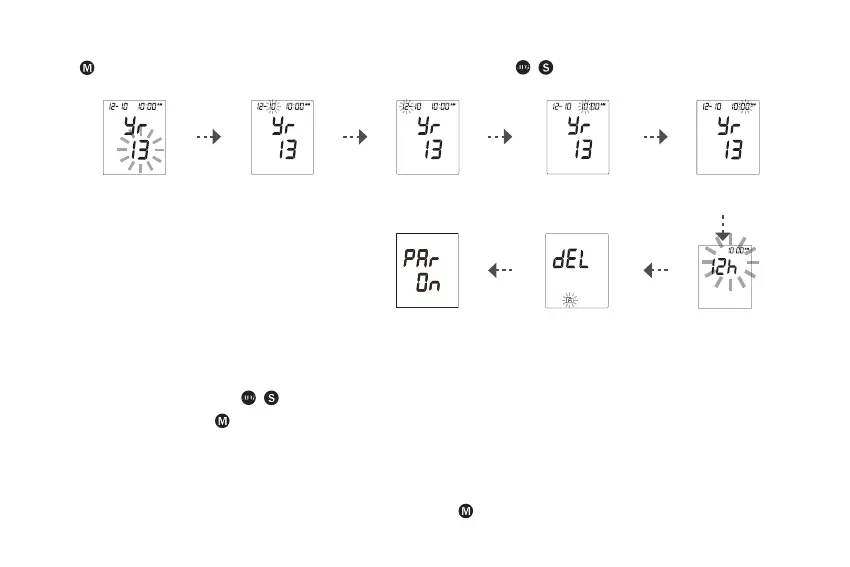
Step 2: Conguring the Settings (Date, Time, Time Format, Memory Deletion, and Bluetooth Pairing (P30 Plus BT only))
Press repeatedly to adjust the value or enable/disable the setting. Then press / to conrm the setting and switch to another
eld.
Set [Year] Set [Month] Set [Day] Set [Hour] Set [Minute]
Pair Bluetooth
(For P30 Plus BT
only)
Memory Deletion Set [Time Format]
Note:
• During memory deletion, do the following:
9 To keep all saved results, press / to keep the saved result.
9 To delete all results, press to delete all memory.
• These parameters can ONLY be changed in the setting mode.
• If the device is idle for 3 minutes during the setting mode, it will turn o automatically.
• The Bluetooth pairing process is only required when user needs to pair this device to a Bluetooth receiver for the rst time, or when user
needs to pair this device to another new Bluetooth receiver. The Bluetooth LED Indicator will blink during the pairing process.
• After the device has been paired with a Bluetooth receiver, press and hold for 3 seconds to start the Bluetooth connection.



 To Next Page