EN-5
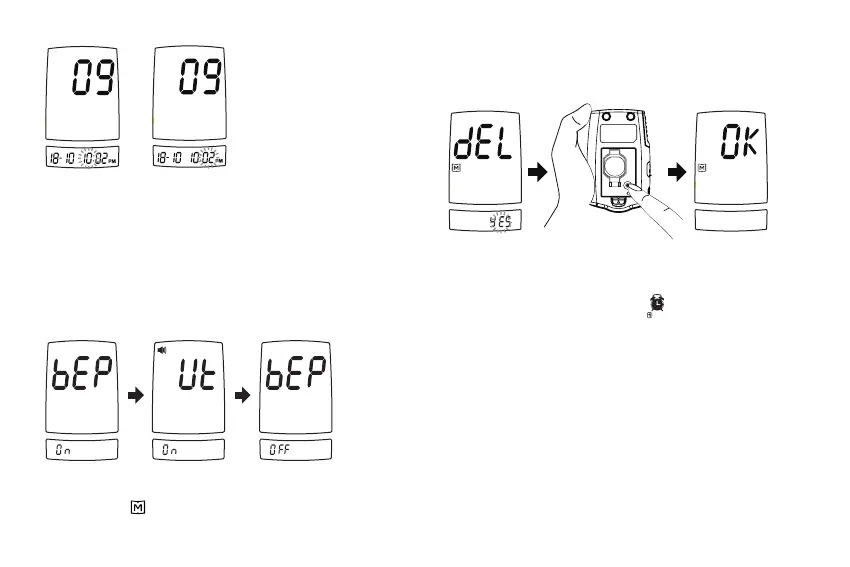
Step 4: Setting the Universal Tone
You may set up Beep On, Universal Tone On and Beep O by
press M to change it.
When Universal Tone is turned on, the meter guides you
through the blood glucose test using beep tones; it also
outputs the result as a series of beeps.
When Beep is turned o, the alarm function will remain
eective.
Step 5: Deleting the memory.
With “dEL” and “
” symbol on the display, press M and select “no”
to keep the results in memory then press SET to skip.
To delete all the results, press M and select “YES”.
Then press SET button to delete all memory. “OK” is displayed
in the meter, which indicates that all data stored is deleted.
BATTERY
SET
Step 6: Setting the reminder alarm.
You may set up any or all of the reminder alarms (1-4). The
meter displays “On” or “OFF” and “
” , press M to turn on or
turn o to set the rst reminder alarm.
Press M to select “On”, then press SET to set the hour. When
the hour is ashing, press M to add an hour. Press SET to
conrm and go to minutes, press M to add one minute. Hold
M longer to add faster. Press SET to conrm and go to the
next alarm setting.



 To Next Page