4. To take another measurement, follow step 2 and 3.
5. The thermometer turns off automatically after 30 seconds.
Replace the sensory cap when finished.
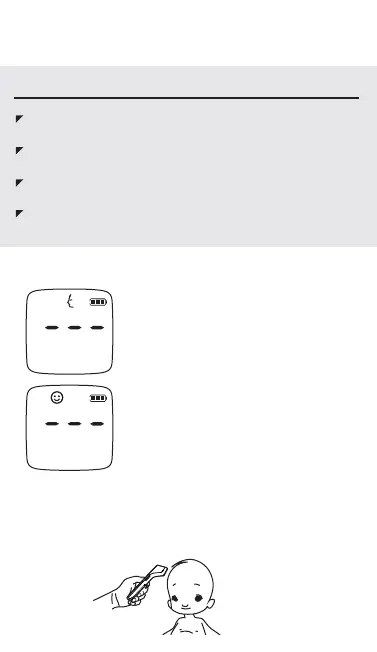
1. Press the SCAN button to turn on
the thermometer.
2. Press and hold the MODE button for
1 second before releasing. An adult
facial profile should be flashing,
indicating that the preset mode is for
adults.
3. Press the MODE key to switch to
Child mode, indicated by a smiley face
icon.
Measuring Temperature for Children
WARNING AND PRECAUTIONS
If the reading is < 89.5°F (31.9°C), the display will show
“Lo”.
If the reading is ≧ 89.6°F (32.0°C) and ≦ 100.3°F (37.9 °C),
the display will show the reading with green backlight.
If the reading is ≧ 100.4 °F (38°C) and ≦ 109.4 °F (43°C),
the display will show the reading with red backlight.
If the reading is ≧ 109.5 °F (43.1°C), the display will show
“Hi”.
4. Aim the scanner at the center of the child’s forehead or temple
1.18 to 2.75" away from skin surface (3 to 7cm). Be sure the
thermometer is perpendicular to the skin surface. Press and
release the SCAN button to take a measurement.


 To Next Page