FORA IR42 stores 30 most recent readings.
1. Press and release the SCAN button to turn on the
thermometer.
2. Press and hold the MEMORY button for 1 second to enter the
memory mode indicated by a flashing " " symbol. The most
recent reading stored will be displayed.
5. The thermometer automatically switches off when left idle for
30 seconds.
6. Replace the sensor cap when finished.
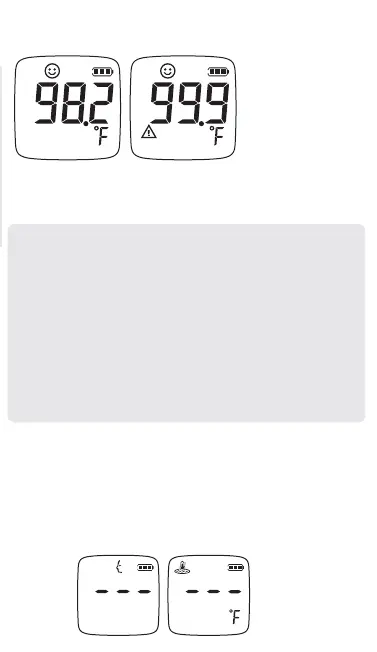
Red backlight with a warning symbol indicates a reading greater
than 99.8°F (37.6 °C).
Note:
● If the reading is ≦ 89.5°F (31.9°C), the display will show
“Lo”.
● If the reading is ≧ 89.6°F (32°C) and ≦ 99.8°F (37.6 °C),
the display will show the reading with green backlight.
● If the reading is ≧ 99.9°F (37.7 °C) and ≦ 109.4°F (43°C),
the display will show the reading with red backlight.
● If the reading is ≧ 109.5°F (43.1°C), the display will show
“Hi”.
● Parents should not rely only on temperature readings. If
you have concerns, please seek medical advice.
1. Press the SCAN button to turn on the thermometer.
2. Press and hold the MODE button for 1 second before
releasing. An adult facial profile should be flashing, indicating
that the preset mode is for adults.
3. Press the MODE key to switch to Surface mode, indicated by
a thermometer icon.
Measuring Surface Temperature


 To Next Page