DAILY OPERATION
SCALE CALIBRATION
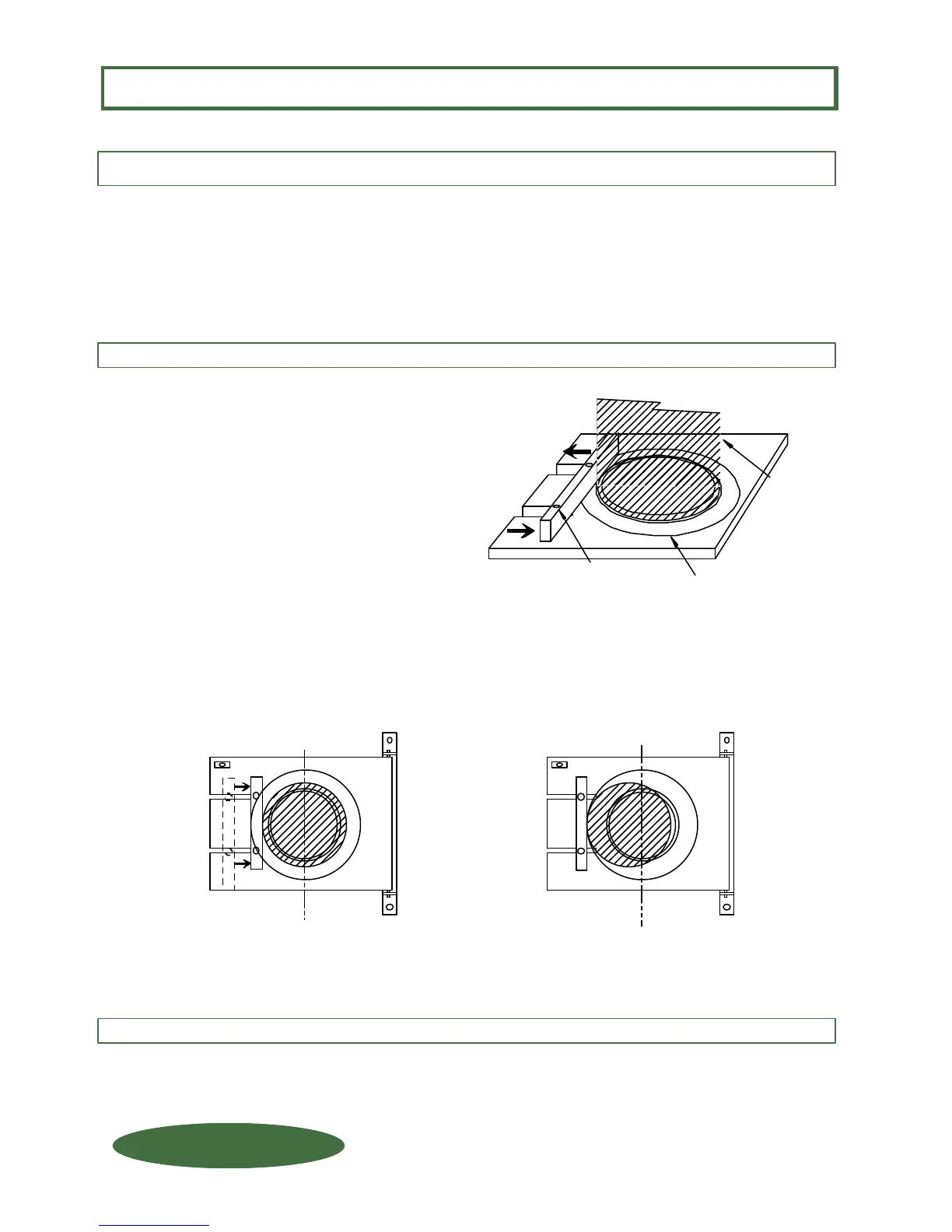
Calibration Rings
STEP 1:
Loosen backstop bolts
and slide backstop
toward edge of platform.
IMPORTANT !
To insure accurate weight readings, it is critical
that the load is properly centered
within the "CALIBRATION RING".
1) Loosen the backstop hold-down
nuts and slide the backstop toward
the edge of the platform.
2) Place the container that is to be
weighed (or an empty container that
is the same diameter of the container
to be weighed) on the platform.
Using the CALIBRATION RINGS
on the platform as the "target",
center the container within the
calibration rings.
3) Slide the backstop against the
container and tighten the backstop
hold-down bolts.
When using containers with the same diameter there is no need to readjust the backstop. Simply slide the
new container against the backstop making sure the container is centered in the Calibration Rings.
STEP 2:
Place container on Platform
and CENTER it on the
Calibration Rings.
STEP 3:
Slide backstop
against container
and tighten bolts.
Backstop
Bolts (2)
Container CENTERED in Calibrating Rings
Container OFF CENTER of Calibrating Rings
CALIBRATING THE SCALE
CORRECT
INCORRECT
FOR SCALES WITH SLOTTED PLATFORM(S) ONLY !
1150-D Burnett Ave, Concord, CA 94520 USA
1-800-893-6723 US & Canada, Fax: 925-686-6713
WWW.FORCEFLOW.COM / INFO@FORCEFLOW.COM
REF: T4\O&M\CYLHYD\200SLOT4.tcw (L09.pdf)
C.3.105
X.3.105
S.3.105
W.3.105
FORCE FLOW
FORCE FLOW
F
F
L
L
O
O
Q
Q
I
I
U
U
P
P


 To Next Page
 Loading...
