U45W Blue Jay User Manual
23
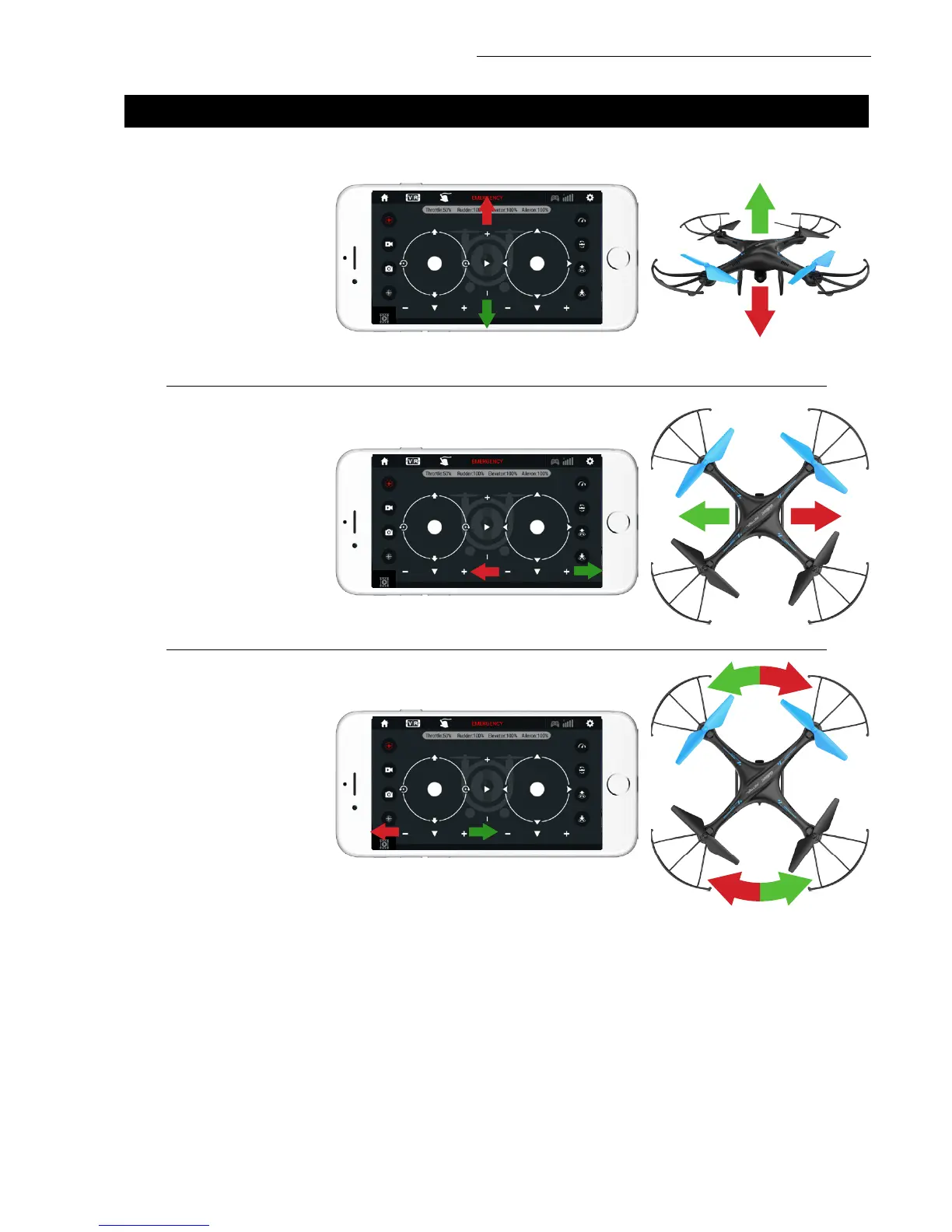
FORWARD/BACKWARD TRIM
LEFT/RIGHT TRIM
LEFT OR RIGHT ROTATION TRIM
Click the “-” of the
Forward / Backward
Trimmer to adjust the
drone till balance if the
drone tilts forward. Click
the “+” to adjust the
drone till balance if the
drone tilts backward.
Click the “+” of the Left
/ Right Flying Trimmer till
balance if the drone tilts
to the left. Click the “-”
to adjust the drone till
balance if the drone tilts
to the right.
Click the “+” of the Left
/ Right Rudder Trimmer
till balance if the drone
rotates left. Click the
“-” to adjust the drone
till balance if the drone
rotates right.
6. APP TRIMMING ADJUSTMENTS
NOTE:
If you can’t find the Wi-Fi signal, turn it off and then on again to search and connect. The available
Wi-Fi control radius/distance is 40 meters, so be sure to keep the drone in range. Exit the app when
you’re changing control method from mobile phone to transmitter.


 To Next Page