NOTE:
Follow the Preflight Operation steps in the user manual if your drone
doesn’t start or isn’t performing properly.
5
The drone is ready to y. See the Preight
Checklist and Basic Flight Controls sections
in the user manual before operating for
more detailed instructions.
QUICK START GUIDE
1
2
3
4
FIGURE 1
FIGURE 4
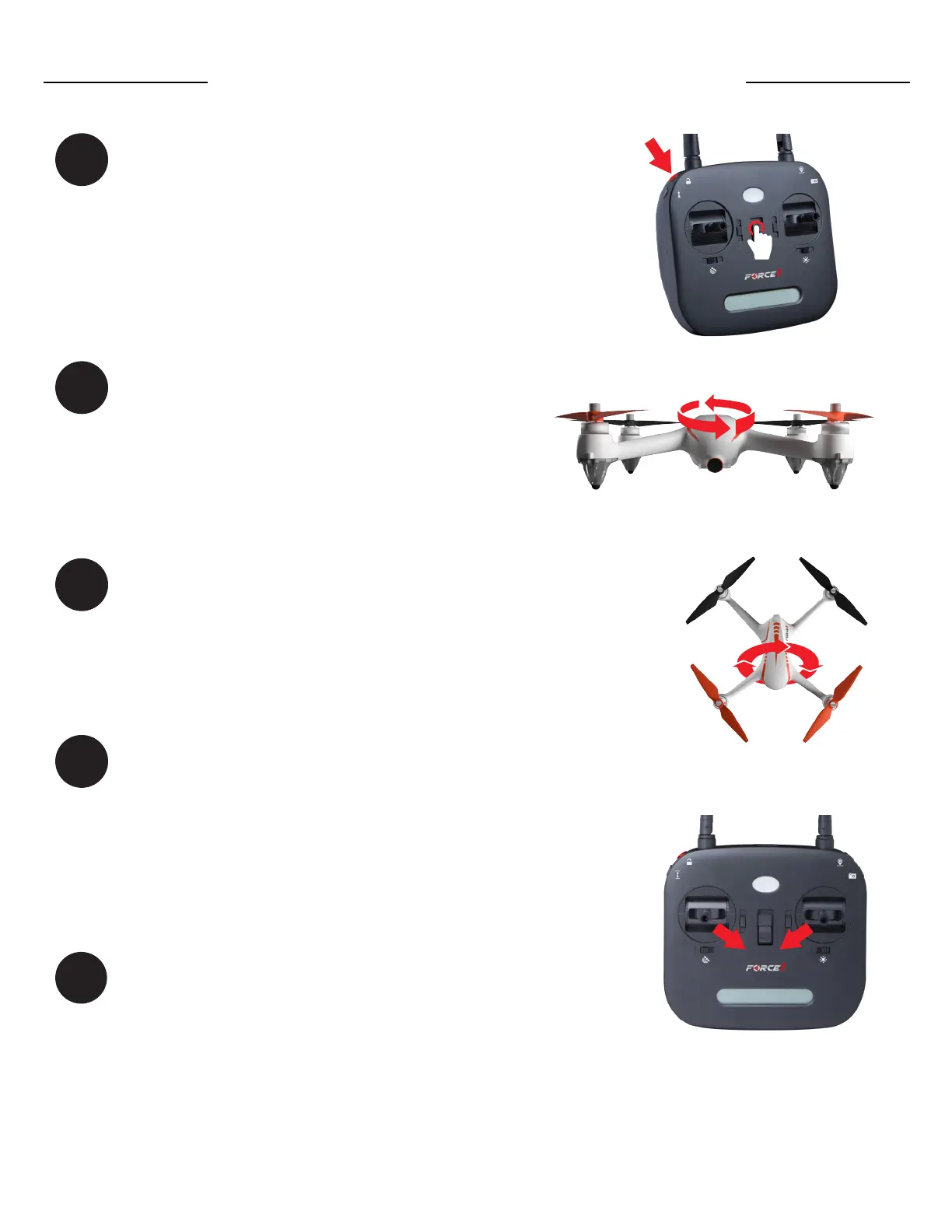
Press and hold the top-left red button while
powering on the transmitter (Fig. 1). Once
the indicator light starts flashing, insert the
drone battery. The transmitter will emit a
single beep when the drone and transmitter
are paired.
Place the drone on a flat surface, facing
away from you. Move the left and right
sticks down and inward simultaneously (Fig.
4). Drone propellers will rotate, indicating it
is unlocked.
When the drone’s front and rear
lights ash yellow, rotate the
drone horizontally 3 times (parallel
to the ground) or until the lights
start ashing green (Fig. 2).
Now, point the drone nose down and rotate
the drone 3 times (perpendicular to the
ground) until you see solid red and yellow
lights. (Fig. 3).
FIGURE 2
FIGURE 3



 To Next Page