F200C Specter User Manual
17
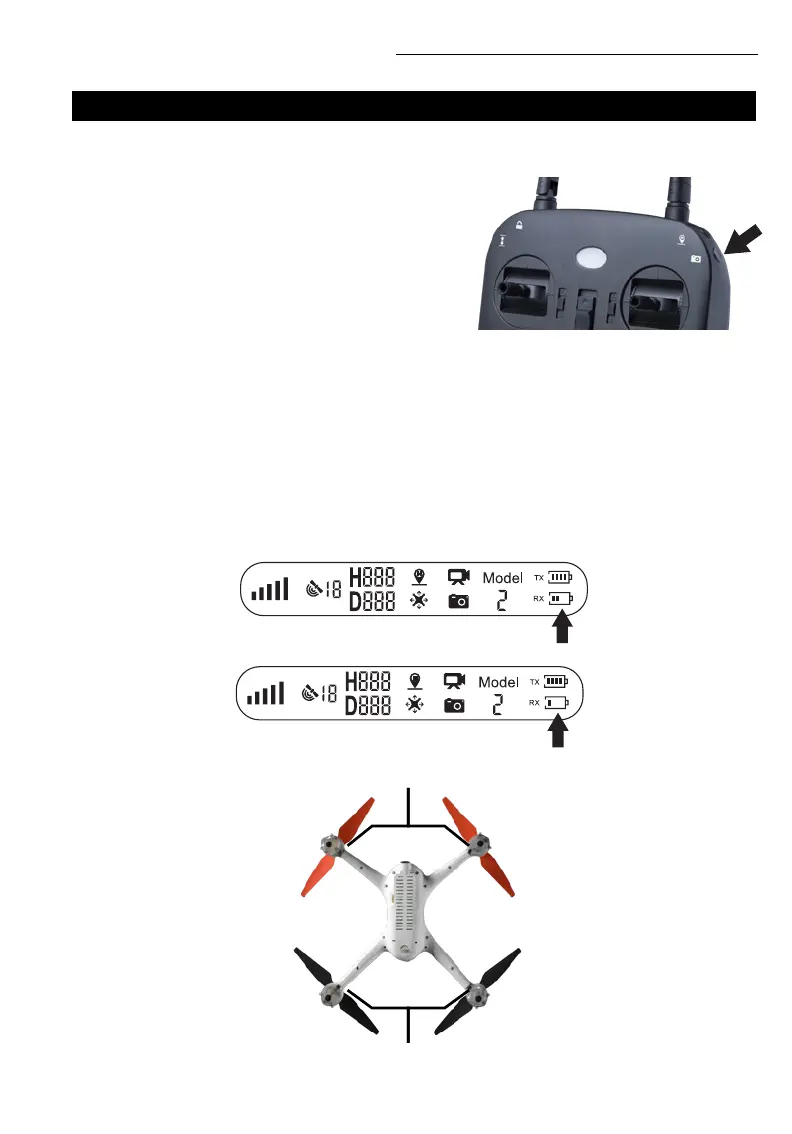
• Press the photo/video button on the top right of the
transmitter to take a photo (Fig. 17). The camera icon
on the LCD screen will flash once indicating that a photo
has been taken
• Press and hold the photo/video button to start recording
video. The video icon on the LCD screen will flash slowly,
indicating that a video is being recorded. Press the
button again to stop recording
FUNCTIONS CONT.
PHOTO / VIDEO
NOTE
Photos/video can’t be taken when the drone camera
has no memory card inserted.
LOW BATTERY WARNING
•
The battery is nearing low voltage when the battery icon in Figure 18 appears on the LCD screen and
the rear lights of the drone flash slowly (the front lights remain the same)
• Low voltage is indicated by the battery icon in Figure 19, and the rear lights of the drone flash rapidly
(the front lights remain the same)
FRONT INDICATOR LIGHTS
BACK INDICATOR LIGHTS
FIGURE 17
FIGURE 18
FIGURE 19



 To Next Page