F200C Specter User Manual
13
2 WAYS TO LOCK/UNLOCK YOUR DRONE
UNLOCK
1. Press the red button; the motors rotate and the drone is unlocked (Fig. 5).
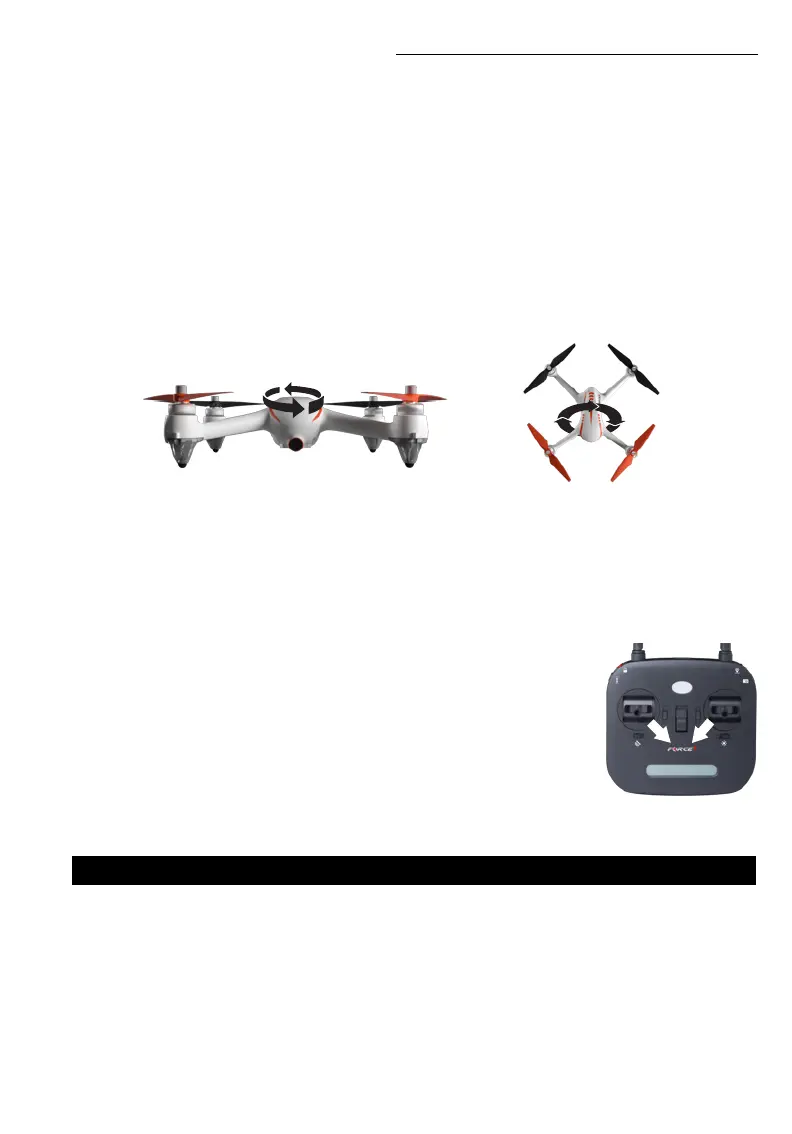
2. Push the left stick to the lower-right corner and the right stick to the lower-left
corner at the same time (Fig. 10).
LOCK
3. Pull the throttle control stick to the bottom position, then press and hold
the red button (Fig. 5) for 3 seconds. The motor will stop immediately and the
drone will lock.
4. After the drone lands on the ground, pull down the throttle control stick to the
bottom position and hold for 3 seconds. The motor will stop immediately and
the drone will lock.
DRONE COMPASS CALIBRATION
Drone compass calibration should be done before every flight, after every battery change and after
every successful initialization detection.
FIGURE 10
HORIZONTAL CALIBRATION
When the drone’s front and rear lights ash light green, hold the drone upright and rotate it 360° 3 times
along the central axis (Fig. 8). The ashing lights will change from light green to green.
VERTICAL CALIBRATION
Hold the drone with its camera facing down and rotate it 360° along its central axis 3 times until the front
light and rear light of the aircraft stop ashing and stay on (Fig. 9).
Now compass calibration is successful.
NOTE
• To fly in GPS mode, choose an open flight area and make sure the satellite number is 7+
• Don’t calibrate the compass in strong magnetic areas like parking lots or construction areas
• Don’t carry magnetic materials with you like key fobs and cellphones
PREFLIGHT CHECKLIST
1. Fly in an open area and abide by all local and federal guidelines. Check the FAA’s B4UFLY mobile app
for up-to-date drone flight info.
2. Make sure your drone and transmitter batteries are fully charged.
3. Put the left stick of the transmitter in the middle position.
4. Follow power off/on instructions closely. Always turn ON your transmitter first before flying, and turn
OFF the drone first when you’re finished.
5. Make sure the connection is solid between your battery and motor; vibration may cause loosening.
6. Make sure the propellers are installed correctly and the motors are working normally after unlocking.
FIGURE 8
FIGURE 9



 To Next Page