FORCE1 RC
8
TRANSMITTER SIGNAL CONNECTION
Keep the transmitter steady during this process, or it may result in signal connection failure.
CAUTION:
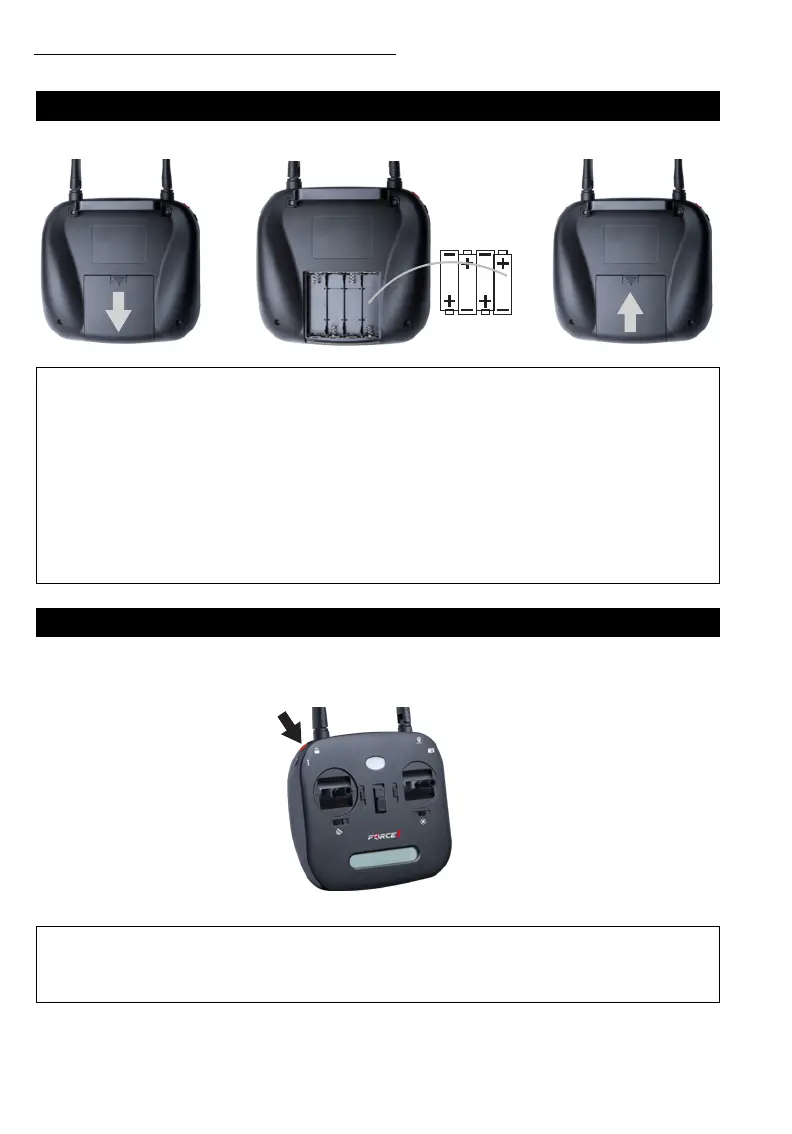
TRANSMITTER BATTERY INSTALLATION
Open the battery cover and insert 4 AA batteries as shown below.
Press and hold the top-left red button and then power on the transmitter (Fig. 1). It will beep twice, and the
indicator light will flash as the transmitter establishes a GPS satellite signal. Flashing will stop when a signal
is found.
• The transmitter needs 4 AA batteries to work
• Insert batteries in correct polarity (+) and (-)
• Don’t mix old and new batteries
• Don’t mix alkaline, standard (carbon-zinc) and rechargeable (nickel-cadmium) batteries
• Remove rechargeable batteries before charging
• Only charge batteries under adult supervision
• Remove spent batteries from the transmitter
• Regularly inspect the charging cable, cord, plug, enclose and other parts; if you notice damage, please
visit Force1rc.com for a replacement, or email us at support@force1rc.com
CAUTION:
FIGURE 1



 To Next Page