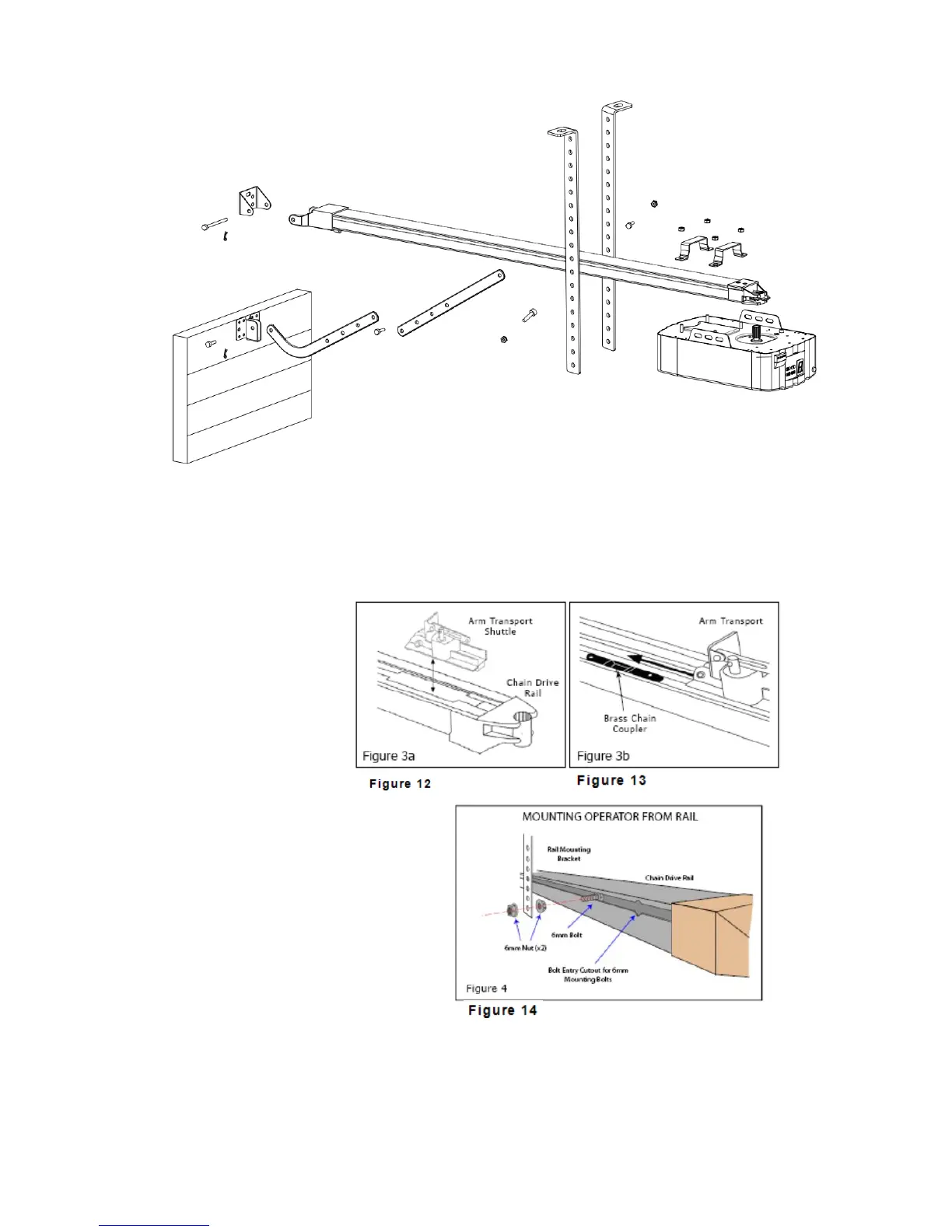
Installation (Aluminium Track)
Figure 11
STEP1(Fig.12, Fig.13)
Insert the shuttle into the cut-out at the end of the Aluminium track. Be sure it
faces the right direction (the disconnection arm on the shuttle faces towards the
opener head). Slide
the shuttle along the
rail until it locks into
place with the brass
chain coupler. Move
the whole shuttle
assembly to the centre
of the drive rail.
STEP2 (Fig.14)
Using the 6mm hexagon head rail
mounting bolt supplied, slide 2 bolts
in each side of the rail through the
cutouts provided.
STEP3 (Fig.11)
Attach the opener head to the steel
track. Assembly the 2 “U” Hanging
brackets with 6mm nuts supplied.
STEP4 (Fig.11)
Place the Aluminium track and opener head assembly centrally on the garage floor,
with the open head furthest away from the door. Lift the front of the track up to the
door bracket. Insert the pivot pin and secure it with the split pin supplied.


 To Next Page