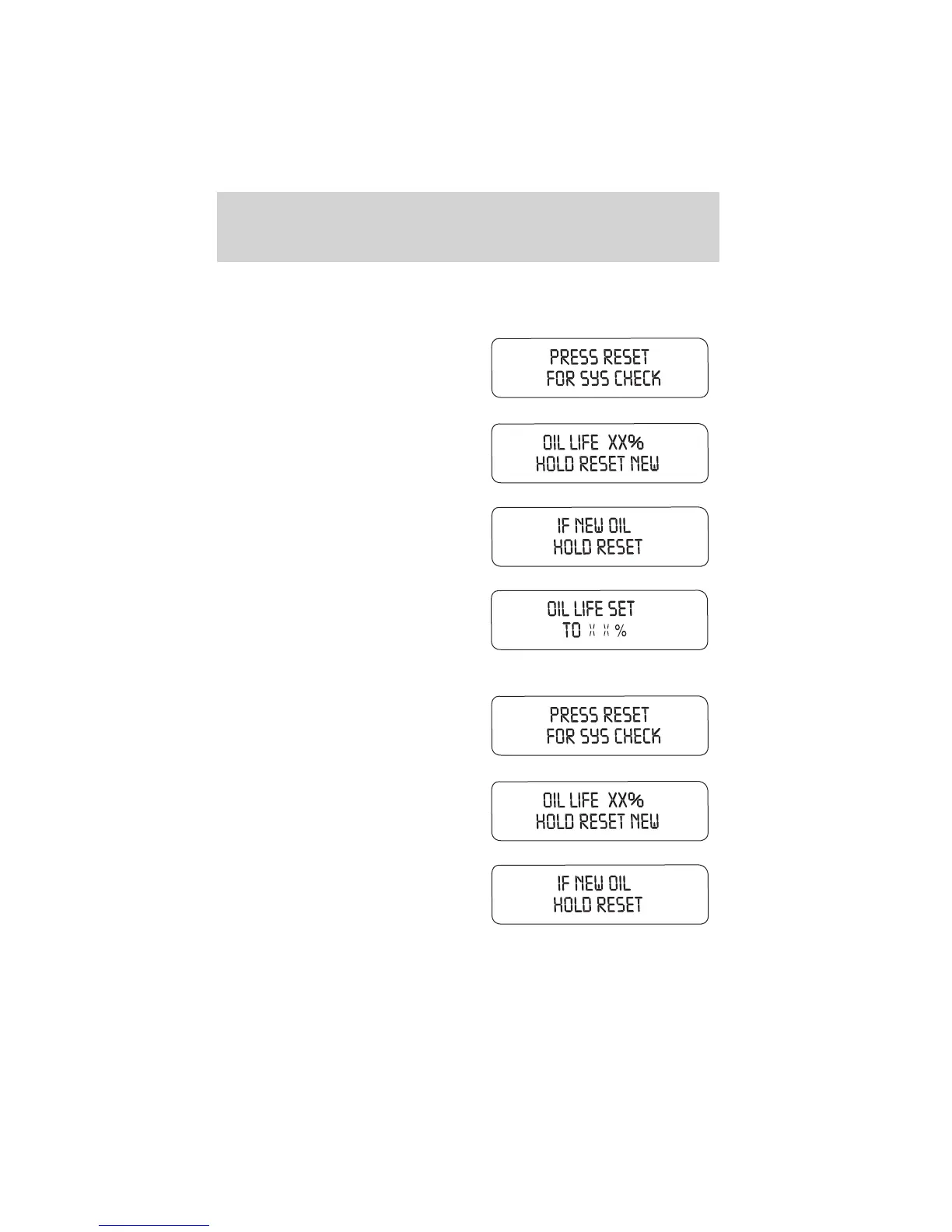
To reset the oil monitoring system to 100% after each oil change
[approximately 8,000 km (5,000 miles) or 180 days] perform the
following:
1. Press the SETUP control to
access the System Check function.
2. Press and release the RESET
control to display “OIL LIFE XX%
HOLD RESET NEW”.
3. Press and hold the RESET
control for 2 seconds to display “IF
NEW OIL HOLD RESET”.
4. Press and hold the RESET
control to display OIL LIFE SET TO
100%. Your oil life is now reset.
To reset the oil monitoring system to your personalized oil life %:
1. Press the SETUP control to
access the System Check function.
2. Press and release the RESET
control to display “OIL LIFE XX%
HOLD RESET NEW”.
3. Press and hold the RESET
control for 2 seconds to display “IF
NEW OIL HOLD RESET”.
Instrumentation
29














 To Next Page