Note: Compass zone and calibration adjustments can be entered by
using the INFO and SETUP MENU controls or using the reset button on
top of the compass sensor mounted behind the mirror.
Compass zone adjustment (if equipped)
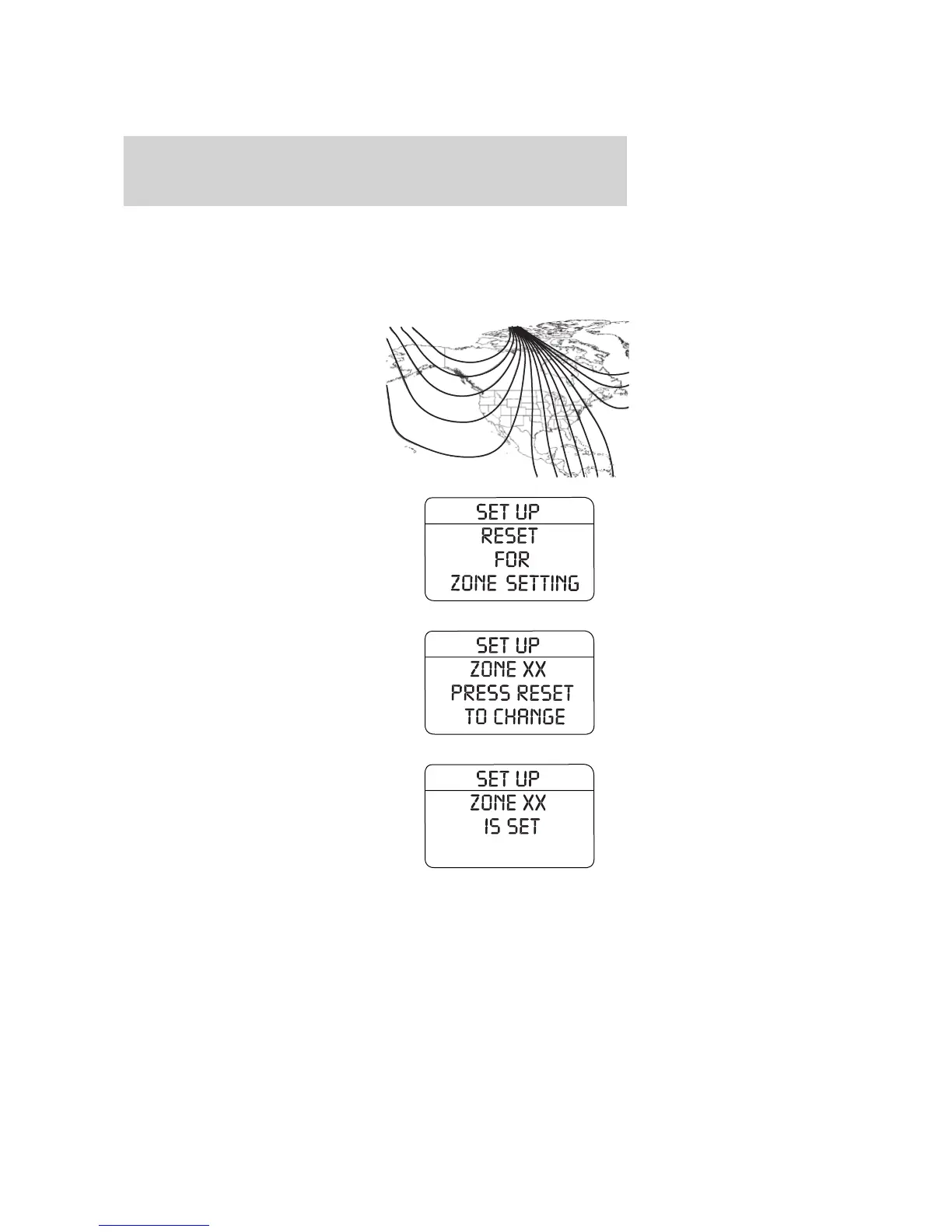
1. Determine your magnetic zone by
referring to the zone map.
2. Turn ignition to the ON position.
3. Start the engine.
4. From SETUP menu, select
compass zone.
5. Press RESET control until the
message center display changes to
show the current zone setting (XX).
6. Press the RESET control
repeatedly until the correct zone
setting for your geographic location
is displayed on the message center.
The range of zone values are from
01 to 15 and “wraps” back to 01.
7. Wait 4 seconds when correct zone
is chosen.
123
4
5
6 7 8 9 1011
12
13
14
15
2007 Explorer (exp)
Owners Guide (post-2002-fmt)
USA (fus)
Driver Controls
127









 To Next Page