• Rear Defrost On • Rear Defrost Off
• Recirc On • Recirc Off
• Panel On • Panel Floor On
• Floor On • Windshield Floor On
• Temperature High • Temperature Low
• Fan Increase • Fan Decrease
• Temperature • Temperature Increase
• Temperature Decrease
• Temperature <15.5–29.5>
degrees
• Temperature <60–85> degrees • My Temp
• Help
*Note: If you have said “Temperature”, you can then say any of the
following commands:
• High • Low
• <15.5–29.5> degrees • <60–85> degrees
For more information on your touchscreen system, refer to the MyFord
Touch™ / MyLincoln Touch™ supplement.
AUXILIARY SYSTEM
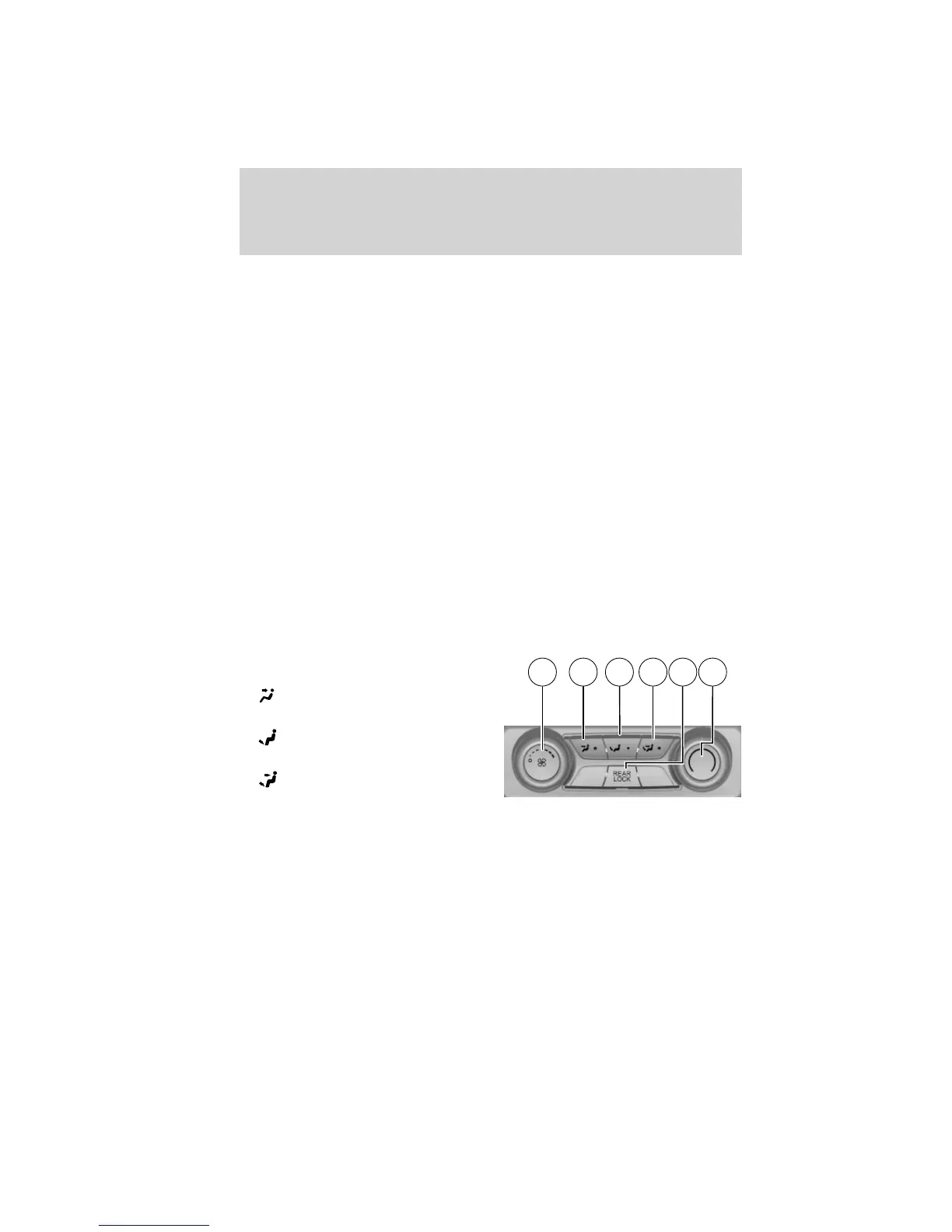
1. Fan control: Turn to adjust the
fan speed.
2.
(Panel): Press to select air
flow direction to the panel.
3.
(Floor): Press to direct air
flow to the floor vents.
4.
(Panel and floor): Press to
direct air flow to the panel and floor
vents.
5. REAR LOCK: This will illuminate when the rear controls have been
locked out by the front controls. At this time, the front controls will
control the settings for the rear controls.
6. Temperature control: Turn to increase/decrease the temperature.
1 62 3 4 5
Climate Controls
74
2011 Explorer (exp)
Owners Guide, 1st Printing
USA (fus)












 To Next Page