USING MYKEY WITH REMOTE START SYSTEMS
MyKey is not compatible with non-Ford-approved aftermarket remote
start systems. If you choose to install a remote start system, please see
your Ford authorized dealer for a Ford-approved remote start system.
MYKEY TROUBLESHOOTING
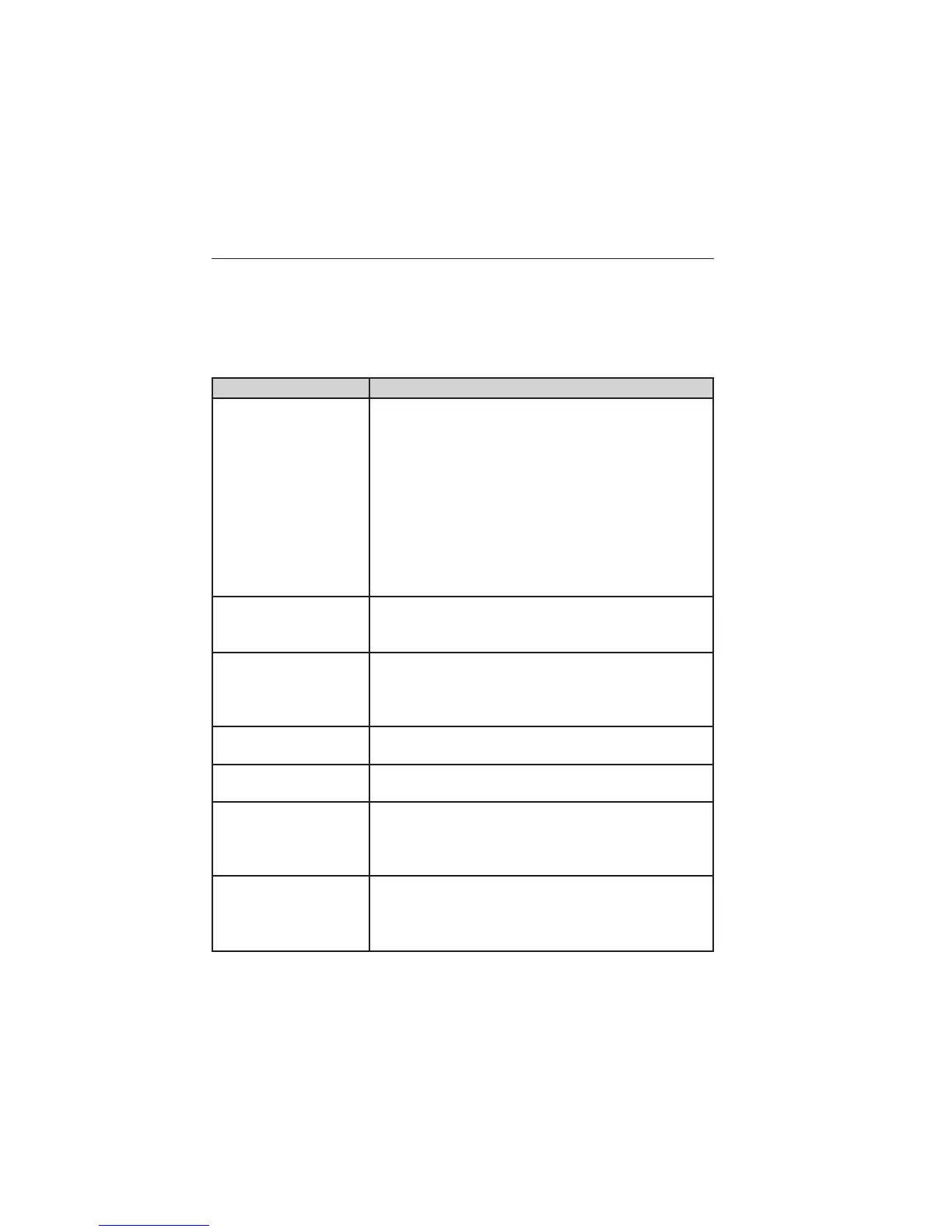
Condition Potential causes
I cannot create a
MyKey.
• The key or fob used to start the vehicle does
not have admin privileges.
• The key or fob used to start the vehicle is the
only admin key (there always has to be at least
one admin key).
• Vehicles with push-button start: The intelligent
access key is not in the backup slot. The backup
slot location information is in another chapter.
See Starting and Stopping the Vehicle.
• SecuriLock passive anti-theft system is disabled
or in unlimited mode.
I cannot program the
configurable settings.
• The key or fob used to start the vehicle does
not have admin privileges.
• No MyKeys are created. See Creating a MyKey.
I cannot clear the
MyKeys.
• The key or fob used to start the vehicle does
not have admin privileges.
• No MyKeys are created. Refer to Creating a
MyKey.
I lost the only admin
key.
• Purchase a new key from your authorized
dealer.
I lost a key. • Program a spare key. See SecuriLock in the
Security.
No MyKey functions
with intelligent access
key (push- button
start).
• An admin fob is present at engine start.
• No MyKey has been created. See Creating a
MyKey.
MyKey distances do
not accumulate.
• The MyKey user is not using the MyKey.
• An admin key holder cleared the MyKeys and
created new MyKeys.
• The key system has been reset.
MyKey 69
2014 Edge (edg)
Owners Guide gf, 2nd Printing, March 2014
USA (fus)



 To Next Page
 Loading...