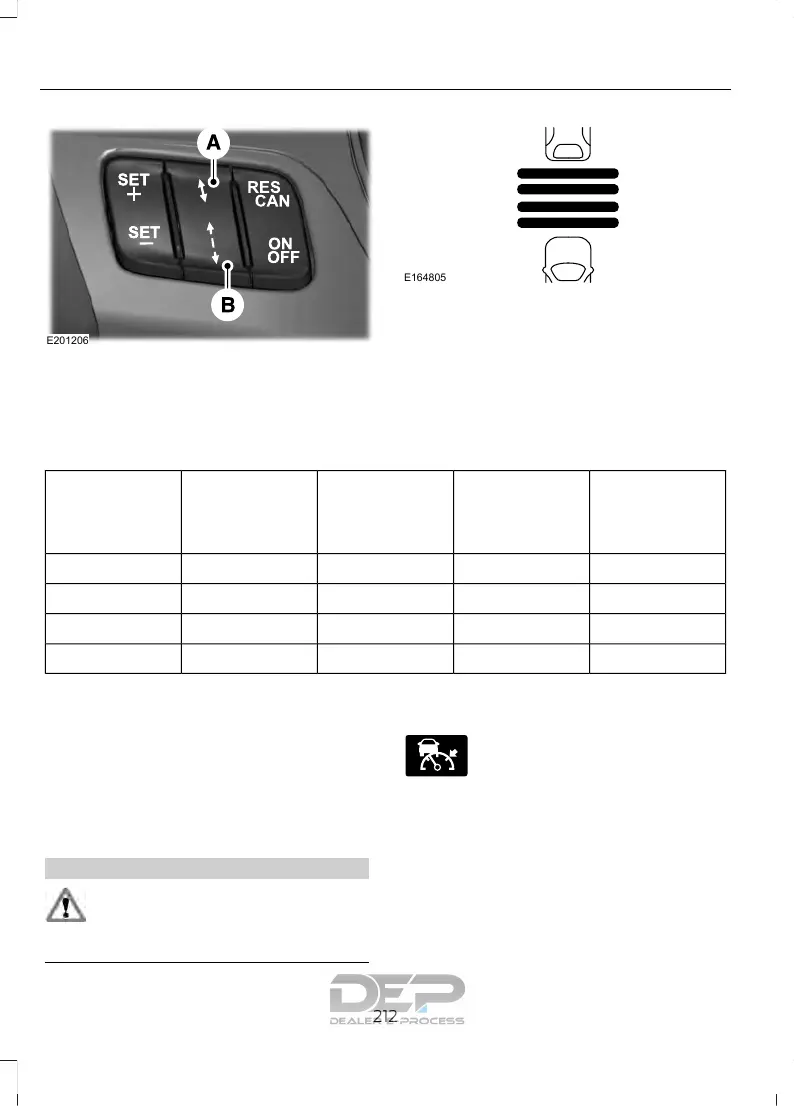
The selected gap appears in the
information display as shown by the bars
in the graphic. Five gap settings are
available.
The gap setting is time dependent and the
distance automatically adjusts with your
vehicle speed.
Adaptive cruise control gap settings
Dynamic beha-
vior
GapTime gap,
seconds
Graphic display,
bars indicated
between
vehicles
Set speed
yd (m)mph ( km/h)
Sport31 (28)1162 (100)
Normal43 (39)1.4262 (100)
Normal55 (50)1.8362 (100)
Comfort67 (61)2.2462 (100)
Each time you start the vehicle, the system
selects the last chosen gap.
Canceling the Set Speed
Press and release CAN or tap the brake
pedal. The set speed does not erase.
Overriding the System
WARNING
If you override the system by pressing
the accelerator pedal, it does not
automatically apply the brakes to
maintain a gap from any vehicle ahead.
You can override the set speed and gap by
pressing the accelerator pedal.
When you override the system,
the green indicator light
illuminates and the lead vehicle
graphic does not show in the information
display.
The system resumes operation when you
release the accelerator pedal. The vehicle
speed decreases to the set speed, or a
lower speed if following a slower vehicle.
212
Explorer (TUB) Canada/United States of America, enUSA, Edition date: 03/2016, First Printing
Cruise Control







 To Next Page