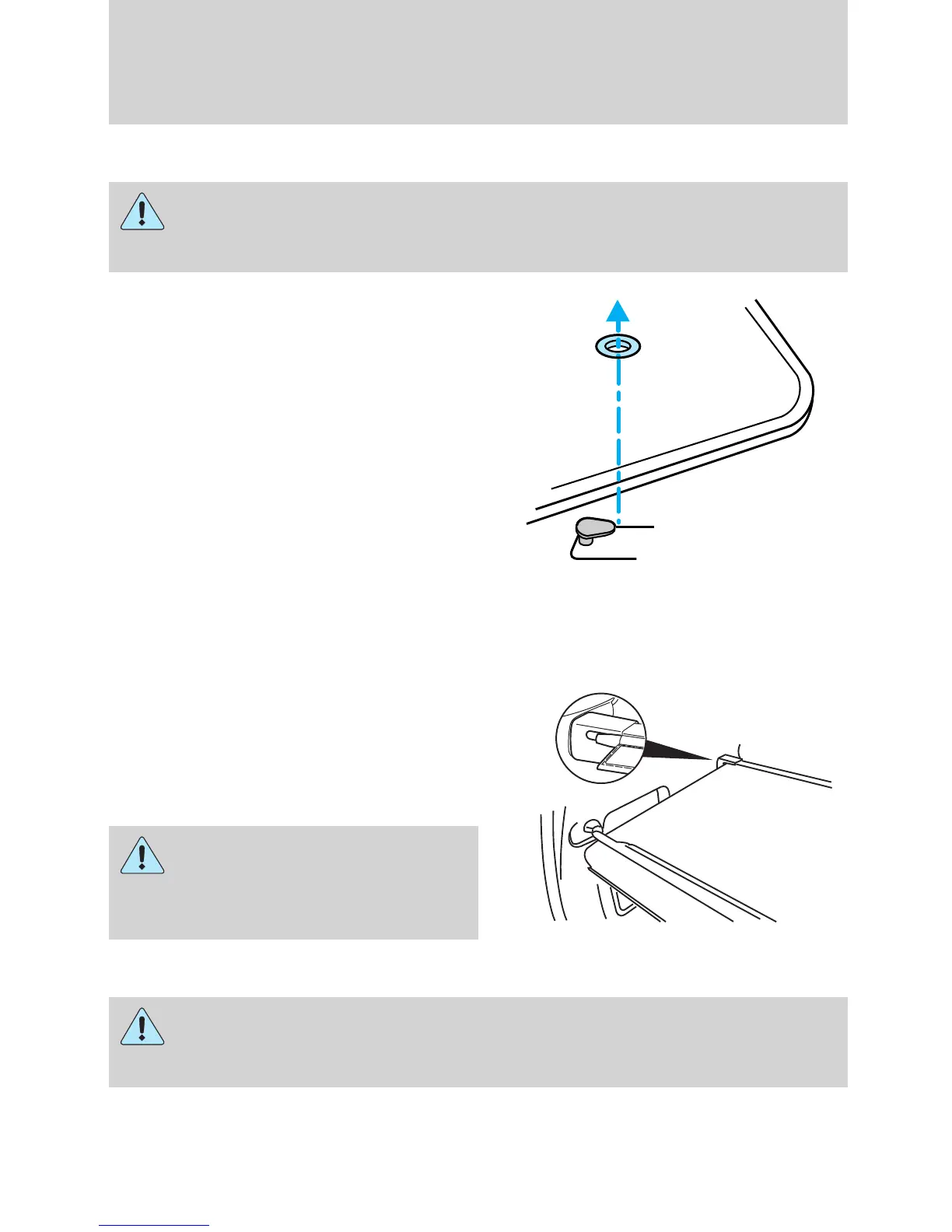
POSITIVE RETENTION FLOOR MAT
WARNING: Do not install additional floor mats on top of the
factory installed floor mats as they may interfere with the
accelerator or the brake pedals.
Position the driver floor mat so that
the eyelet is over the pointed end of
the retention post and rotate
forward to lock in. Make sure that
the mat does not interfere with the
operation of the accelerator or the
brake pedal. To remove the floor
mat, reverse the installation
procedure.
CARGO COVER (IF EQUIPPED)
Your vehicle may be equipped with a cargo area cover that covers the
luggage compartment of your vehicle.
To install the cover:
Push both ends of the cover into the
depressions (right side first) in the
trim panels behind the second row
seat.
WARNING: To reduce the
risk of injuries, the cargo
area cover must be properly
installed on the rear trim panels.
WARNING: Do not place any objects on the cargo area cover.
They may obstruct your vision or strike occupants of the vehicle
in the case of a sudden stop or collision.
Driver Controls
149
REVIEW COPY ——
2009 Explorer (exp), Owners Guide (own2002), 3rd Printing, Market: USA
(fus)














 To Next Page