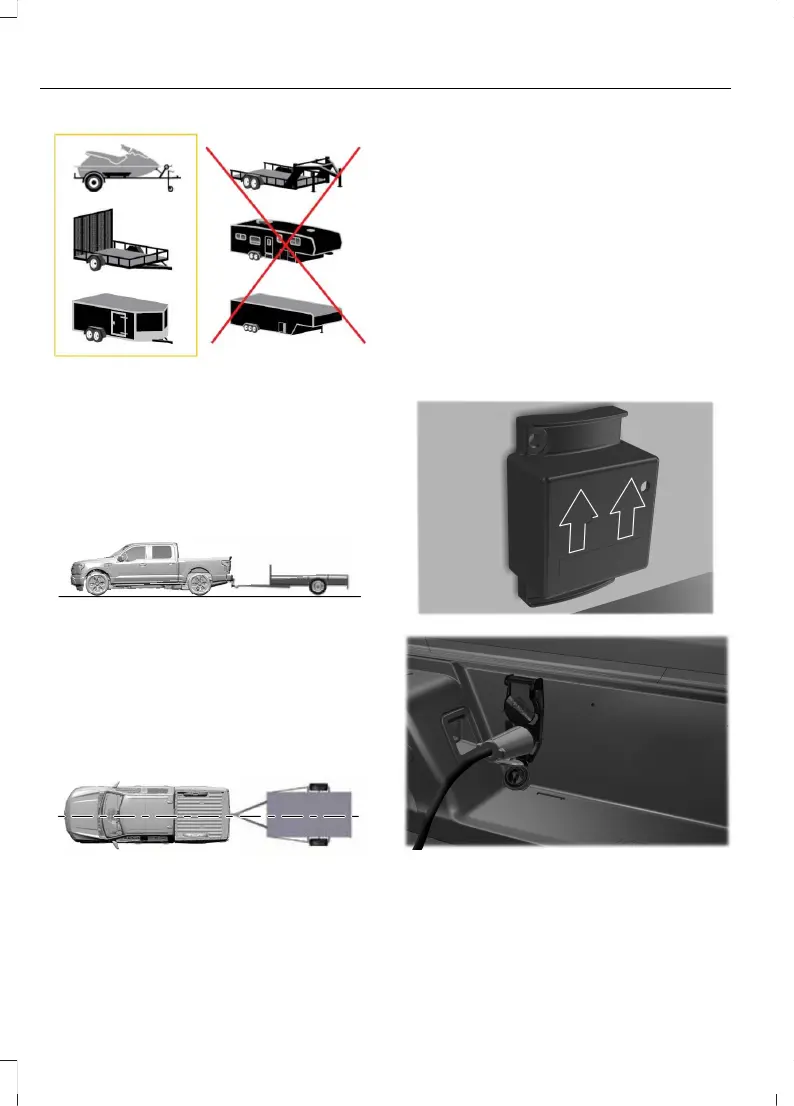
Positioning the Trailer
Hitch your trailer to the truck and connect
the electrical wiring harness. Check to
make sure that the wiring is working. See
Connecting a Trailer (page 348).
Park your vehicle and hitched trailer on a
level surface.
For best results, make sure that your trailer
rides level with the ground when you hitch
your vehicle. See Connecting a Trailer
(page 348).
Make sure that the trailer and your vehicle
are in line with each other. You can do this
by putting the transmission in drive (D) and
pulling straight forward.
Configuring the Trailer in the
Touchscreen
1. Shift to reverse (R).
2. Press the camera view button.
3. Press the trailer view icon.
4. Press Add Trailer.
5. Follow the directions on the
touchscreen to enter the trailer name
and trailer type, then proceed to the
sensor setup.
TRAILER SENSOR INSTALLATION
Refer to the instructions included with your
trailer sensor for detailed information
regarding installation.
372
F-150 Lightning (TFD) Electric, Canada/United States of America, enUSA, Edition date: 202112, First-Printing
Trailer Reversing Aid - Vehicles With: Trailer Reverse
Guidance (TRG)


 To Next Page