Settings (cont’d)
MyKey Create MyKey Hold OK to Create MyKey
Traction Ctrl Always On or User Selectable
Max Speed 80 MPH (130 km/h) or Off
Speed Warning 45 mph (75 km/h), 55 mph
(90 km/h), 65 mph (105 km/h) or Off
Volume Limiter On or Off
Clear MyKeys Hold OK to Clear All MyKeys
System Reset Hold OK to Reset System to Factory Default
System Check
All active warnings will display first if applicable. The system check
menu may appear different based upon equipment options and current
vehicle status. Use the up/down arrow buttons to scroll through the
list.
Status Display
The following features will display in the information center.
Compass
Displayed in the status line at the bottom of the display. Displays the
vehicle’s heading direction.
To calibrate the compass: Enter the compass menu and select Calibrate.
Follow the prompts.
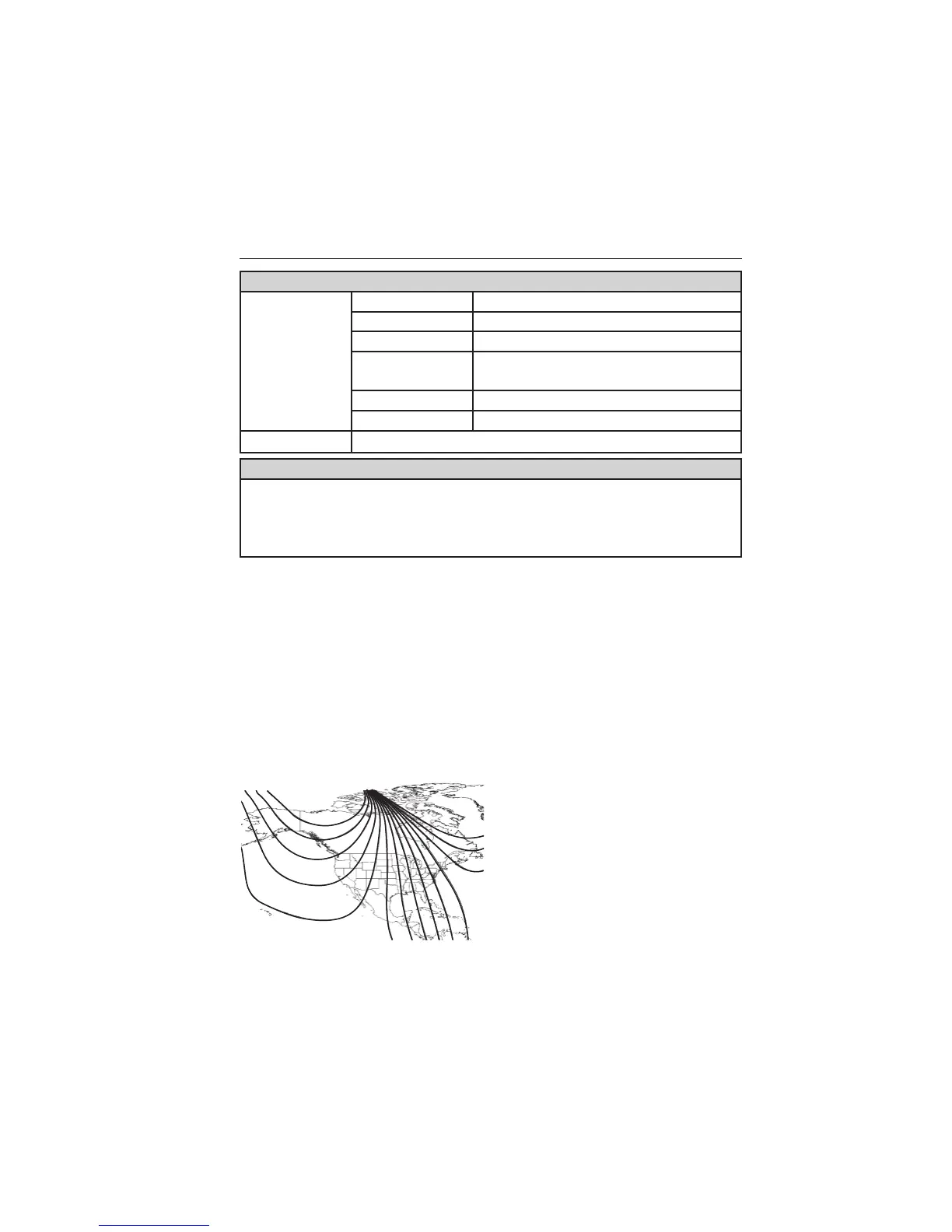
To set the compass zone: Enter the compass menu and select Set. Follow
the prompts. See the diagram below to determine your magnetic zone.
Determine which magnetic zone you
are in for your geographic location
by referring to the zone map.
123
4
5
6 7 8 9 1011
12
13
14
15
110 Information Displays
2013 Focus (foc)
Owners Guide gf, 1st Printing
USA (fus)


 To Next Page