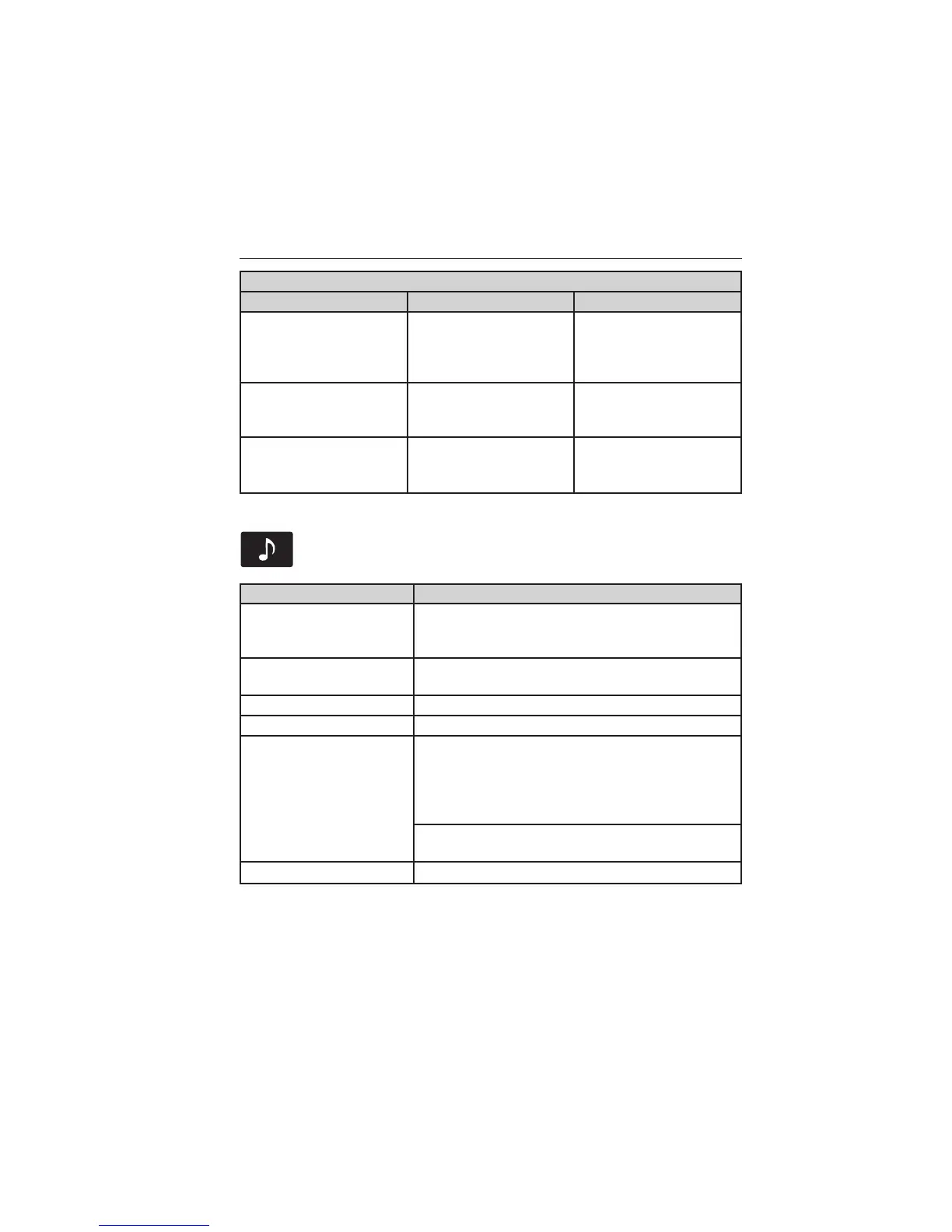
SIRIUS Troubleshooting Tips
Radio Display Condition Possible Action
Call SIRIUS
1–888–539–7474.
Satellite service has
been deactivated by
SIRIUS Satellite Radio.
Call SIRIUS at
1–888–539–7474 to
reactivate or resolve
subscription issues.
No Channels Available. All the channels in the
selected category are
locked or skipped.
Unlock or unskip the
channels using the
channel guide.
Subscription Updated. SIRIUS has updated
the channels available
for your vehicle.
None.
CD
Press the lower left corner of the touchscreen, then select the
CD tab.
When you select: You can:
Repeat Choose to repeat the currently playing track,
all tracks on the disc or turn the feature off if
already on.
Shuffle Play the tracks or entire albums in random
order, or turn the feature off if already on.
Scan Hear a brief sampling of all available tracks.
More Info See disc information.
Options Sound: Adjust Bass, Treble, Midrange,
Balance and Fade, THX Deep Note Demo (if
equipped), DSP (if equipped), Occupancy
Mode (if equipped), and Speed Compensated
Volume settings.
Compression: Turn the compression feature
on and off.
Browse Look through all available audio sources.
You can also advance and reverse the current track or current folder (if
applicable).
400 MyFord Touch姞 (If Equipped)
2013 Focus (foc)
Owners Guide gf, 1st Printing
USA (fus)



 To Next Page