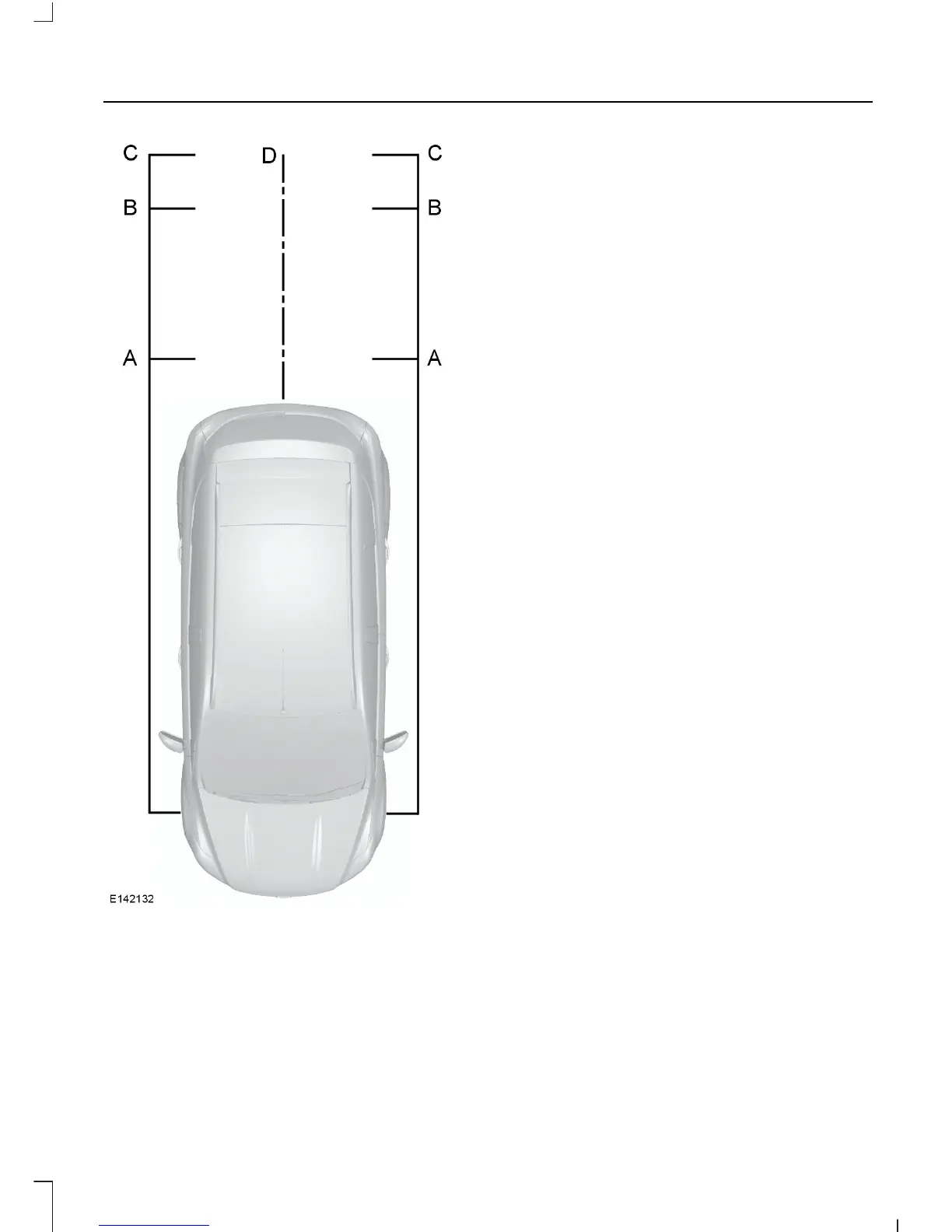
Red - up to 12 inches (0.3 meter)A
Amber - 12 - 24 inches (0.3 - 0.6
meter)
B
Green - 24 - 35 inches (0.6 - 0.9
meter)
C
Black - center line of the
projected vehicle path
D
Note: The green line is extended from 35
inches (0.9 meter) up to a distance of 126
inches (3.2 meters).
Note: When reversing with a trailer, the lines
on the screen are not shown. The camera
will show your vehicle direction and not the
trailer.
Switching the Rear View Camera
Off
Note: The system will automatically switch
off once your vehicle speed has reached
approximately 7 mph (12 km/h).
Press function button 4. For item location:
See Audio System (page 223).
Vehicles with Parking Aid
The display will additionally show a
colored distance bar. This guide indicates
the distance from the rear bumper to the
detected obstacle.
These are color coded as follows:
• Green - 24 - 71 inches (0.6 to 1.8
meters).
• Amber - 12 - 24 inches (0.3 to 0.6
meter).
• Red - 12 inches (0.3 meter) or less.
141
Kuga (CBS) Vehicles Built From: 10-03-2014, Vehicles Built Up To: 31-12-2014, CG3585en enGBR, Edition date: 02/2014, None
Parking Aids



 To Next Page