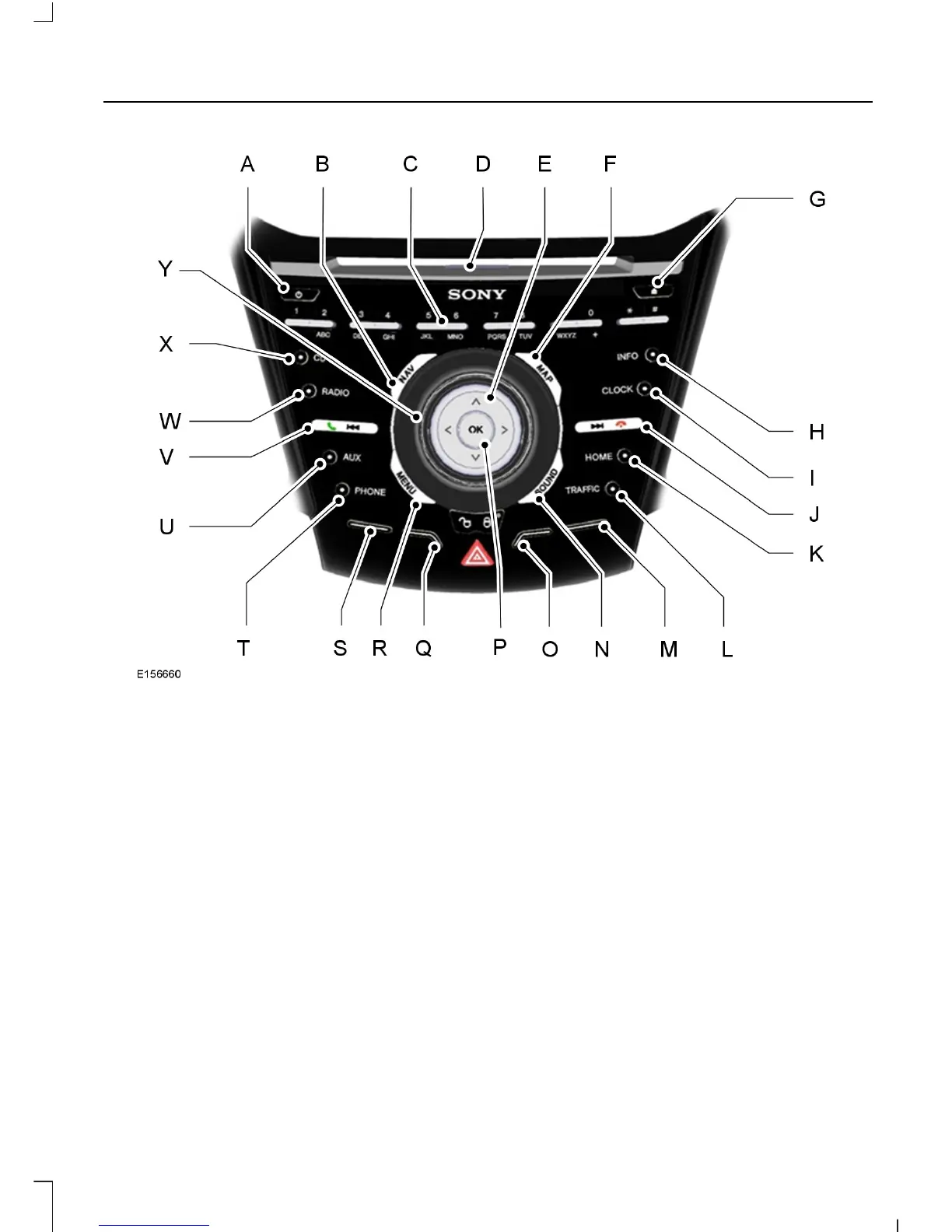
On, Off: Press the button to switch the audio system on or off.A
NAV: Press the button to access the navigation system.B
Numeric keypad: Press the button to recall a previously stored station. To
store a favorite station press and hold until the sound returns. In CD mode, press
a number to select a track. In phone mode, use the buttons to dial a phone
number.
C
CD slot: Where you insert a CD.D
Cursor arrows: Press the button to scroll through on-screen choices.E
MAP: Press the button to access map features.F
Eject: Press the button to eject a CD.G
INFO: Press the button to access radio, CD, USB, IPod and Navigation
information. If Navigation has been selected, pressing this button will show
details of your current location or journey.
H
CLOCK: Press the button to access the clock functions.I
247
Kuga (CBS) Vehicles Built From: 10-03-2014, Vehicles Built Up To: 31-12-2014, CG3585en enGBR, Edition date: 02/2014, None
Audio System



 To Next Page