MEMORY FUNCTION (if equipped)
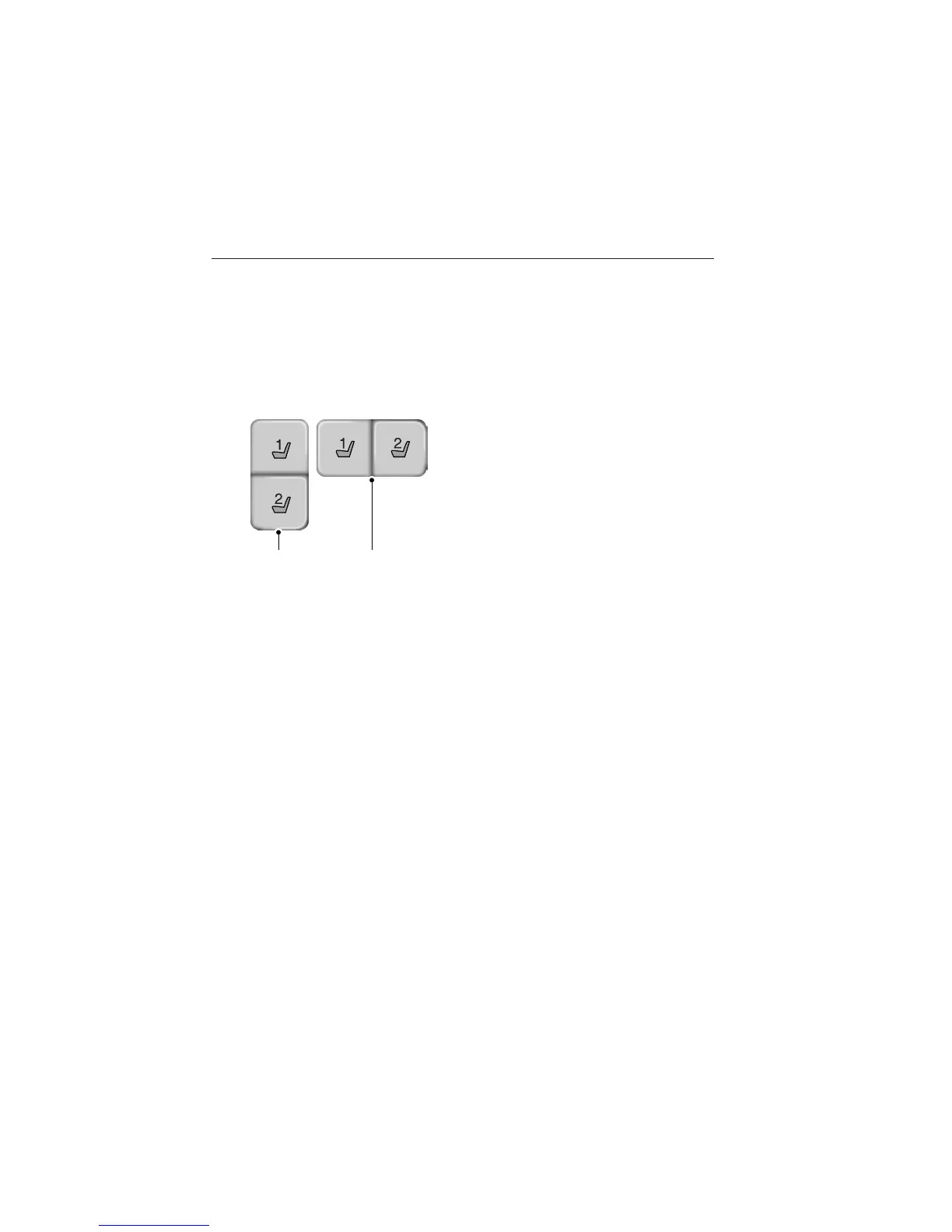
The memory control, located on the side seat panel, allows positioning
recall of the:
• Driver seat.
• Power mirrors.
• Adjustable pedals (if equipped).
• Power tilt/telescopic steering column (if equipped).
A. Type 1
B. Type 2
Programming a memory position
Note: You can program a memory position at any time.
• To program a position, move the memory features to the desired
positions using the associated controls. Press and hold the desired
memory button for at least two seconds. A chime will sound
confirming that a memory position has been set.
• To program another position, repeat the previous procedure using the
other buttons.
Recalling a memory position
You can recall a programmed memory position:
• In any gearshift position if the ignition is not on.
• Only in park (P) or neutral (N) if the ignition is on.
Press the desired memory control to recall a memory position.
Recalling a memory position with the remote control
The memory positions are also recalled when you press unlock on your
remote control (if the transmitter is programmed to a memory position)
or, when you enter a valid personal entry code that is programmed to a
memory position. If you enable the easy entry feature, the seat will first
A B
Seats 149
2014 Taurus
Owners Guide gf, 2nd Printing, September 2013
USA (fus)



 To Next Page