Need help?
Do you have a question about the Ford VCM3 and is the answer not in the manual?
Explains warning notices and symbols used in the text.
Details warning signs and symbols on the device itself.
Specifies qualified personnel for product operation and their supervision.
Outlines FCC rules and conditions for VCM3 operation in the USA.
Directs users to the location of open-source software license information.
States VCM3 compliance with EMC directives and potential interference.
Defines the intended use conditions and operating environment for VCM3.
Addresses user responsibility for wireless compliance with country regulations.
Warns about compromised protection if VCM3 is used contrary to specifications.
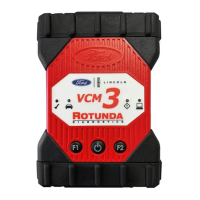
Describes VCM3 as a tool for automotive electrical and electronic diagnostics.
Lists the components included in the VCM3 Base Kit for vehicle data transfer.
Illustrates and describes the keys, ports, and connectors on the VCM3 device.
Details the fixed USB configuration for VCM3 connection and firmware updates.
Explains WLAN setup requiring USB connection to VCI Manager.
Introduces extra features of the VCM3 device.
Covers establishing connection via the 26-pin diagnostic cable.
Explains how VCM3 receives power from the vehicle or USB port.
Details the meaning of the four LEDs indicating VCM3 status.
Describes the VCI Manager software for VCM3 configuration and updates.
Guides users to the PTS website for minimum PC requirements.
Refers users to follow specific instructions for user software installation.
Instructions for installing VCI Manager and VCI Manager Launcher software.
Guide to preparing the VCM3 hardware for diagnostics.
Explains how to find the VCM3 serial number on the rating plate.
Step-by-step guide to updating VCM3 firmware via USB.
Details how to configure VCM3 for network communication using VCI Manager.
Steps to verify matching software versions between PC and VCM3.
Guide to configuring wireless communication methods for VCM3.
Default configuration for VCM3 point-to-point wireless setup.
Guide to configuring VCM3 for workshop network via access point.
Procedure to restore VCM3 point-to-point settings to factory default.
Instructions for connecting VCM3 to the vehicle's DLC.
Steps to perform a reset by removing and reattaching power.
Recommendations for troubleshooting error LEDs on VCM3.
Steps to diagnose and resolve VCM3 power-up issues.
Explains the cause and solution for a flashing red vehicle LED on VCM3.
Describes the VCM3 beeping sound related to power loss.
Addresses VCM3 shutting off unexpectedly after power loss.
Explains the Checkmark LED indicating overheating and wireless adapter shutdown.
Troubleshooting advice for D-Link DWA131 E1 dongle wireless issues.
Resolving VCI Manager yellow icon issues with wireless adapters.
Steps to fix communication failures between PC and VCM3 via USB.
Troubleshooting wireless communication problems with VCM3.
Guide to recover VCM3 software after corruption due to power or communication errors.
Instructions for extended non-use and disconnecting power.
Guidelines for handing over, transporting, and disconnecting the VCM3.
Information on environmentally friendly recycling and disposal of VCM3.
Details the two-year warranty period and what it covers.
Lists conditions that void the warranty or are not covered.
States that express warranties replace all implied ones.
Technical specifications for connectivity and processing components.
Details on LEDs, beeper, and power source specifications.
Physical dimensions, weight, operating temps, and protection ratings.
Details on the diagnostic cable connector and voltage resistance.
 General
| Type | Vehicle Communication Module |
|---|---|
| Category | Automobile Accessories |
| Function | Vehicle diagnostics and reprogramming |
| Compatibility | Ford vehicles |
| Connection | USB |
| Protocols | CAN, ISO9141, J1850PWM |
| Functions | Read/clear DTCs, data logging, module programming |
| Software | Ford IDS |
| Usage | Professional automotive repair and maintenance |

 To Next Page