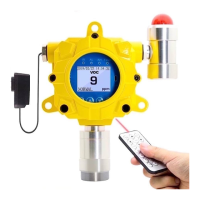
INDUSTRIAL FIXED GAS DETECTOR, FD-60
FORENSICS DETECTORS
TM
!
!
FORENSICS DETECTORS
TM
www.forensicsdetectors.com
!
4. OPERATION
SETUP: Unbox detector. Identify your power source. The detector
comes with a power supply that connects to the power cord. To set up
the detector remove the 5 hex screws with the hex driver provided.
Ensure (1) the power cable is secured on the PCB (2) connect the
LED/BUZZER fixture (3) sensor assembly is secure. Please note, for
flexibility the power cable and alarm LED/BUZZER fixture can be
swapped on either side to accommodate installation and aesthetics.
4.1 Turn ON/ OFF
Connect 24V power to the detector. The detector enters a 60-second countdown.
Once complete, it then enters into normal detection mode. Once first ON, allow 30
minutes for the gas detector to stabilize then the data displayed in the main display is
the gas concentration value of instantaneous detection. The detector has been
FACTORY calibrated. Hence, it is NOT necessary to perform any CALIBRATION,
however do ensure ALARMS are set to the users satisfaction and local exposure limit
requirements (as necessary per your safety officer advice or consult with local, state
or federal authorities). The detector can be turned off by directly disconnecting the
power supply. We recommend BUMP testing to confirm operation of alarms.
4.2 Menu Item Operation Description
The detector should be operated and controlled via the remote control. Otherwise, one
can use the detector button control on the main panel, but will need to remove the
cover. To do so, with the hex screwdriver delivered, unscrew 5 screws to open the
metal cover and display 4 buttons: return, up, down, and OK. Three operation
interfaces:
1. Detection interface
2. Function menu
3. Parameter setting interface.
Parameter
setting
interface
View STEL!
TWA data
analysis
Return
detection
interface


 To Next Page