4
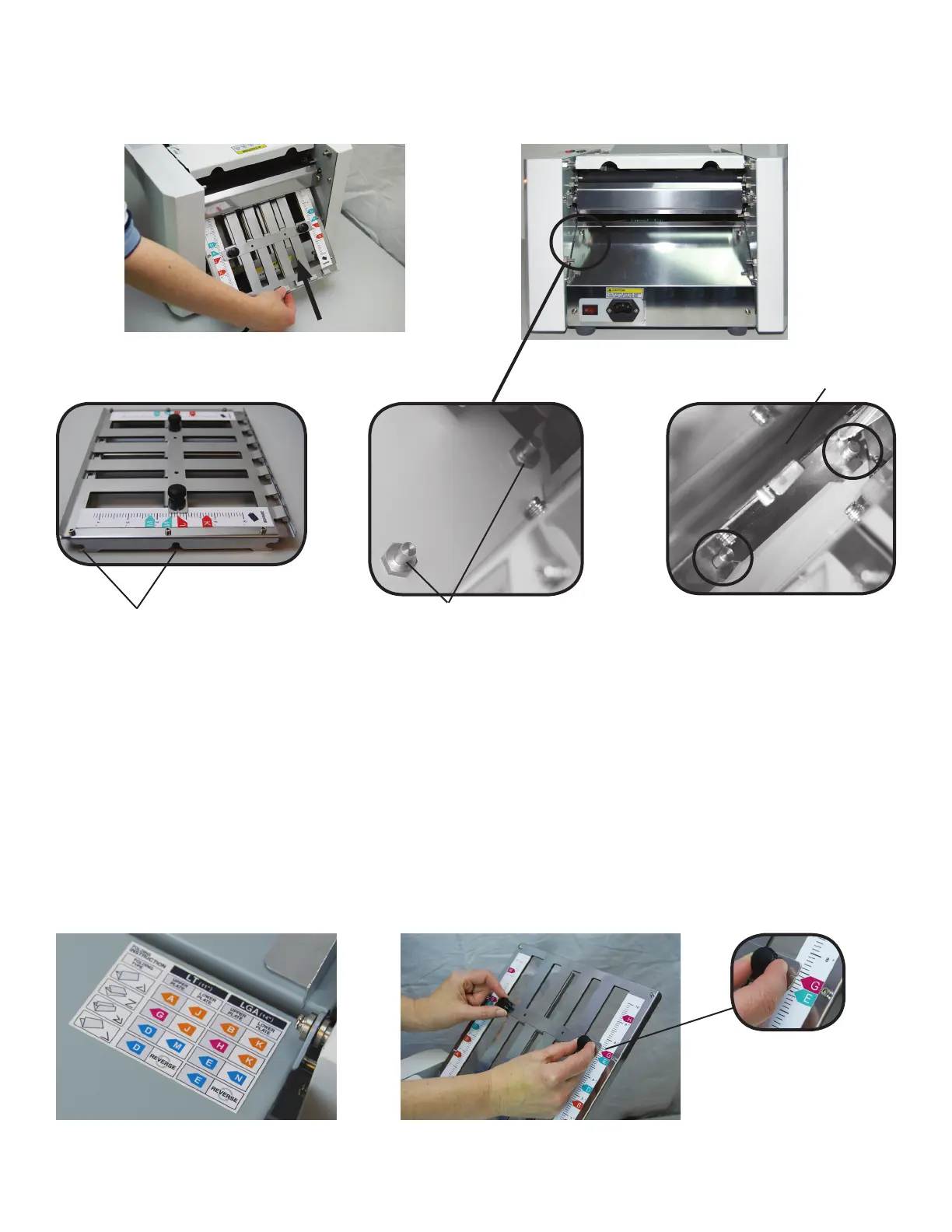
Install the lower fold plate at an angle, as shown. Align the notches on the fold plate with the lower fold plate
pins. Push gently on the fold plate to lock it into position.
1. Determine the fold type and paper size.
2. Refer to the chart on the infeed table for fold plate settings based on the fold type and paper size. For
example, if you are folding an 8.5” x 11” sheet (LT) into an accordion fold (Z) set the upper fold plate stop
to “G” and the lower fold plate stop to “J”.
3. To adjust the fold stops loosen the two thumbscrews, slide the fold stop up or down to the correct position
and tighten the thumbscrews.
Note: To process a Half Fold, Set the upper fold plate stop to the proper position and then remove the
lower fold plate, rotate it 180
o
and re-install it.
To set custom folds, refer to the chart on page 6.
Lower fold plate notches
Lower Fold Plate
Setting Fold Plates
Fold stop position decal on infeed
table.
Loosen the thumbscrews to adjust
the fold stop position.
Align the fold stop notch
with the matching letter.
Lower fold plate pins
Lower fold plate
Lower fold plate seated on pins


 To Next Page