- With Formovie Mini Projector Dice and the Google Assistant,
quickly access entertainment, control smart devices, get
answers on screen, and more using your voice.
4
Remote Control
1
1
2
2
3
3
4
4
5
5
6
6
7
7
8
8
9
9
10
11
12
10
11
12
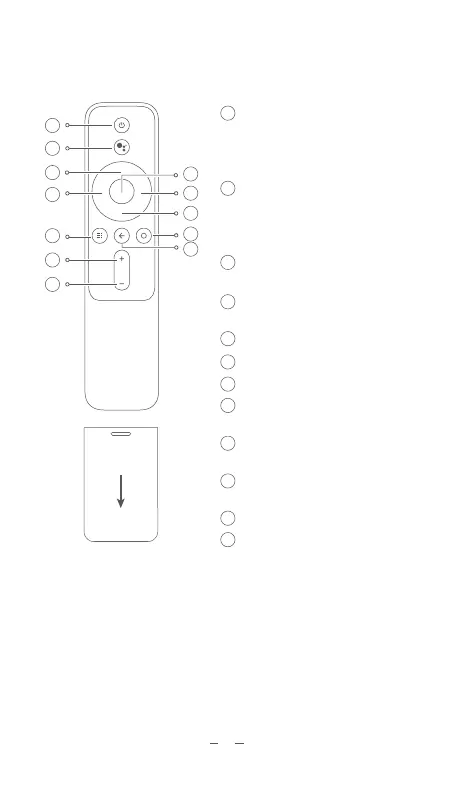
On/Off Button
Directional Pad (Up):
Directional Pad (Left):
Press Once: Select Power off /
Restart / Screenshot
Press Twice: Turn Off
Google Assistant
Press the Assistant button on
your remote to talk to Google
Assistant
Move Up
Move Left
APP: Access the APP interfce
Home: Return to the home screen
Return:
Return to the previous menu
Volume + : Increase the volume
Volume - : Decrease the volume
OK: Confirm the selected
option or setting
Directional Pad (Right):
Move Right
Directional Pad (Down):
Move Down
Battery Cover
Tips:


 To Next Page