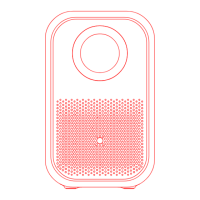
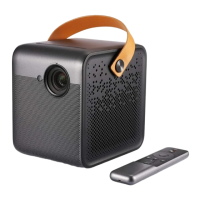
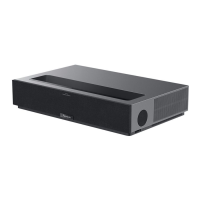
The Formovie X5 4K Laser Projector is a sophisticated home entertainment device designed to deliver a high-quality visual experience. This projector utilizes advanced laser technology to produce stunning 4K resolution images, making it suitable for a wide range of applications, from movie nights to presentations. Its design emphasizes both aesthetic appeal and functional efficiency, ensuring a seamless user experience.
Function Description
The Formovie X5 serves as a primary display unit, projecting images onto a screen or wall with exceptional clarity and brightness. At its core, the projector features a powerful laser light source, which is responsible for generating the vibrant and detailed 4K images. The device is equipped with multiple input ports, allowing for connectivity with various external devices such as media players, gaming consoles, and computers. These ports include LAN, headphone, USB, HDMI1 eARC, HDMI2, and S/PDIF, providing comprehensive options for audio and video input and output.
The projector incorporates a smart assist sensor and a far-field voice hole, enabling intelligent features such as automatic image adjustments and voice control. The on/off button is conveniently located for easy power management. For audio, the device includes integrated speaker holes, and for enhanced cooling, it features heat dissipation holes. The projector can be placed on a flat surface using its foot mats or mounted using the hanging screw holes, offering flexibility in installation. A support screw hole is also available for additional mounting options.
Usage Features
The Formovie X5 is designed for ease of use, offering several features that enhance the user experience.
Image Focus: The projector provides multiple methods for achieving optimal image focus.
- Method 1 (Automatic Focus): After the projector is moved, it automatically adjusts the image focus, simplifying setup.
- Method 2 (Manual Fine Adjustment): Users can access the system settings via the remote controller, navigate to "Common Use," and select "Image focus" to trigger auto-focus. Following the automatic adjustment, the left and right buttons on the remote can be used for fine-tuning the focus, ensuring a perfectly sharp image.
- Method 3 (Quick Access): A long press on the Launchpad button on the remote controller allows for quick entry into the image focus interface, providing a fast way to make adjustments.
Keystone Correction: To ensure a perfectly rectangular image, even when the projector is not perfectly aligned with the screen, the Formovie X5 offers keystone correction.
- Method 1 (Automatic Adjustment): Similar to focus, the projector automatically adjusts the image to a square shape after being moved, correcting any distortion.
- Method 2 (Manual Adjustment): By pressing the Launchpad Key on the remote, users can access the "Setting" menu, then select "Common" > "Manual Keystone Correction." The direction keys can be used to directly adjust the image, and the OK button switches control points for precise manipulation. The Menu key allows for resetting the image to its original state.
Remote Controller: The included remote controller is central to operating the projector. It features a power button for turning the device on/off and accessing the power-off menu. A voice button enables voice control when pressed and held. The Launchpad button serves dual functions: a short press brings up the setting menu, while a long press enters the fast focus interface. Navigation buttons (up, down, left, right) and a center button facilitate menu navigation and selection. A home button returns to the main page, and a back button allows users to return to the previous menu. The menu key opens the current application's setting menu. Volume keys adjust the audio output. For initial setup, the remote controller can be paired by pressing and holding the Home and Menu buttons simultaneously while close to the projector (within 20cm).
Connectivity: The variety of ports ensures broad compatibility. HDMI ports are ideal for high-definition video sources, while the USB port allows for direct media playback. The LAN port provides wired network connectivity, and the headphone jack offers a private listening experience. The S/PDIF port supports digital audio output for connection to external sound systems.
Safety Features: The projector includes several safety markings and instructions to ensure safe operation. These include warnings for electric shock, high temperatures, and the necessity of grounding. It also provides instructions for safe transport and handling of the laser light source. The product is a Class 1 laser product, but contains Class 4 lasers internally, emphasizing that only authorized personnel should service it.
Maintenance Features
Maintaining the Formovie X5 involves adhering to specific guidelines to ensure its longevity and optimal performance.
Environmental Considerations:
- Ventilation: It is crucial not to place any objects within 20cm of the projector's heat dissipation holes and air inlet to prevent overheating and maintain proper cooling. Blocking these areas can lead to heat buildup and potential fire hazards.
- Placement: The projector should be placed on a stable platform, stand, or desktop to prevent it from falling and causing damage or injury. It should not be placed in poorly ventilated or confined spaces, near strong magnetic fields, in direct sunlight, near fire alarms, or in environments with extreme heat, cold, or humidity.
- Moisture: The product should not be exposed to rain or moisture, and its working environment humidity should be between 21% and 81%. If any liquid or solid object enters the enclosure, the device should be unplugged immediately and inspected by a professional service technician.
Battery Handling (Remote Controller):
- Replacement: When replacing batteries in the remote controller, attention must be paid to the positive and negative poles. Only manufacturer-approved batteries should be used, as incorrect models can pose an explosion or fire risk.
- Disposal: Used batteries must be disposed of according to local regulations and instructions, not in household garbage.
- Safety: Batteries should not be exposed to extremely high temperatures (sunlight, fire, microwave, oven) to prevent explosion or leakage. They should not be disassembled, impacted, crushed, cut, or pried with sharp objects. Batteries should also not be subjected to extremely low air pressure. If a battery appears swollen, it should not be used. Batteries should not be swallowed, and medical assistance should be sought immediately if ingestion is suspected. The battery compartment must be securely closed, and batteries should be kept away from children.
Troubleshooting: The manual provides a troubleshooting guide for common issues:
- Failure to display image, system crashes, abnormal image display: The recommended solution is to turn off the power, unplug the power cord, then re-plug and restart the system.
- Remote controller issues (lost or not paired): Turn off the power, unplug the power cord, wait 5 minutes, then re-plug and restart. Re-pair the remote controller after the system starts.
- System shuts down due to high temperature: Remove any obstacles from the air inlet and outlet to ensure smooth airflow, then restart the system.
- Other faults: Contact maintenance personnel for on-site repair or send the projector for after-sale service.
Hazardous Substances: The product includes a table detailing the names and contents of hazardous substances, indicating compliance with environmental standards. This information is provided to inform users about the materials used in the product and to encourage responsible disposal at the end of its life cycle. The EFUP (Environmental Friendly Use Period) is indicated by a number in a circle, and users are encouraged to comply with national laws for recycling waste electrical and electronic products.
The Formovie X5 4K Laser Projector is designed to be a reliable and user-friendly device, with comprehensive instructions for both operation and maintenance to ensure a long and safe service life.



 To Next Page
 General