8
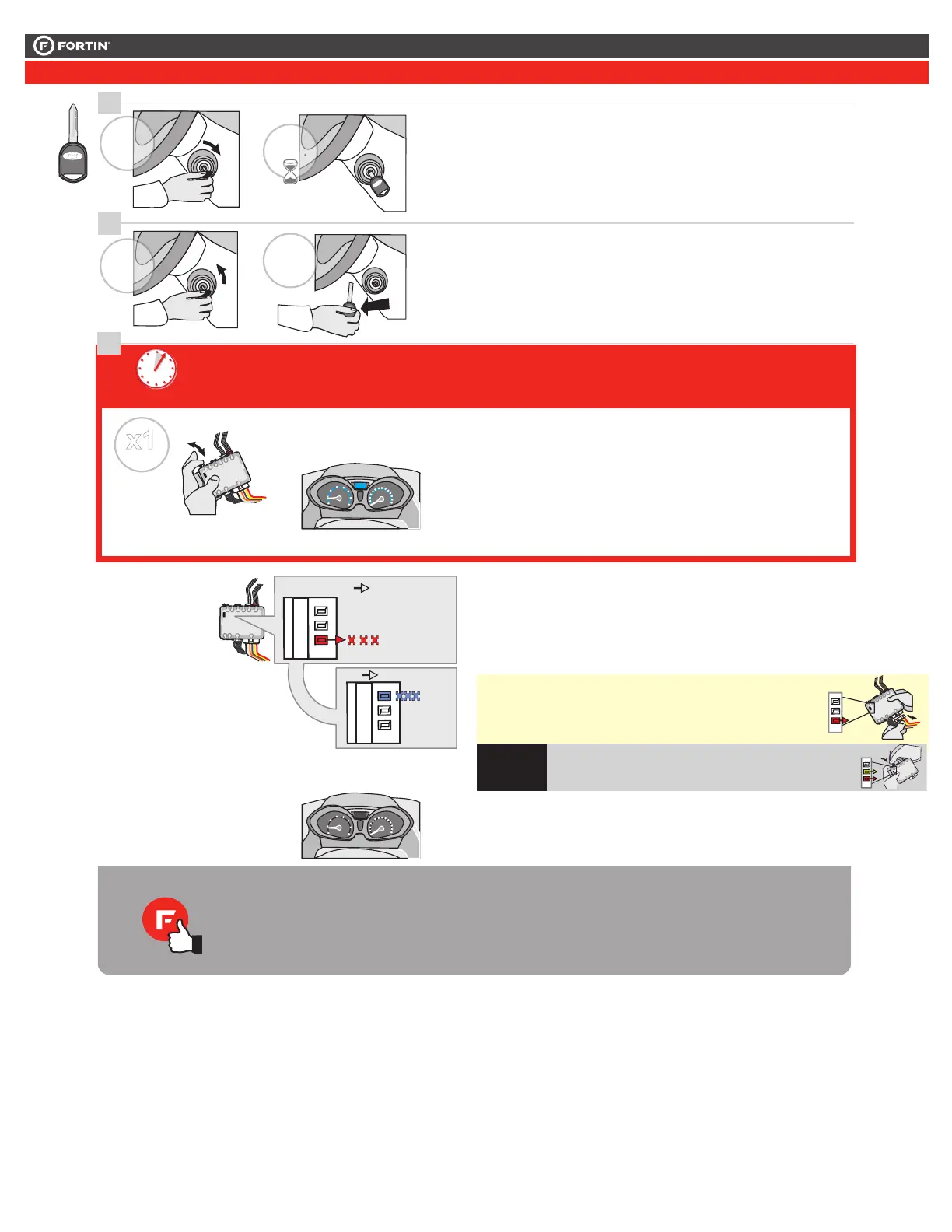
Press and release the
programming button.
The vehicle ignition turn
ON.
Pesez et relâchez
le bouton de
programmation.
L'ignition du véhicule
s'allume.
Ignition ON
The RED LED will flash
rapidly 10x times.
The BLUE LED will flash
rapidly.
Key bypass programmed.
CAN-Bus programmed.
La DEL ROUGE clignotera
10x fois rapidement.
La DEL BLEU clignotera
rapidement:
Contournement de clé
programmé.
Réseau CAN programmé.
6
7
5 sec. max
CAUTION The following step must
be completed within 5 seconds.
Otherwise disconnect all connectors
and go back to step 1.
ATTENTION
5 secondes.
débranchez allez
les prochaines étapes doivent être
complétées en moinsde
Si non, tous les connecteurs et
àl'étape 1.
x1
PRESS
Wait 3 seconds. Attendre 3 secondes.
The module is now
programmed.
Le module est
programmé.
Use the remote of the remote
starter or security system to test
all of the supported features to
ensure proper programming.
Testez toutes les fonctions
supportées sur le véhicule avec la
télécommande du démarreur à
distance ou du système de sécurité.
The vehicle ignition will
turn OFF.
L'ignition du véhicule
s'éteins.
Ignition OFF
WITH
T-HARNESS
AVEC
HARNAIS EN T
If the LED is solid RED
disconnect the 4 Pin
connector (Data-Link)
and go back to step 1.
Si le DEL est ROUGE
solide débranchez le
connecteur 4 pins
(Data-Link) et allez
à l'étape 1.
A
E
F
G
J
I
H
B
C
D
A
E
F
G
J
I
H
B
C
D
A
E
F
G
J
I
H
B
C
D
FLASH 10X
IGNITIONON
FLASH 10X
FLASH
If the LED is solid RED
disconnect the 4 Pin
connector (Data-Link) and go
back to step 1.
Si le DEL est ROUGE solide
débranchez le connecteur 4
pins (Data-Link) et allez à
l'étape 1.
A
E
F
G
J
I
H
B
C
D
L
O
CK
AC
CON
PUSH
START
IG
N
KEY#2
CLÉ#2
L
OCK
ACC O
N
STAR
T
IGN
ON
.
TURN
ON/RUN
WAIT
3 SEC
LO
C
K
ACCO N
P
U
S
H
START
OFF
LO
C
K
AC
C
O
N
STA
RT
P
U
SHP
U
SH
F
TURN
OF
REMOVE
KEY
Tournez la deuxième
clé fonctionelle à Ignition.
Turn the second functional
key to the Ignition ON/RUN
position.
Turn
Remove
the key to the OFF
position.
the second key.
Tournez
Retirez
la clé à la
position Arrêt (OFF)
la deuxième clé
du barillet d'alimentation.
5-Prog.4-4-RTO
This guide may change without notice. See www.fortin.ca for latest version.
Ce guide peut faire l’objet de changement sans préavis. Voir www.fortin.ca pour la récente version.
KEY BYPASS PROGRAMMING PROCEDURE 2/2
|
PROCÉDURE DE PROGRAMMATION CONTOURNEMENT DE CLÉ 2/2
Page 7 / 12





 To Next Page