
 Need help?
Do you have a question about the Fortinet FortiSwitch-124D-POE and is the answer not in the manual?
Details configuring management ports via web-based manager and CLI.
Covers RADIUS user group and switch interface configuration for 802.1x.
Details configuring Link Aggregation Control Protocol (LACP) trunks/LAGs.
Details creating access profiles for admin accounts via GUI and CLI.
Guides on setting up TACACS remote administrator accounts using GUI.
Shows the CLI command to enable Power over Ethernet (PoE) on a port.
 General
| Model | FortiSwitch-124D-POE |
|---|---|
| Category | Switch |
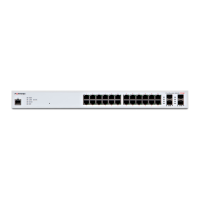
| Total Ports | 24 |
| PoE Ports | 24 |
| Port Type | 10/100/1000BASE-T |
| SFP Uplink Ports | 4 |
| PoE Budget | 370 W |
| Switching Capacity | 56 Gbps |
| Forwarding Rate | 41.7 Mpps |
| Power Supply | Internal |
| AC Input Voltage | 100-240 VAC |
| Operating Temperature | 0°C to 40°C (32°F to 104°F) |
| Management | Web-based GUI, CLI, SNMP |
| Layer | Layer 2 |
| Jumbo Frame Support | Yes |
| VLAN Support | Yes |
| Dimensions (W x D x H) | 440 x 44 mm |
| Security Features | 802.1X |
| Standards Compliance | IEEE 802.3, 802.3u, 802.3ab, 802.3x |
| Form Factor | Rackmount |
| Humidity | 10% to 90% (non-condensing) |
| MAC Address Table Size | 16, 000 |



 To Next Page