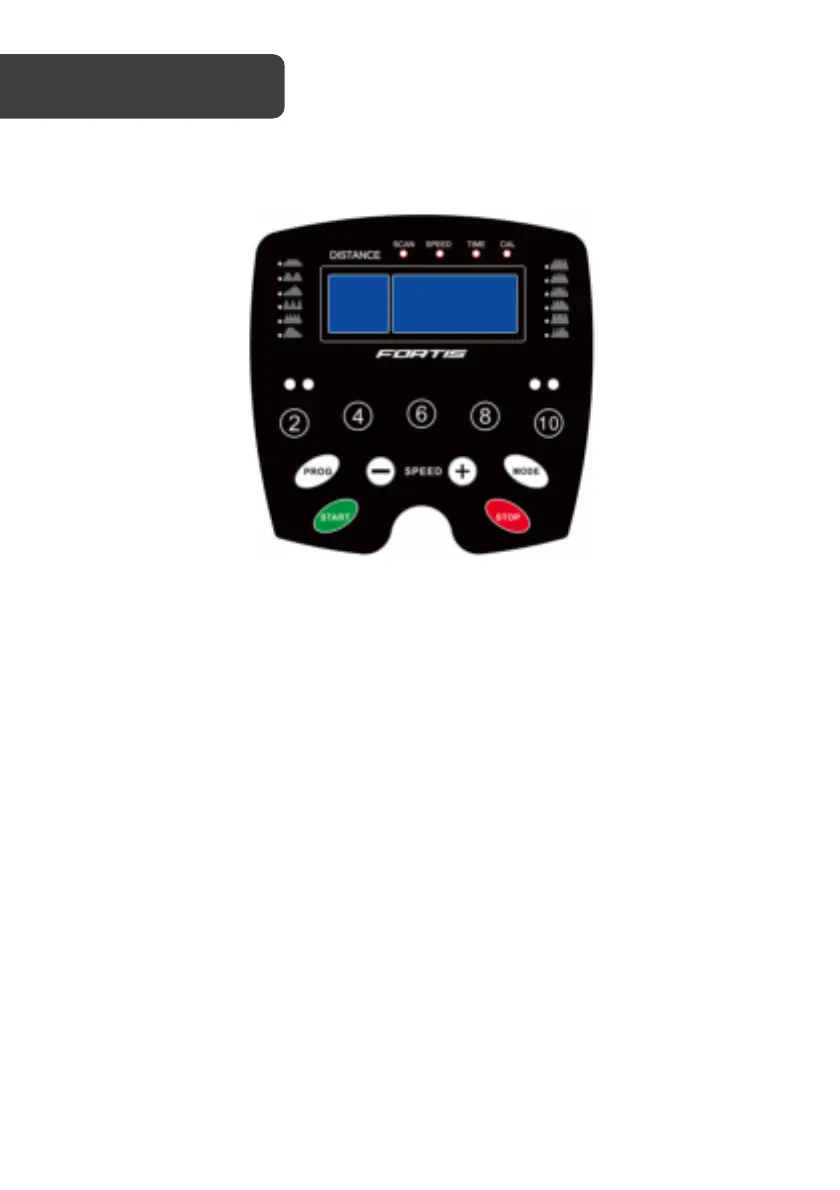
Control Panel
1. Press “START”, the machine will start at 0.8km/h after 3 seconds.
2. Press "+" key to speed up and "-" key to slow down. The fastest speed is 10.5km/h
and lowest is 0.8km/h.
3. Press the "mode" key, to cycle between the different functions in the following
order: Speed, Time, Calorie, and Scan. When "scan" is selected the screen will
automatically move between Distance, Time and Calories every 5 seconds.
4. The treadmill has 12 inbuilt programs. To select a program, ensure that the
treadmill is in standby with the belt stationary. Press the "PROG" button to select
the desired program then press “START” to start the machine.
5. For emergency stop, please pull-out safety key. The machine will stop very slowly.
Pull out safety key and the screen will show “Err”, put on it will show ‘OFF”.
6. Press "STOP" key to stop the machine after using.


 To Next Page