Operating instructions in manual normal mode
1. Place the treadmill horizontally on the ground.
2. Tu m o n t h e p o w e r, t u r n o n t h e p o w e r s w i t c h . T h e p o w e r s w i t c h i n d i c a t o r l i g h t s u p
and the buzzer will sound once.
3. Check the screen to see if there is any abnormality in the data. Stand on the non-
slip edge strip before clicking to prevent accidental fall.
4. Press the start button on the remote control, the electronic watch window will
display: 3 - 2 - 1 with buzzer sound and then the motor will start.
5. The starting speed is: 0.8km/h. You can press the speed +, - keys to adjust the
speed and select the appropriate speed for your needs.
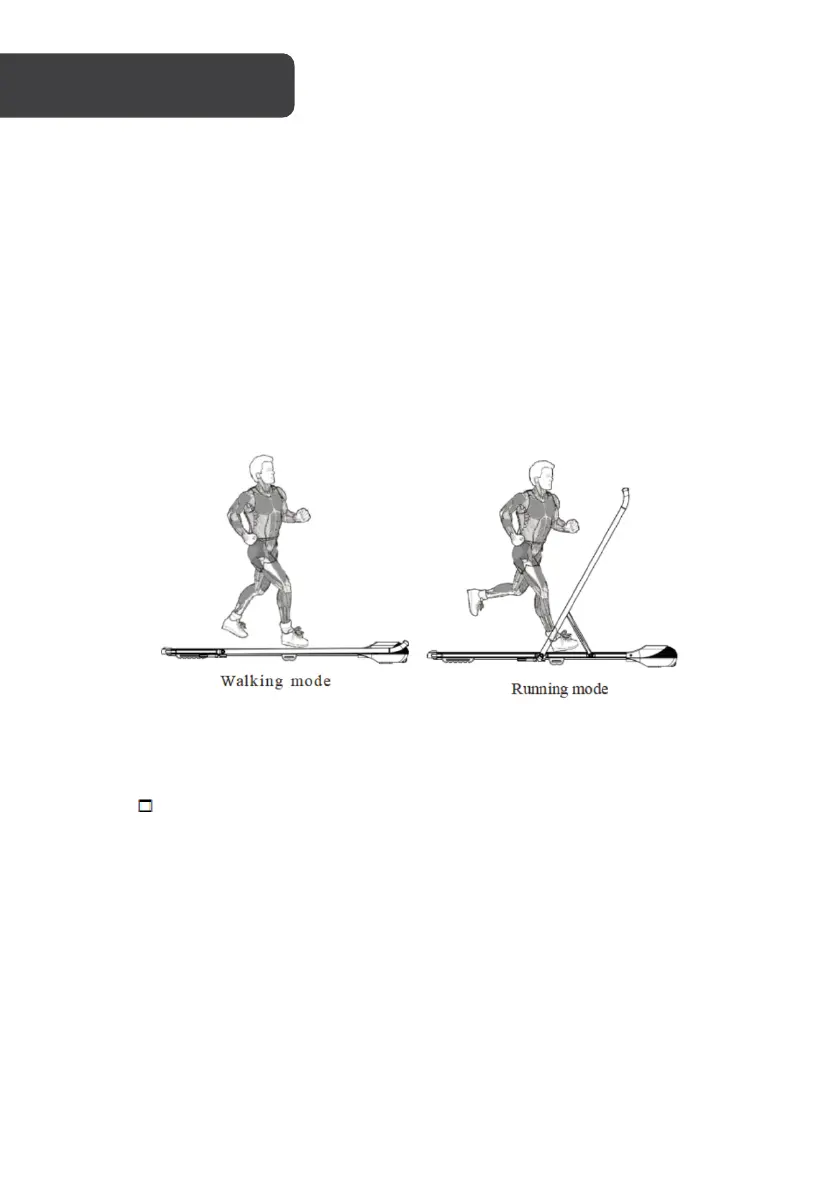
6. When the handle bar is folded, the walker will function at a speed range of 0.8-
6.0km/h.
7. Expand the column for treadmill mode, speed range: 0.8-8.8km/h.
Remote Button Function
1. " " is start/stop button: This button can be used to stop the treadmill from
running state and reset to zero during exercise. Use this button also as the start
button when the power is on and the safety lock in its position.
2. "+" is speed increasing button: Adjust the speed after the treadmill starts, its
adjustment range is 0.1km/time and it continues to increase when it is held for
more than 1 second.
3. "-" is speed decreasing button: Adjust the speed after the treadmill starts, the
adjustment range is 0.1km/time and continue to decrease when it is held for more
than 1 second.


 To Next Page