10
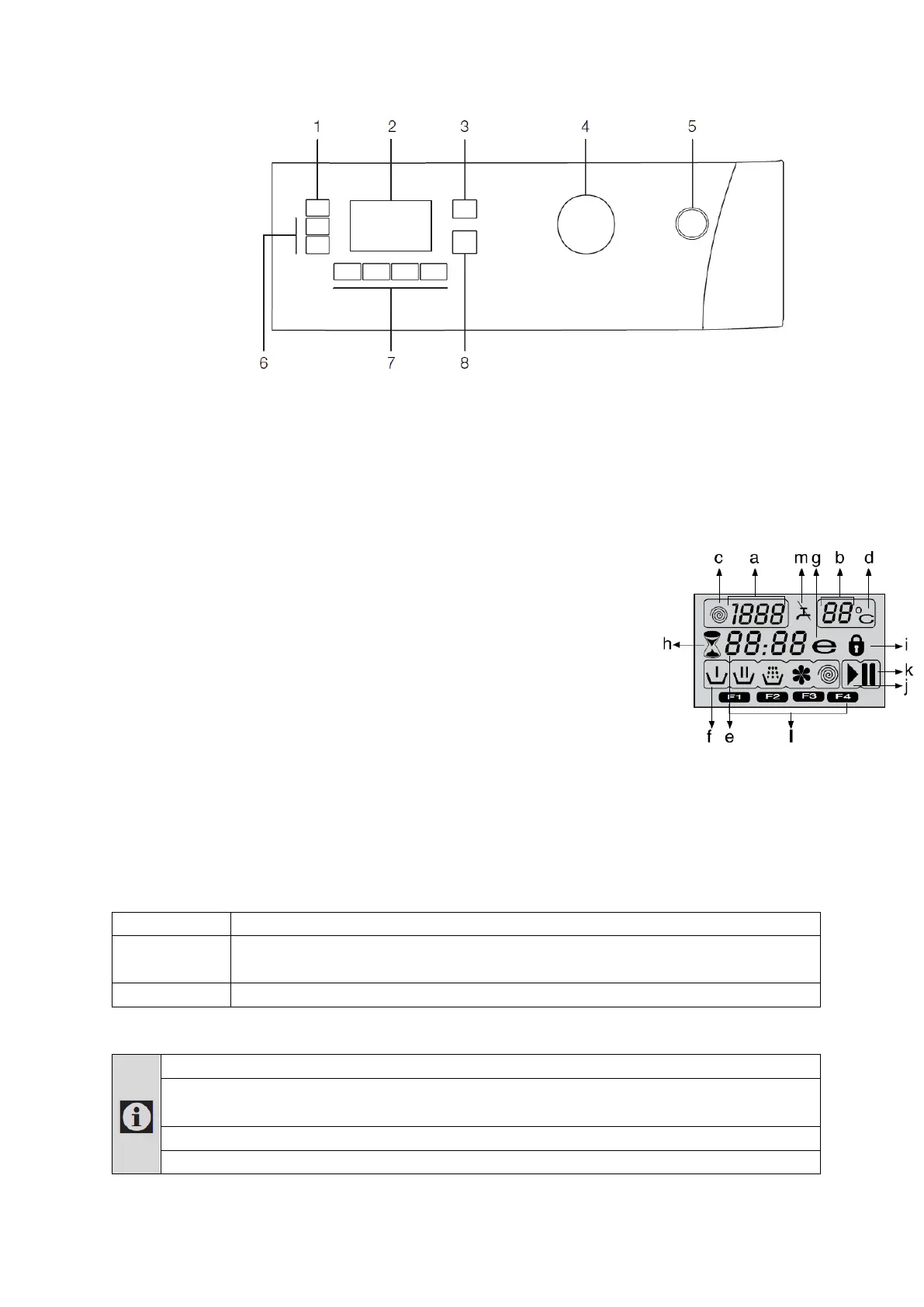
Control panel
1. Spin button
2. Display
3. Temperature button
4. Programme Selection knob
5. On / Off button
6. Time Delay buttons (+ / -)
7. Auxiliary Function buttons
8. Start / Pause button
Display symbols
Preparing the appliance
Make sure that the hoses are connected tightly. Plug in the washer. Turn the tap on completely. Place the
laundry in the washer. Add detergent and fabric softener.
Programme selection
Select the suitable programme base on the type, quantity and soiling degree of the laundry in accordance with
the "Programme table" and the temperature table below.
Heavily soiled white cottons and linens. ( tableclothes, towels, bed sheets, etc.)
Normally soiled, coloured, fade proof linens, cottons or synthetic clothes (shirt, nightgown,
etc.) and lightly soiled white linens (underwear, etc.)
Blended laundry including delicate textile (veil curtains, etc.), synthetics and wools.
Select the desired programme with the Programme Selection knob.
Programmes are limited with the highest spin speed appropriate for that particular type of fabric.
When selecting a programme, always consider the type of fabric, colour, degree of soiling and
permissible water temperature.
Always select the lowest required temperature. Higher temperature means higher power consumption.
For further programme details, see "Programme table"
a) Spin Speed indicator
b) Temperature indicator
c) Spin symbol
d) Temperature symbol
e) Remaining Time and Time Delay
indicator
f) Programme Indicator
(Prewash / Main Wash / Rinse /
Softener / Spin)
g) Economy symbol
h) Time Delay symbol
i) Door Locked symbol
j) Start symbol
k) Pause symbol
l) Auxiliary Function symbols
(F1-Prewash/F2-Quick Wash/
F3-Rinse Plus/F4-Anti-creasing)
m) No Water symbol



 To Next Page
 Loading...