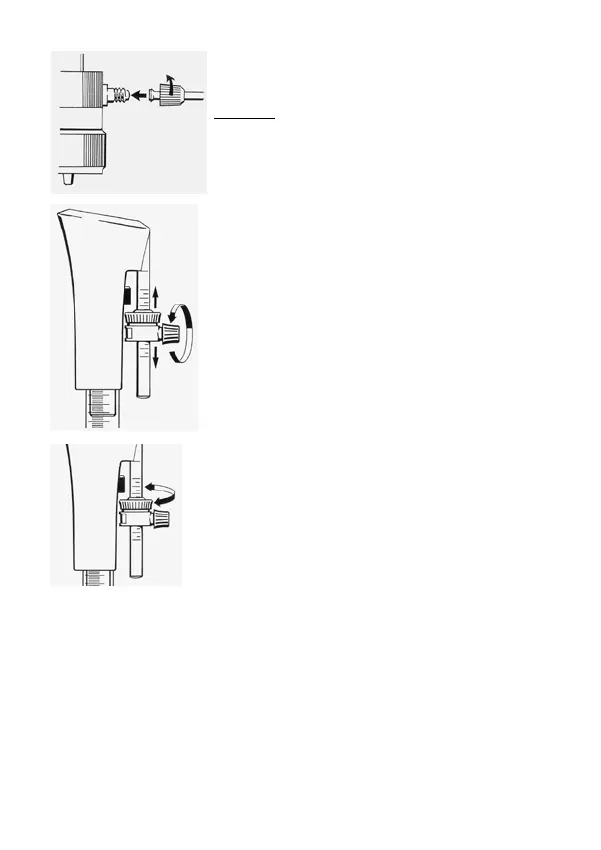
Screw the discharge tube set onto the thread adaptor
of the PTFE valve block. Remove stopper cap from the
discharge tube.
Warning:
If the stopper cap is not removed when dispensing,
there may be an overpressure in the channel system
and uncontrolled dispensing may be the result.
To ll the dispenser the rst time lift and lower piston a
short distance several times until no air bubbles are seen
in the cylinder. Model HF: Because of the PTFE-cylinder
there are no graduations on the cylinder. (Note: - blee-
ding air from the system with return of all liquid direct to
the reservoir is possible with the 'LOOP' system)
2. Volume setting
Loosen the nut of the volume setting system, set the
desired volume. The upper edge of the ne adjustment
screw shows the volume set. Fix the screw.
For calibrating purposes turn the screw of the ne
adjustment. Turn downwards to increase the volume,
turn upwards to decrease the volume.
3. Dispensing procedure
a) For safety make sure that the discharge tube does not point at the user or any
other person. By using the built-in FIX adapter it is possible to t the dispenser as re-
quired.Remove stopper cap by holding the discharge tube tight with other hand.
b) Set the desired volume with the volume setting system.
c) Lift the dispensing piston up with the nger guard. Do not touch the piston itself to
avoid any unlikely contact with chemicals. The piston stops at the volume set. The
graduation on the glass cylinder is an additional optical control of the volume set or
air-bubbles. There is no graduation on the PTFE-cylinder of the model HF.
16



 To Next Page