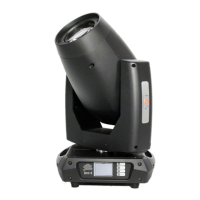
The FOS CYCLONE PRO D2 LED Strobe Wash Outdoor Moving Light is a versatile and robust lighting fixture designed for professional use in various environments. This product manual provides essential information for its safe installation, operation, and maintenance, ensuring optimal performance and longevity.
Function Description
The FOS CYCLONE PRO D2 is an LED strobe wash moving light, combining the capabilities of a powerful strobe and a dynamic wash fixture. It is designed for outdoor use, boasting an IP65 rating, which signifies its protection against dust and low-pressure water jets from any direction. This makes it suitable for events and installations where exposure to the elements is a factor. The fixture features both strobe panel LEDs and strobe tube LEDs, allowing for a wide range of lighting effects. Its moving light functionality enables dynamic positioning and beam direction, enhancing its versatility in various lighting designs. The device can be controlled via DMX, offering comprehensive control over its functions and effects. Additionally, it supports master/slave configurations and stand-alone operation with pre-programmed modes, providing flexibility for different setup requirements.
Usage Features
The FOS CYCLONE PRO D2 offers a range of features designed for ease of use and flexibility in lighting applications:
- Control Panel and LCD Display: The fixture is configured using a control panel and an LCD display located on the arm side. This interface allows users to navigate menus, select options using arrow buttons, and confirm selections with the Enter button. After powering on, the display shows the currently selected operating mode and other relevant information.
- DMX Control: The fixture is primarily designed for DMX control, allowing integration into larger lighting systems. It supports various DMX channel modes (7CH, 14CH, 15CH, 42CH, 43CH), providing different levels of control over its functions. Users can set the DMX start address and select the desired DMX channel mode through the control panel. The DMX connection uses 3-pin XLR connectors, with specific pin assignments for ground, negative signal, and positive signal. For outdoor installations, IP-rated XLR connectors are recommended.
- Master/Slave Configuration: For simpler setups or synchronized effects across multiple fixtures, the FOS CYCLONE PRO D2 can be configured in a master/slave arrangement. One fixture can be set as the master, and other fixtures of the same type can be set as slaves, mimicking the master's settings. This is particularly useful for achieving coordinated lighting displays without individual DMX programming for each unit.
- Stand-Alone Operation: When a DMX controller is not available or desired, the fixture can operate in stand-alone mode. It comes with two pre-programmed modes: "Auto Color" and "Auto Fade." These modes play continuously in a loop, and their run speeds are adjustable. This feature allows for quick deployment and basic lighting effects without complex external control.
- Static Color Setting: Users can manually configure the fixture to display a predefined and static color. This is achieved through the "Manual Color" menu, offering a convenient way to achieve specific color mixes without a DMX controller.
- Installation Flexibility: The fixture can be installed in any orientation. However, for horizontal installations with a downward beam angle, it is advised to consider a rain shield or adjust the position to minimize water pooling in the fan wells, especially in areas with high rainfall. The fixture comes with two quarter-turn brackets for mounting at elevation, and a safety cable attachment point is provided for secure installation.
- AC Power Connection: The fixture operates on a wide range of AC mains power (100–240 V, 50/60 Hz). For permanent installations, a qualified electrician should wire the mains cable to a suitable branch circuit with an appropriate IP-rated junction. For temporary setups, the mains cable can be fitted with a grounded connector suitable for exterior use. The manual specifies the number of fixtures that can be connected to standard type C circuit breakers (10A and 16A) to prevent overload.
- Internal Effects: The fixture includes internal effects such as electronic dimmer (0-100%), electronic shutter (max. 20 Hz), and LED macro effects, providing built-in options for dynamic lighting.
- Overheating Protection: The cooling system is temperature-controlled and includes overheating protection, ensuring safe and reliable operation even during extended use.
Maintenance Features
To ensure the FOS CYCLONE PRO D2 maintains optimal performance and a long lifespan, regular maintenance is crucial:
- Regular Cleaning: The manual emphasizes the importance of regular cleaning. The frequency of cleaning will depend on the operating environment. Users are advised to check the fixture at frequent intervals during the first few weeks of operation to determine the necessary cleaning schedule for their specific situation.
- Cleaning Procedure: When cleaning, a soft cloth dampened with a solution of water and a mild detergent should be used. It is critical to avoid products containing solvents, abrasives, or caustic agents, as these can damage the fixture's hardware, cables, and connectors.
- Pre-Operation Inspection: Before operation, users should unpack and inspect the fixture for any damage incurred during transport.
- On-Board Test: After connecting the fixture to power, an on-board test can be run using the "Fixture Test" menu. This test verifies that the fixture and each LED are functioning correctly, helping to identify any issues before full operation.
- Safety Precautions: The manual outlines several safety precautions that also contribute to maintenance and longevity. These include always powering off/unplugging the fixture before removing covers, ensuring proper grounding, and not applying power if the fixture is damaged. These measures prevent electrical shock and potential damage to the unit.
- Environmental Considerations: The IP65 rating means the fixture is protected from dust and water jets, reducing the need for extensive internal cleaning due to environmental ingress. However, avoiding immersion in water or exposure to high-pressure water jets is still important to maintain its integrity.
- Ventilation: Ensuring adequate ventilation around the fixture is crucial for its cooling system. A minimum clearance of 0.1 m (4 in.) around the cooling fans must be maintained. This prevents overheating, which can lead to premature component failure.
- No Unauthorized Modifications: Users are explicitly warned not to paint, cover, or modify the fixture, as such actions can impair its performance, safety features, and potentially void warranties. Opening the fixture to replace the supplied power cable or connecting it to an electrical dimmer system is also prohibited, as it can cause damage.

 Need help?
 General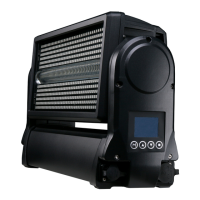

 To Next Page