EasyManua.ls Logo

Foscam G2EP - User Manual

Foscam G2EP
11 pages
Print Icon
To Next Page IconTo Next Page
Loading...
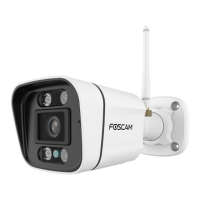
Outdoor Security Camera
G2EP
User’s guide
Question and Answer IconNeed help?

Do you have a question about the Foscam G2EP and is the answer not in the manual?

Summary

Package Contents

Security Tips

Physical Description

Setting Up Your Camera: Connection via the Foscam App

Wired Connection

Other Ways to Access Your Camera

Foscam VMS

Introduces Foscam VMS, a PC tool for managing multiple cameras, compatible with Windows & Mac.

Add the IP Camera

Instructions on adding an IP camera to Foscam VMS, including account creation and setup wizard.

Foscam Cloud Service

Hardware Installation

Important Notice

Camera Username & Password

Manages camera access and security; reset procedure for forgotten credentials.

Foscam Cloud Service Account Username & Password

Account details for Foscam App and Cloud Service, can be registered on either.

Storage Media

Details supported storage formats like cloud, NVR, and Micro SD card (FAT-32).

Firmware Upgrade

Guides on upgrading camera firmware using the Foscam App or official website.

Safety Tips

Product Performance

Technical Support

Warranty Conditions

EU Declaration of Conformity

WEEE

Summary

Package Contents

Security Tips

Physical Description

Setting Up Your Camera: Connection via the Foscam App

Wired Connection

Other Ways to Access Your Camera

Foscam VMS

Introduces Foscam VMS, a PC tool for managing multiple cameras, compatible with Windows & Mac.

Add the IP Camera

Instructions on adding an IP camera to Foscam VMS, including account creation and setup wizard.

Foscam Cloud Service

Hardware Installation

Important Notice

Camera Username & Password

Manages camera access and security; reset procedure for forgotten credentials.

Foscam Cloud Service Account Username & Password

Account details for Foscam App and Cloud Service, can be registered on either.

Storage Media

Details supported storage formats like cloud, NVR, and Micro SD card (FAT-32).

Firmware Upgrade

Guides on upgrading camera firmware using the Foscam App or official website.

Safety Tips

Product Performance

Technical Support

Warranty Conditions

EU Declaration of Conformity

WEEE

Foscam G2EP Specifications

General IconGeneral
TypeIP security camera
Placement supportedOutdoor
Connectivity technology-
Card reader integratedYes
Compatible memory cardsMicroSD (TransFlash)
Maximum memory card size128 GB
Form factorBullet
Mounting typeWall
Product colorWhite
Minimum illumination- lx
Power source typeDC
Mobile operating systems supportedAndroid, iOS
LED typeIR
Night vision distance20 m
Total megapixels2 MP
Maximum resolution1920 x 1080 pixels
Sensor typeCMOS
Alert notification typeText alert message
Number of cameras1

Related product manuals