Need help?
Do you have a question about the Foss Kjeltec 8100 and is the answer not in the manual?
Routine cleaning of the steam generator system as part of regular maintenance.
Cleaning of components related to sample handling and safety.
Cleaning the tube adapter for optimal performance.
Cleaning up any liquid spills to maintain instrument cleanliness.
Ensuring sample racks are in good condition and properly placed.
Verification of the instrument's safety features.
Checking the status and levels of reagent tanks.
Inspection of digestion tubes for wear or damage.
Cleaning the alkali pump to ensure proper function.
Cleaning the splash head to prevent buildup.
Cleaning the system for dispensing receiver solution.
Checking the tube adapter for proper fit and condition.
Cleaning the steam generator for efficient operation.
Scheduled service by FOSS for preventive maintenance.
Overview of menu options and corresponding control keys for operation.
Explanation of icons indicating system status, notices, and errors.
Actions for preparing samples and checking instrument readiness.
Steps for selecting a program and starting the analysis process.
How to view progress during analysis and perform maintenance afterwards.
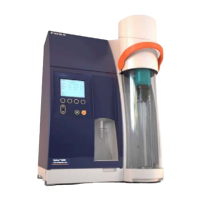
The Kjeltec™ 8100/8200 Distillation Unit is an advanced laboratory instrument designed for efficient and precise distillation, primarily used in Kjeldahl analysis for nitrogen and protein determination. This Quick Guide, version 6006 3343 / Rev. 3, provides essential information for its operation and maintenance.
The Kjeltec™ 8100/8200 unit automates the distillation step in the Kjeldahl method, which involves separating ammonia from a digested sample. The instrument ensures accurate and reproducible results by controlling key parameters such as steam generation, alkali addition, and receiver solution dispensing. It is designed to handle various sample types and volumes, making it a versatile tool for analytical laboratories in food, feed, agriculture, and environmental sectors. The unit's core function is to distill the ammonia from the digested sample into a receiver flask containing an acid solution, preparing it for subsequent titration.
The Kjeltec™ 8100/8200 features a user-friendly interface with a menu-driven system and display icons for intuitive operation. The main menu labels include "Analyse," "History," "Settings," and "Manual," each providing access to specific functions.
Navigation and analysis keys include "Up," "Down," "Start," and "Stop," facilitating easy interaction with the instrument. The display also features status and event icons, including "Notice," "Warning," "Canceled," and "Error," to keep the user informed about the instrument's operational status and any potential issues.
The workflow for an analysis is straightforward:
Regular maintenance is crucial for ensuring the longevity and optimal performance of the Kjeltec™ 8100/8200 Distillation Unit. The manual outlines a comprehensive maintenance schedule with daily, weekly, monthly, and yearly tasks, as well as additional maintenance as needed. FOSS offers FossCare support plans, which include regular preventive maintenance by certified engineers, providing a convenient way to ensure the instrument remains in top condition.
The maintenance intervals are categorized as follows:
Daily (D):
Weekly (W):
Every 1-3 Months (1-3 M):
Additional Maintenance (Add.): These tasks are performed as needed, often in response to specific issues or after a certain number of analyses.
Yearly (Y):
By adhering to this detailed maintenance schedule, users can maximize the lifespan of their Kjeltec™ 8100/8200 Distillation Unit, ensure consistent analytical accuracy, and minimize downtime.
 General
| Category | Laboratory Equipment |
|---|---|
| Method | Kjeldahl |
| Automation Level | Semi-automatic |
| Type | Distillation Unit |
| Application | Protein analysis |
| Reproducibility | ±1% RSD |
| Power Supply | 230 V, 50 Hz |
| Titration System | Automatic colorimetric |
| Cooling Water Consumption | 2 L/min |

 To Next Page