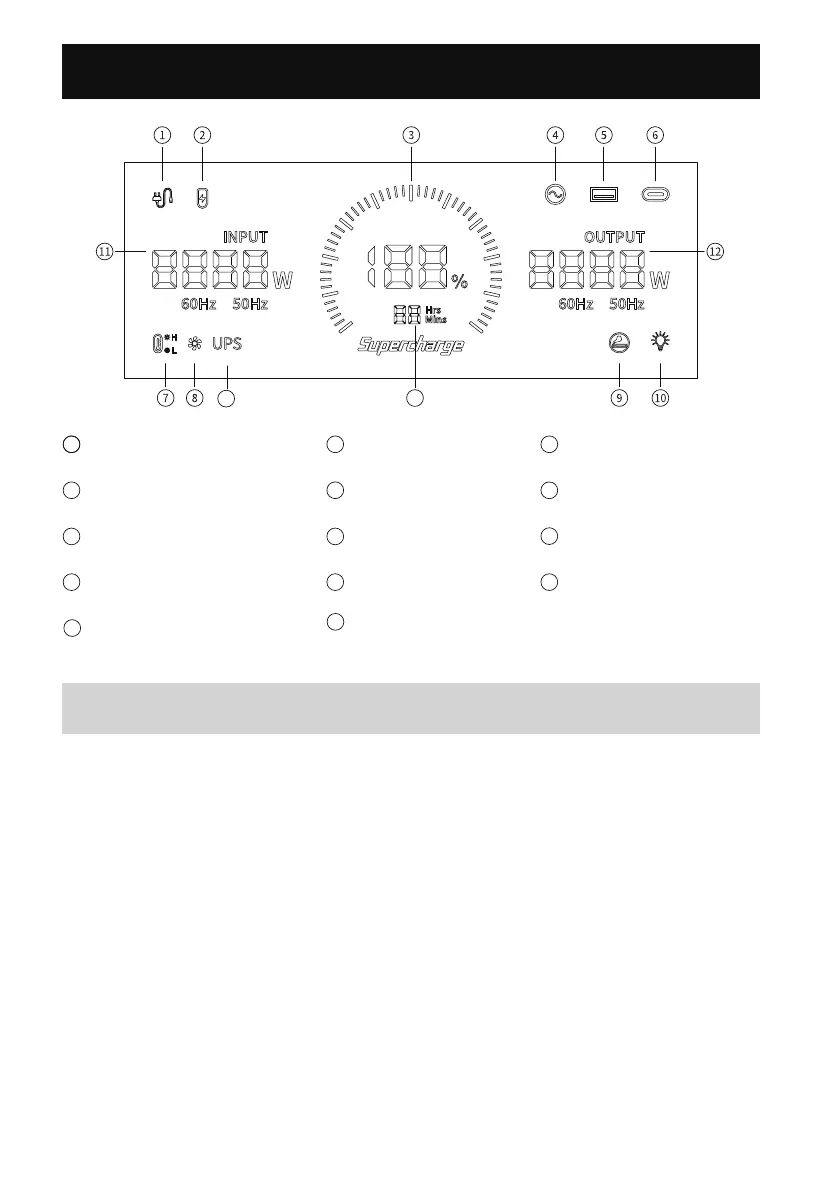
Introduction of Display Interface
5
Screen Display Description
Power display: When the product is in the charging state, the battery
progress bar rotates continuously in the form of a clockwise marquee,
and the battery level percentage gradually increases; when the product
battery level is 0, the battery level percentage icon flashes.
Input and output status: When the product is working, the total input
power, total output power and the cursor corresponding to the working
area will be displayed on the screen.
Alarm prompt: See the following troubleshooting sheet for details.
5
11
7
12
4
6
10
2
9
3
Battery Level Percentage
PD3.0 Output
Cigar Lighter (12V) Output
Output Power in Total
1
8
Connected to the AC Mains
AC Output
High/Low Temperature
Protection LED Light
Charge time/Using
XT60 Input
USB Output
Fan Status
Input Power in Total
UPS mode
Time
13
13
14
14


 To Next Page