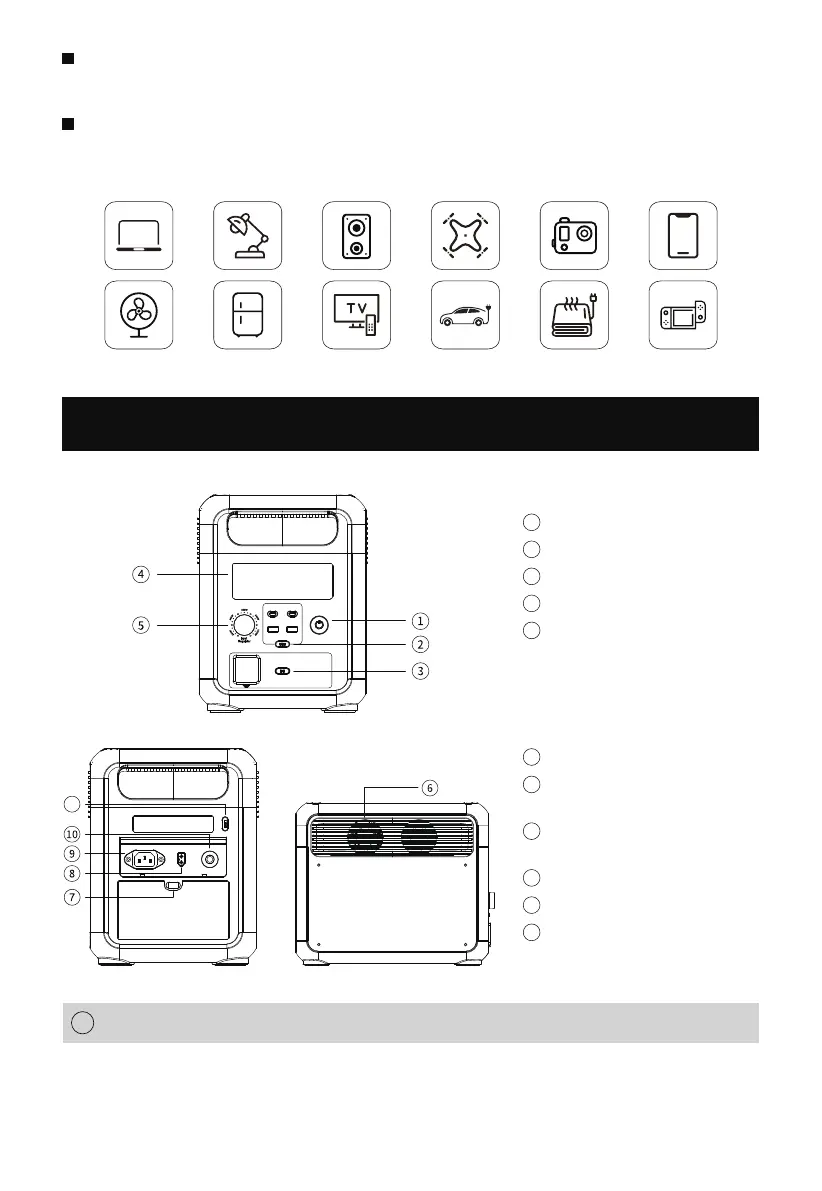
Power ON/OFF Button
1
Instructions: Press and hold the power button for 3S to wake up the
system, turn on the LCD display, and press and hold again for 3S to
turn it off.
2
Button Function Introduction
LED Light Button
(switch to different mode)
Solar Input Port
( for solar panel)
AC Input
Overload Protection Button
Cooling Air Duct
AC Switch
(manually switch to 50/60Hz)
In UPS mode, the switchover time is less than 10ms which is truly
seamless switching.
Multiple protection mechanisms such as battery, circuit, structure,
etc., guarantee the product safety.
1
2
3
4
Power ON/OFF Button
USB ON/OFF Button
DC ON/OFF Button
LCD Screen
Input Power Knob
7
8
9
6
10
11
5


 To Next Page