3
Cabinets & Counters with FD1-11 and FD1-14 Controller
Start-Up and Operation
Initial Set Up
After unpacking clean and allow the cabinet to stand for 2 hours before turning on.
Ensure the cabinet is situated where neither hot nor cold air sources will affect its performance. Make sure that
a minimum clearance of 310mm above and 50mm around the cabinet is available for ventilation and effective
operation.
Initial Start up
Connect the unit to a suitable mains power outlet and turn the supply on. Please do not plug or unplug the unit with
wet hands.
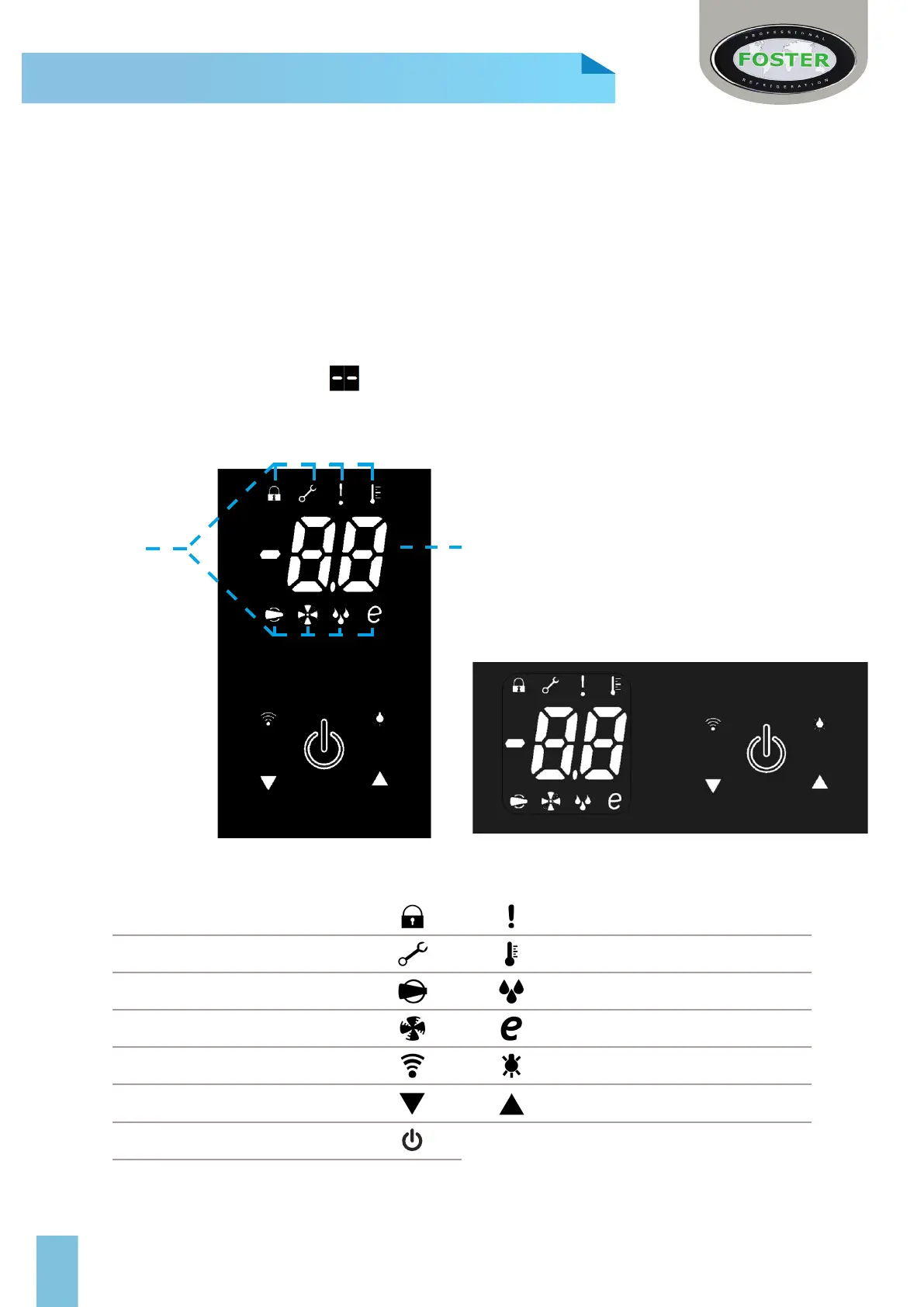
The cabinet will energise briey showing followed by the power switch slowly pulsing with a blank display. The
unit is now in standby.
(Some icons or switches are only visible during adjustment, when activated by parameters or through operation/
manual selection).
For all Reduced Width Counters please see controller
information on page 13.
Cabinet Version
Keypad Lock Warning/ Alarm
Service Mode Temperature Setting
Compressor Function Defrost Function
Evaporator Fan Function Reduced Energy Mode
Data Download Switch Light Switch
Decrease Switch Increase Switch
Power Switch
Counter Version
Function Icons
Temperature Display



 To Next Page