11
FMPRO & FMSLIM Multideck - User Manual
KG
Keypad Sounds
If the user does not require the keypad to indicate with a sound when a button is
pressed this can be turned o. Press and hold button 2 for 3 seconds until the display
shows ‘SP’. Press button 2 until the display shows ‘biP’. Press button 1 to display
the current value. ‘Yes’ indicates keypad sounds are active and ‘no’ indicates keypad
sounds are not active. Select the value required and press button 1 to save the new
value. If button 1 is not pressed the new value will not be stored. Exit with button 3.
Shelves, Supports, Loading and Air Flow
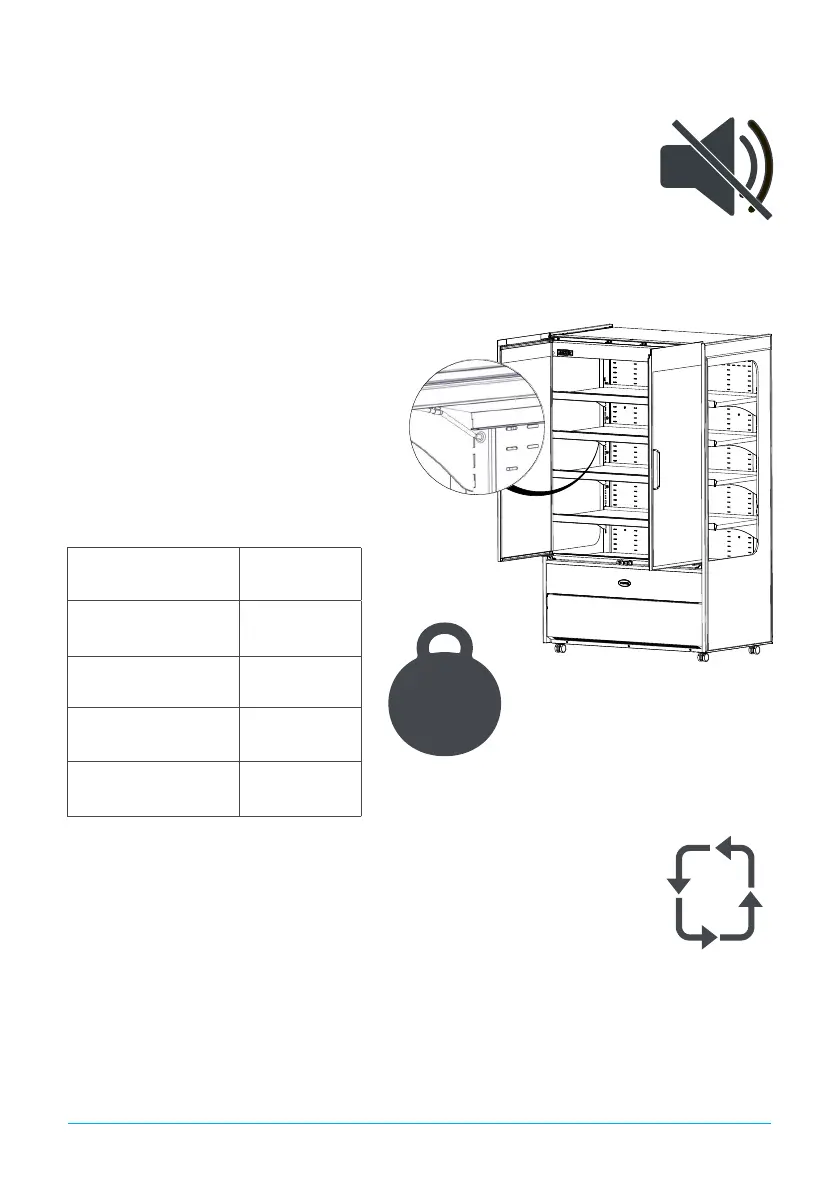
The appliance is supplied with adjustable,
removable trayslides and shelves. Each shelf is
secured at each end for transport in the location as
indicated below. These should be removed
prior to use.
Each shelf is capable of supporting the maximum
weight of product listed below when evenly
distributed.;
Do not block air vents with product. A minimum of 25mm should be maintained
between the top of the product and the shelf above.
Always ensure air can circulate around/through the stored product. It is important
that for optimum energy and temperature performance that adequate airow is
maintained around the perimeter of the shelves, and around all stored products.
FMPRO700NG /
FMSLIM700NG
50kg
FMPRO900NG /
FMSLIM900NG
65kg
FMPRO1200NG /
FMSLIM1200NG
90kg
FMPRO1500NG /
FMSLIM1500NG
110kg
FMPRO1800NG /
FMSLIM1800NG
135kg
Appliance Max weight per shelf



 To Next Page