EasyManua.ls Logo

Fostex 250 - Page 10

Fostex 250
28 pages
Print Icon
To Next Page IconTo Next Page
To Previous Page IconTo Previous Page
Loading...
this
instance).
The
object
at
this
point
is
to
record
on
only
one
track
ot
the
tape
at
a
time.
If
the
PAN
pot
is
set
in
some
mid
position,
part
of
the
signal
is
being
assigned
to
an
unused
buss,
which
serves
only
to
degrade
the
signal
-
to-noise
ratio
on
the
track
being
recorded
(part
of
the
signal
is
"wasted”).
In
some
cases
it
is
possible
one
could
hear
a
signal
in
the
headphones
(or
monitor
speakers),
even
though
that
signal
is
not
actually
being
recorded.
8.
Set
the
METER
function
switch
to
RECORDER
position
so
that
VU
METER
#
4
will
monitor
the
signal
level
from
input
channel
1
(as
assigned
to
record
buss
#
4).
NOTE:
In
order
to
adjust
the
TRIM
(LINE-MtC)
control,
it
will
be
necessary
to
provide
an
average
level
signal
at
the
channel
input.
It
is
O.K.
for
you
to
sing,
talk,
or
play
an
in¬
strument,
although
during
setup
it
will
be
easier
to
have
a
friend
do
this
as
you
adjust
the
Model
250
controls.
Alter¬
natively,
use
a
radio,
phonograph
record
played
over
speakers,
a
continuous
organ
note,
or
any
convenient
sound
that
will
stimulate
a
microphone
at
approximately
the
level
of
the
ultimate
sound
source.
After
the
setup
is
achieved
and
the
actual
performance
is
under
way,
the
levels
can
be
retrimmed
slightly,
as
may
be
required.
9.
Begin
with
the
TRIM
control
set
fully
CCW
at
LINE
posi¬
tion.
Then
with
a
typical
signal
present
at
the
channel
in¬
put,
adjust
the
trim
control
until
the
METER
pointer
peaks
at
from
-
3
VU
to
0
VU
(The
TRK
4
meter
in
this
example).
The
peak
indicating
LED
in
the
meter
face
should
flash
only
occasionally,
if
at
all.
Do
not
record
at
too
low
a
level
(e.g.,
-20
VU),
as
this
will
cause
excess
noise.
If
the
peak
LED
flashes
regularly
with
the
VU
meter
topping
at
-3
to
0
VU,
the
sound
source
has
a
very
high
peak-to-
average
signal
ratio
(e.g.,
forte
piano
or
plucked
guitar).
To
avoid
distortion,
readjust
the
trim
to
reduce
LED
flashing,
and
accept
the
somewhat
lower
average
VU
level.
(It
may
be
desirable
to
use
a
compressor.)
NOTE:
The
system
is
now
adjusted
for
proper
signal
levels
from
the
channel
input,
through
the
record
elec¬
tronics,
and
onto
the
tape.
It
is
now
appropriate
to
set
up
the
monitor
section;
adjustments
of
HEADPHONE
level
do
not
affect
the
recording
or
VU
levels.
10.
The
MONMIX
knob
is
set
at
#7.
This
knob
is
located
at
the
top
of
channel
4;
the
other
MONMIX
knobs
are
set
full
CCW.
NOTE:
Observe
that
the
MONMIX
controls
associated
with
channel
4
are
used,
not
channel
1.
This
is
because
the
recording
is
occuring
on
track
4.
Any
one
or
more
in¬
put
channels
can
be
assigned
to
track
4
(channel
1
was
used
here),
but
the
playback
from
track
4
is
accessible
only
by
means
of
the
MONMIX
control
of
the
channel
numbered
to
correspond
to
the
track
(e.g.,
#4).
11.
Initially
set
the
HEADPHONE
control
at
center
(OFF),
and
plug
a
pair
of
8-ohm
or'higher
impedance
stereo
head¬
phones
into
either
HEADPHONE
jack
on
the
Model
250
front
panel;
then
advance
the
knob
CCW
to
obtain
a
com¬
fortable
listening
level.
NOTE:
Assuming
that
the
AUX
INPUT
jacks
are
not
being
used
during
this
operation,
it
is
a
good
idea
to
set
RCV1
-2
at
minimum
(HO)
to
eliminate
any
hiss
from
the
unused
inputs.
12.
There
is
another
method
to
HEADPHONE
monitoring
for
obtaining
the
most
pleasing
sound
by
passing
the
playback
signal
through
the
equalizer.
The
INPUT
selector
of
channel
4
is
set
to
TAPE
position.
The
INPUT
fader
is
set
at
nominal
position,
PAN
pot
at
center,
the
4
CHAN
BUSS
at
3-4
position
(not
at
1
-2
posi¬
tion
as
it
will
oscillate),
the
MASTER
1
-2
fader
at
nominal
position,
and
the
HEADPHONE
control
is
gradually
ad¬
vanced
CW
from
its
OFF
position
until
the
4
CHAN
BUSS
signal
is
heard
at
a
comfortable
level.
13.
Press
the
RESET
button
to
zero
the
index
counter
so
that
after
the
recording,
the
ZERO
RETURN
button
can
be
used
to
automatically
rewind
to
this
point
on
the
tape.
14.
Check
the
PITCH
CONTROL
to
make
sure
it
is
centered
so
that
tape
records
at
normal
3-3/4
ips
speed
(9.5
cm/s).
NOTE:
Recording
can
be
done
at
faster
or
slower
speeds
for
certain
special
effects,
but
for
“normal"
recording
PITCH
should
be
centered.
15.
When
ready
to
begin
recording,
simultaneously
depress
the
RECORD
and
PLAY
buttons.
Confirm
that
tape
is
win¬
ding
at
constant
speed
onto
the
right
hub.
The
LED
above
the
#
4
RECORD
TRACK
button
now
should
stay
on
in¬
stead
of
blinking,
and
the
record
mode
LED
adjacent
to
the
RECORD
button
should
also
turn
on.
NOTE:
Check
the
VU
METER
and
peak
LED
occasionally
to
ensure
they
are
in
the
proper
range.
If
level
ad¬
justments
are
necessary
while
recording,
USE
THE
IN¬
PUT
FADER,
NOT
THE
TRIM
control.
16.
When
the
recording
is
completed,
press
the
STOP
button
(which
cancels
recording
and
stops
the
tape).
PLAYING
BACK
THE
INITIAL
TRACK
JUST
RECORDED
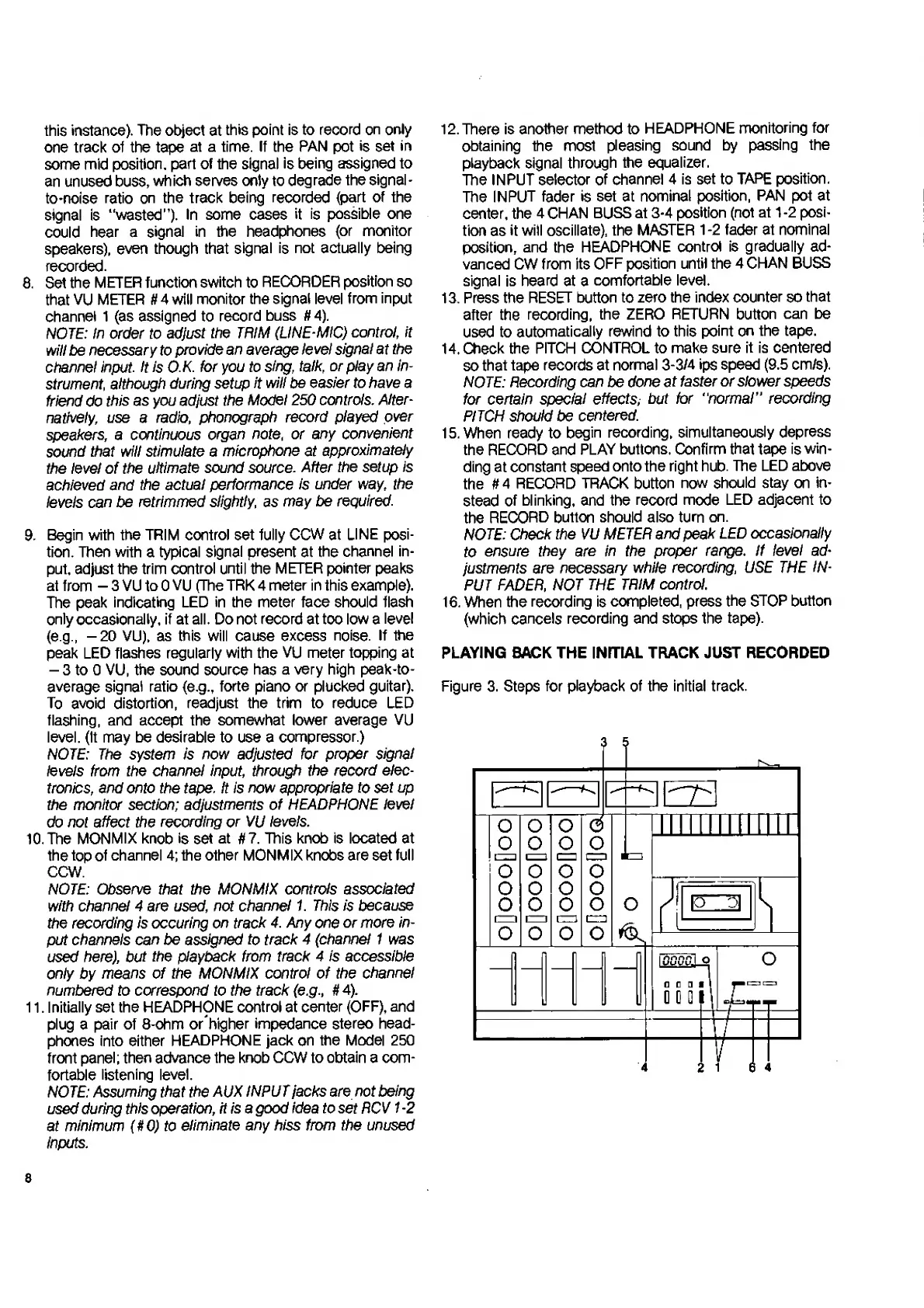
Figure
3.
Steps
for
playback
of
the
initial
track.
8

Related product manuals