EasyManua.ls Logo

Fostex 250 - Initial Recording (Cutting Original Tracks); Preparing to Record the First Track

Fostex 250
28 pages
Print Icon
To Next Page IconTo Next Page
To Previous Page IconTo Previous Page
Loading...
USING
THIS
MANUAL
The
balance
of
this
manual
is
presented
in
a
sequence
of
the
basic
steps
one
would
follow
to
create
a
master
tape:
from
recording
the
original
tracks,
to
sync
recording
(overdubbing)
and
then
mixdown
(remixing).
After
that,
combining
tracks
(ping-pong),
stereo
recording,
and
other
peripheral
topics
are
covered.
If
the
reader
is
quite
familiar
with
hooking
up
elec¬
tronic
systems,
a
look
at
the
electronic
specifications
and
block
diagram
in
Section
11
will
suffice.
Otherwise,
we
recommend
reading
the
front
and
rear
panel
descriptions
in
Section
1,
and
also
the
interface
information
in
Section
9.
Most
procedures
are
organized
so
they
can
be
followed
step-
by-step.
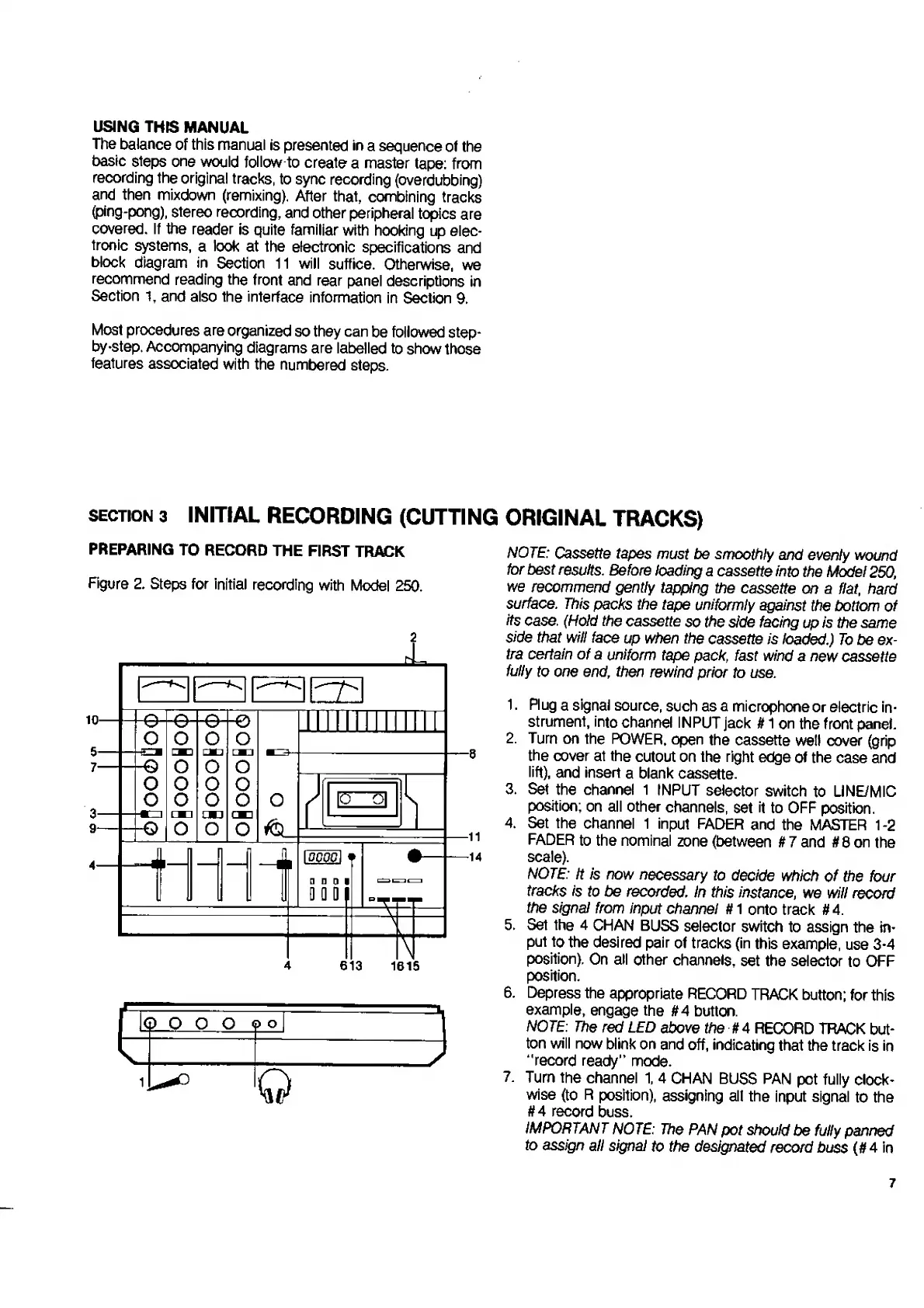
Accompanying
diagrams
are
labelled
to
show
those
features
associated
with
the
numbered
steps.
SECTION
3
INITIAL
RECORDING
(CUTTING
ORIGINAL
TRACKS)
PREPARING
TO
RECORD
THE
FIRST
TRACK
Figure
2.
Steps
for
initial
recording
with
Model
250.
4
613
1615
r
G
0
o
o
ML
i
:-?
i
o
NOTE:
Cassette
tapes
must
be
smoothly
and
evenly
wound
for
best
results.
Before
loading
a
cassette
into
the
Model
250,
we
recommend
gently
tapping
the
cassette
on
a
flat,
hard
surface.
This
packs
the
tape
uniformly
against
the
bottom
of
its
case.
(Hold
the
cassette
so
the
side
facing
up
is
the
same
side
that
will
face
up
when
the
cassette
is
loaded.)
To
be
ex¬
tra
certain
of
a
uniform
tape
pack,
fast
wind
a
new
cassette
fully
to
one
end,
then
rewind
prior
to
use.
1.
Plug
a
signal
source,
such
as
a
microphone
or
electric
in¬
strument,
into
channel
INPUT
jack
#
1
on
the
front
panel.
2.
Turn
on
the
POWER,
open
the
cassette
well
cover
(grip
the
cover
at
the
cutout
on
the
right
edge
of
the
case
and
lift),
and
insert
a
blank
cassette.
3.
Set
the
channel
1
INPUT
selector
switch
to
UNE/MIC
position;
on
all
other
channels,
set
it
to
OFF
position.
4.
Set
the
channel
1
input
FADER
and
the
MASTER
1-2
FADER
to
the
nominal
zone
(between
It
7
and
#
8
on
the
scale).
NOTE:
It
is
now
necessary
to
decide
which
of
the
four
tracks
is
to
be
recorded.
In
this
instance,
we
will
record
the
signal
from
input
channel
It
1
onto
track
#
4.
5.
Set
the
4
CHAN
BUSS
selector
switch
to
assign
the
in¬
put
to
the
desired
pair
of
tracks
(in
this
example,
use
3-4
position).
On
all
other
channels,
set
the
selector
to
OFF
position.
6.
Depress
the
appropriate
RECORD
TRACK
button;
for
this
example,
engage
the
#4
button.
NOTE:
The
red
LED
above
the
#4
RECORD
TRACK
but¬
ton
will
now
blink
on
and
off,
indicating
that
the
track
is
in
“record
ready"
mode.
7.
Turn
the
channel
1,
4
CHAN
BUSS
PAN
pot
fully
clock¬
wise
(to
R
position),
assigning
all
the
input
signal
to
the
#4
record
buss.
IMPORTANT
NOTE:
The
PAN
pot
should
be
fully
panned
to
assign
all
signal
to
the
designated
record
buss
(#4
in
7

Related product manuals