EasyManua.ls Logo

Fostex 250 - Sync Recording (Overdubbing); Making the Overdub

Fostex 250
28 pages
Print Icon
To Next Page IconTo Next Page
To Previous Page IconTo Previous Page
Loading...
section
4
SYNC
RECORDING
(OVERDUBBING)
Sync
recording,
also
known
as
overdubbing,
is
one
of
the
major
benefits
of
multi-track
recording.
It
permits
complex
musical
arrangements
to
be
assembled-one
element
at
a
time,
sometimes
by
a
single
performer.
The
performer
listens
via
headphones
to
previously
recorded
tracks
while
record¬
ing
one
or
more
additional
tracks
on
the
same
tape.
The
Model
250
has
special
capabilities
that
enable
it
to
playback
and
record
synchronously
(sync
recording).
Recording
in
sync
(making
an
overdub)
is
a
natural
extension
of
the
process
used
to
record
the
original
track.
The
unit
must
be
set
for
sync
playback.
If
the
performer
is
other
than
the
person
operating
the
Model
250,
then
a
second
set
of
head¬
phones
should
be
worn
by
the
performer.
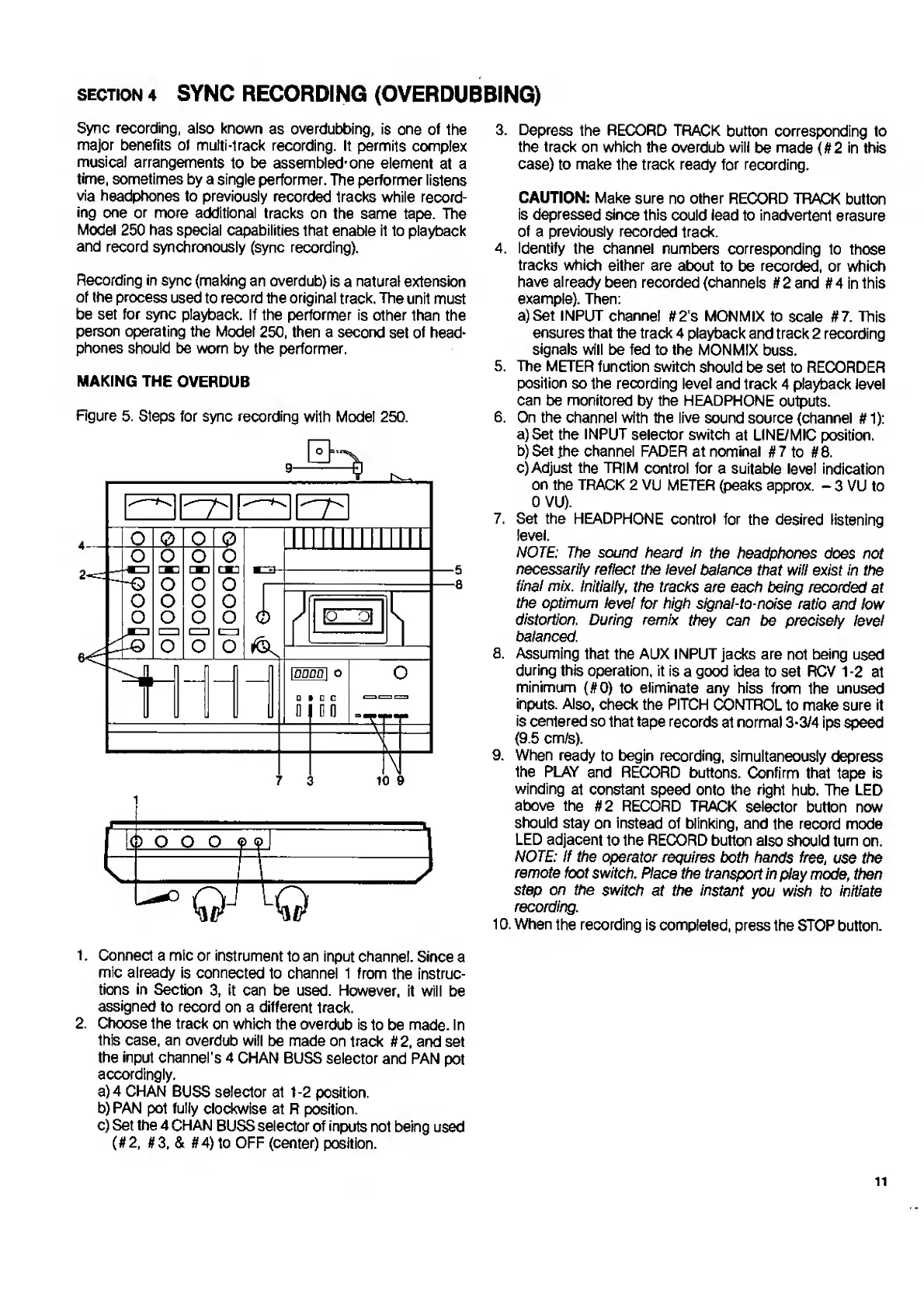
MAKING
THE
OVERDUB
Figure
5.
Steps
for
sync
recording
with
Model
250.
5
â– 
a
3
t.
Connect
a
mic
or
instrument
to
an
input
channel.
Since
a
mic
already
is
connected
to
channel
1
from
the
instruc¬
tions
in
Section
3,
it
can
be
used.
However,
it
will
be
assigned
to
record
on
a
different
track.
2.
C
hoose
the
track
on
which
the
overdub
is
to
be
made.
In
this
case,
an
overdub
will
be
made
on
track
#2,
and
set
the
input
channel’s
4
CHAN
BUSS
selector
and
PAN
pot
accordingly.
a)
4
CHAN
BUSS
selector
at
1-2
position.
b)
PAN
pot
fully
clockwise
at
R
position.
c)
Set
the
4
CHAN
BUSS
selector
of
inputs
not
being
used
(#2,
#3,
&
#4)
to
OFF
(center)
position.
3.
Depress
the
RECORD
TRACK
button
corresponding
to
the
track
on
which
the
overdub
will
be
made
(
f
t
2
in
this
case)
to
make
the
track
ready
for
recording.
CAUTION:
Make
sure
no
other
RECORD
TRACK
button
is
depressed
since
this
could
lead
to
inadvertent
erasure
of
a
previously
recorded
track.
4.
Identify
the
channel
numbers
corresponding
to
those
tracks
which
either
are
about
to
be
recorded,
or
which
have
already
been
recorded
(channels
#
2
and
#4
in
this
example).
Then:
a)
S
et
INPUT
channel
#2's
MON
MIX
to
scale
#7.
This
ensures
that
the
track
4
playback
and
track
2
recording
signals
will
be
fed
to
the
MONMIX
buss.
5.
The
METER
function
switch
should
be
set
to
RECORDER
position
so
the
recording
level
and
track
4
playback
level
can
be
monitored
by
the
HEADPHONE
outputs.
6.
On
the
channel
with
the
live
sound
source
(channel
#
1):
a)
Set
the
INPUT
selector
switch
at
LINE/MIC
position.
b)
S
et
.the
channel
FADER
at
nominal
#7
to
#8.
c)
Adjust
the
TRIM
control
for
a
suitable
level
indication
on
the
TRACK
2
VU
METER
(peaks
approx.
-
3
VU
to
OVU).
7.
Set
the
HEADPHONE
control
for
the
desired
listening
level.
NOTE:
The
sound
heard
in
the
headphones
does
not
necessarily
reflect
the
level
balance
that
will
exist
in
the
final
mix.
Initially,
the
tracks
are
each
being
recorded
at
the
optimum
level
for
high
signal-to-noise
ratio
and
low
distortion.
During
remix
they
can
be
precisely
level
balanced.
8.
Assuming
that
the
AUX
INPUT
jacks
are
not
being
used
during
this
operation,
it
is
a
good
idea
to
set
RCV
1
-2
at
minimum
(#0)
to
eliminate
any
hiss
from
the
unused
inputs.
Also,
check
the
PITCH
CONTROL
to
make
sure
it
is
centered
so
that
tape
records
at
normal
3-3/4
ips
speed
(9.5
cm/s).
9.
When
ready
to
begin
recording,
simultaneously
depress
the
PLAY
and
RECORD
buttons.
Confirm
that
tape
is
winding
at
constant
speed
onto
the
right
hub.
The
LED
above
the
#2
RECORD
TRACK
selector
button
now
should
stay
on
instead
of
blinking,
and
the
record
mode
LED
adjacent
to
the
RECORD
button
also
should
turn
on,
NOTE:
If
the
operator
requires
both
hands
free
,
use
the
remote
foot
switch.
Place
the
transport
in
play
mode,
then
step
on
the
switch
at
the
instant
you
wish
to
initiate
recording.
10.
When
the
recording
is
completed,
press
the
STOP
button.
ii

Related product manuals