EasyManua.ls Logo

Fostex 250 - Page 14

Fostex 250
28 pages
Print Icon
To Next Page IconTo Next Page
To Previous Page IconTo Previous Page
Loading...
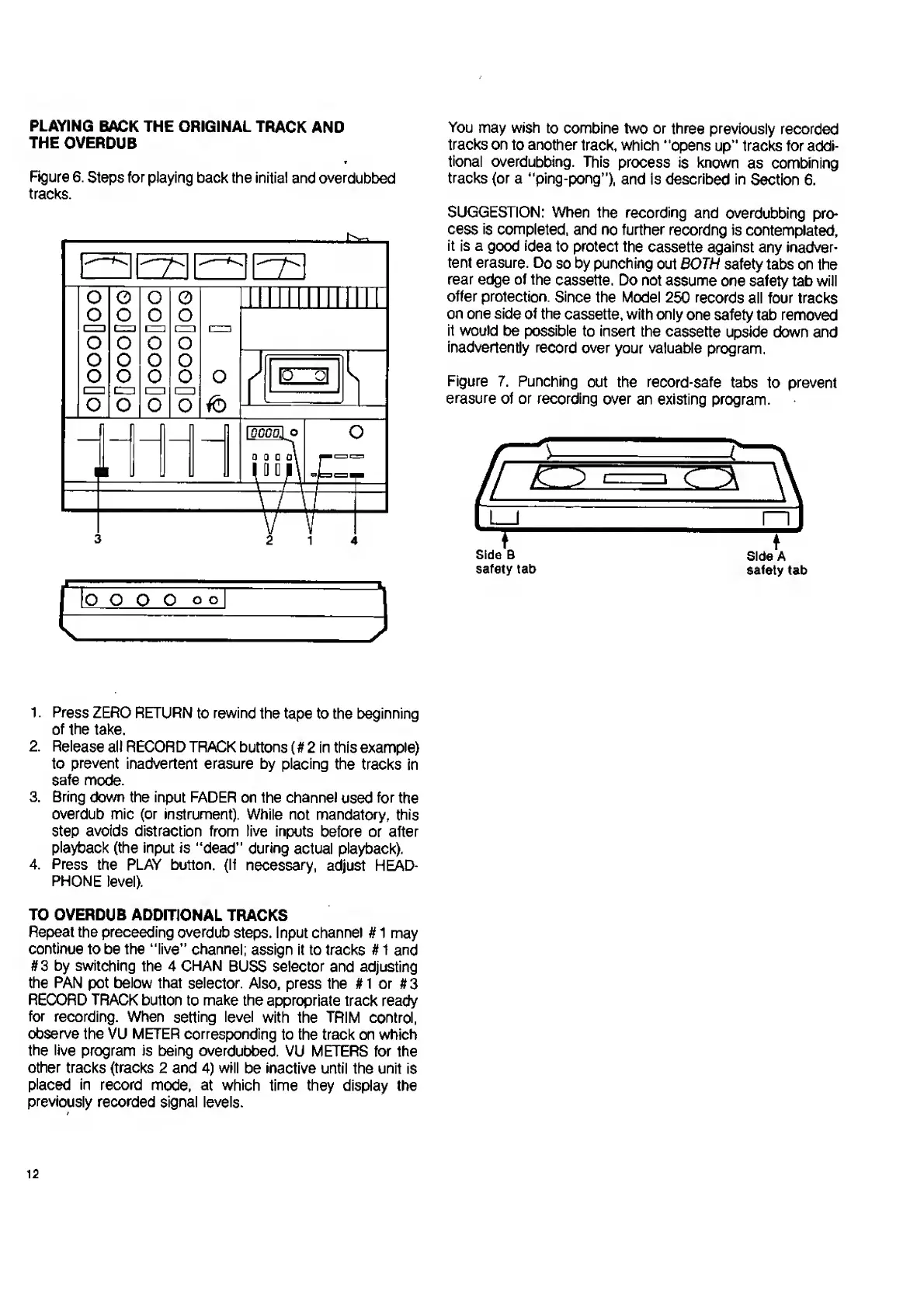
PLAYING
BACK
THE
ORIGINAL
TRACK
AND
THE
OVERDUB
Figure
6.
Steps
for
playing
back
the
initial
and
overdubbed
tracks.
IS
Sal
l
o
o
o'
o
o
o
ooOoooQo
1
1
ui
miiniiiii
Hi
10
o|
i
o
-V
TAL7
\
i
2
1
4
You
may
wish
to
combine
two
or
three
previously
recorded
tracks
on
to
another
track,
which
“opens
up"
tracks
for
addi¬
tional
overdubbing.
This
process
is
known
as
combining
tracks
{or
a
“ping-pong’’),
and
is
described
in
Section
6.
SUGGESTION:
When
the
recording
and
overdubbing
pro¬
cess
is
completed,
and
no
further
recordng
is
contemplated,
it
is
a
good
idea
to
protect
the
cassette
against
any
inadver¬
tent
erasure.
Do
so
by
punching
out
BOTH
safety
tabs
on
the
rear
edge
of
the
cassette.
Do
not
assume
one
safety
tab
will
offer
protection.
Since
the
Model
250
records
all
four
tracks
on
one
side
of
the
cassette,
with
only
one
safety
tab
removed
it
would
be
possible
to
insert
the
cassette
upside
down
and
inadvertently
record
over
your
valuable
program.
Figure
7.
Punching
out
the
record-safe
tabs
to
prevent
erasure
ot
or
recording
over
an
existing
program.
1.
Press
ZERO
RETURN
to
rewind
the
tape
to
the
beginning
of
the
take.
2.
Release
all
RECORD
TRACK
buttons
(#
2
in
this
example)
to
prevent
inadvertent
erasure
by
placing
the
tracks
in
safe
mode.
3.
Bring
down
the
input
FADER
on
the
channel
used
for
the
overdub
mic
(or
instrument).
While
not
mandatory,
this
step
avoids
distraction
from
live
inputs
before
or
after
playback
(the
input
is
“dead”
during
actual
playback).
4.
Press
the
PLAY
button.
(If
necessary,
adjust
HEAD¬
PHONE
level).
TO
OVERDUB
ADDITIONAL
TRACKS
Repeat
the
preceeding
overdub
steps.
Input
channel
#
1
may
continue
to
be
the
“live”
channel;
assign
it
to
tracks
#
1
and
#
3
by
switching
the
4
CHAN
BUSS
selector
and
adjusting
the
PAN
pot
below
that
selector.
Also,
press
the
#
1
or
#
3
RECORD
TRACK
button
to
make
the
appropriate
track
ready
for
recording.
When
setting
level
with
the
TRIM
control,
observe
the
VU
METER
corresponding
to
the
track
on
which
the
live
program
is
being
overdubbed.
VU
METERS
for
the
other
tracks
(tracks
2
and
4)
will
be
inactive
until
the
unit
is
placed
in
record
mode,
at
which
time
they
display
the
previously
recorded
signal
levels.
12

Related product manuals