EasyManua.ls Logo

Fostex 250 - Mixdown (Remixing); Setup and Procedure for Mixdown

Fostex 250
28 pages
Print Icon
To Next Page IconTo Next Page
To Previous Page IconTo Previous Page
Loading...
sections
MIXDOWN
(REMIXING)
During
the
initial
recording
and
overdubbing
stages,
tracks
are
recorded
at
near
maximum
levels.
Also,
it
is
probable
that
each
sound
source
has
been
recorded
on
only
one
track
(not
panned
between
tracks).
The
final
stage
in
creating
a
stereo
program
requires
that
track-to-track
levels
be
balanced,
and
that
each
track
be
panned
somewhere
from
left-to-right
in
the
stereo
perspective.
Some
touch-up
equalization
may
also
be
done
at
this
time.
The
final
process
is
known
as
mixdown
(or
remixing).
In
previous
steps,
you
monitored
the
program
using
head¬
phones,
and
the
Model
250
MONMIX
buss
signal
came
directly
from
the
reproduce
amplifiers.
Monitoring
is
more
critical
during
the
mixdown,
and
hence
loudspeakers
are
preferable
to
headphones
(although
phones
can
be
used).
Any
good
stereo,
high
fidelity
sound
system
will
do
the
job.
Simply,
connect
a
pair
of
cables
from
the
Model
250
LINE
OUT
1
and
2
jacks
to
the
auxiliary
or
line
inputs
on
the
stereo
integrated
amplifier
or
receiver
(or
to
the
power
amp
inputs)
by
a
set
of
"Y”
cables.
As
a
precaution,
turn
off
the
stereo
amplifier,
and
set
its
volume
at
minimum,
before
connection
to
the
Model
250.
Connect
the
LI
NE
OUT
1
and
2
jacks
of
whatever
stereo
tape
recorder
you
wish
to
use
for
making
the
stereo
master
tape
to
the
other
side
of
the
“Y”
cable
(conventional
cassette
or
reel
-to-reel).
NOTE:
An
alternative
connection
involves
connecting
the
Model
250
LINE
OUT
to
the
preamp,
integrated
amp/preamp
or
receiver,
and
then
connecting
the
tape
output
jacks
from
that
unit
to
the
stereo
recorder.
This
may
be
an
easier
ap¬
proach
if
your
sound
system
is
already
connected
to
a
stereo
recorder.
The
drawback
is
that
the
output
from
the
Model
250
must
go
through
additional
electronics
before
it
is
re-recorded,
and
thus
may
be
degraded
unnecessarily.
The
MASTER
1-2
FADER
controls
the
level
at
both
the
LINE
OUT
1,
2
jacks,
so
level
changes
affecting
the
recording
will
be
heard
in
the
monitor
speakers.
This
FADER
should
be
set
to
obtain
the
optimum
recording;
monitor
levels
can
be
trim¬
med
using
the
volume
control
on
your
preamp,
amplifier,
integrated
amp/preamp
or
receiver.
You
may
wish
to
do
several
“trial
runs”,
refining
fhe
mix
prior
to
making
the
transfer
to
the
stereo
recorder.
SET
UP
AND
PROCEDURE
FOR
MIXDOWN
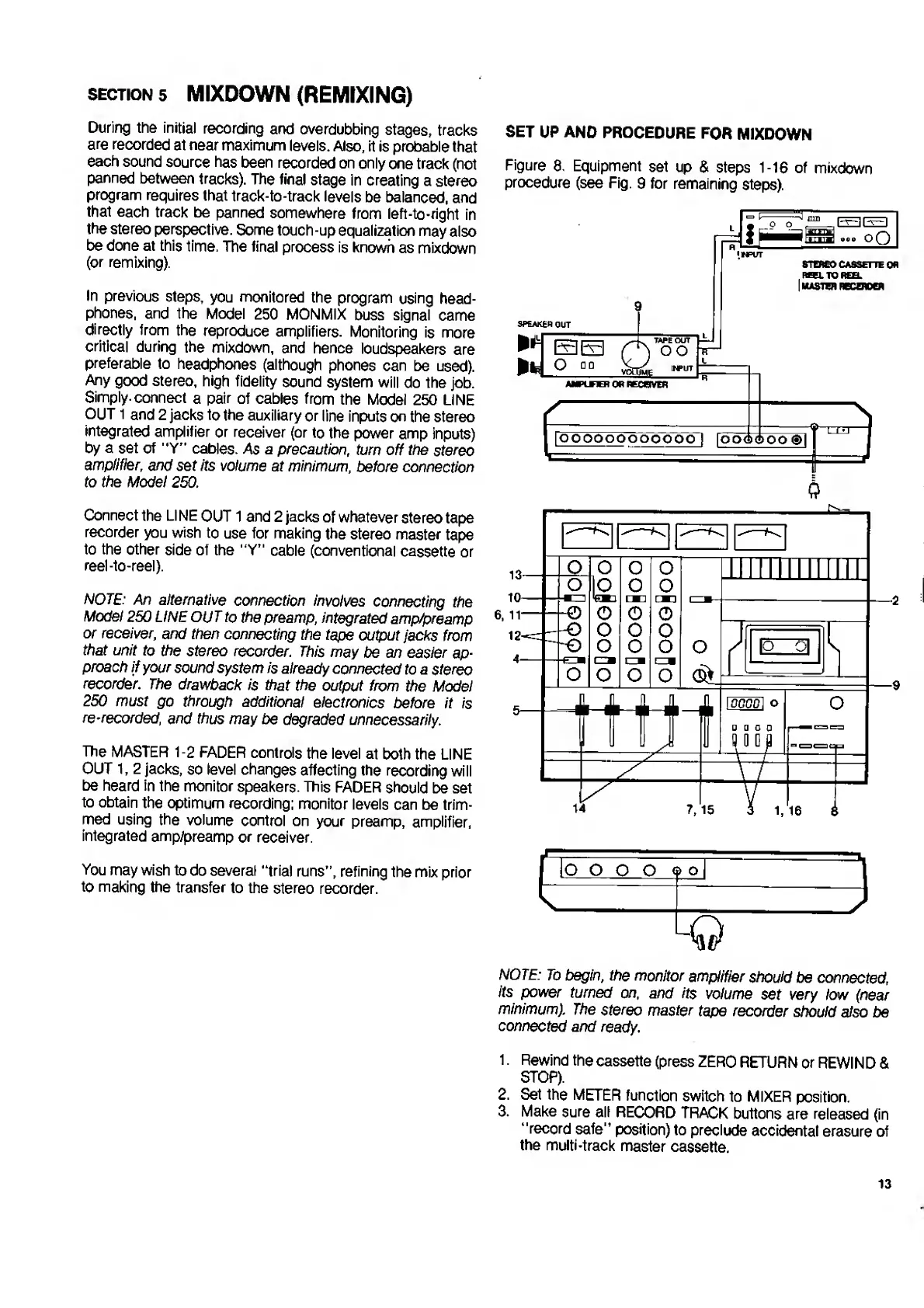
Figure
8.
Equipment
set
up
&
steps
1
-16
of
mixdown
procedure
(see
Fig.
9
for
remaining
steps).
SPEAKER
OUT
EL
TAPE
OUT
oo
cm
AMPUHBl
OR
RECOVER
I
oO
'
INPUT
STEREO
CASSETTE
OR
«L
TO
REEL
|
MASTER
RBCEROER
roooooo
O
O
P
pool
fOPoAop
0
0
NOTE:
To
begin,
the
monitor
amplifier
should
be
connected,
its
power
turned
on,
and
its
volume
set
very
low
(near
minimum).
The
stereo
master
tape
recorder
should
also
be
connected
and
ready.
1.
Rewind
the
cassette
(press
ZERO
RETURN
or
REWIND
&
STOP).
2.
Set
the
METER
function
switch
to
MIXER
position.
3.
Make
sure
all
RECORD
TRACK
buttons
are
released
(in
“record
safe"
position)
to
preclude
accidental
erasure
of
the
multi-track
master
cassette.
13

Related product manuals