EasyManua.ls Logo

Fostex 250 - Page 16

Fostex 250
28 pages
Print Icon
To Next Page IconTo Next Page
To Previous Page IconTo Previous Page
Loading...
4.
Set
all
INPUT
selector
switches
to
TAPE
position.
5.
Initially,
set
all
input
FADERS
at
nominal
(#7
to
#8).
NOTE:
The
TRIM
controls
have
no
effect
when-the
unit
is
operated
in
this
configuration.
6.
Initially,
set
all
4
CHAN
BUSS
PAN
pots
at
center.
7.
Set
the
MASTER
1-2
FADER
at
nominal
(#
7
to
#8).
8.
Press
the
PLAY
button,
causing
tape
to
roll.
9.
Gradually
bring
up
the
monitor
amplifier
volume
until
the
desired
level
is
heard.
(Alternately,
if
listening
with
head¬
phones,
adjust
the
HEADPHONE
volume
control
CW
from
OFF
position).
NOTE:
Both
channels
will
have
the
same
program
(mono),
and
relative
balance
probably
will
be
incorrect
at
this
point.
10.
Set
the
4
CHAN
BUSS
selector
to
1-2
of
channel
1
and
those
of
other
channels
2
through
4
to
OFF
position
and
the
channel
1
fader
to
nominal
position.
11.
Adjust
the
4
CHAN
BUSS
PAN
pot
on
channel
1
to
place
the
program
from
track
1
anywhere
from
left
to
right
in
the
stereo
perspective.
12.
Adjust
the
channel
1
EQ
controls
as
desired
to:
a)
obtain
the
most
pleasing
sound
quality,
b)
reduce
leakage
of
unwanted
sound
in
the
channel,
or
c)
improve
separation
from
other
channels
by
accenting
or
minimizing
parts
of
the
frequency
sjDectrum.
13.
Set
the
4
CHAN
BUSS
selector
of
channel
1
to
OFF
posi¬
tion
and
that
of
channel
2
to
1
-2
and
bring
up
the
fader
of
channel
2.
Repeat
steps
11
and
12
for
channel
2,
and
for
each
of
the
remaining
channels,
thus
creating
a
stereo
panorama
of
the
various
acoustic
images.
14.
Bring
up
all
four
channel
input
FADERS
to
nominal
set¬
ting;
then
move
them
down
(or
up)
as
required
to
balance
the
level
between
tracks.
Observe
the
VU
METERS
to
ensure
that
the
level
peaks
between
-
3
VU
and
0
VU
in
both
the
1
(track
1)
and
2
(track
2)
meters;
the
red
peak
indicator
LEDs
should
flash
only
once
in
a
while.
NOTE:
The
3
and
4
meters
will
be
inactive
in
this
mode;
only
the
2
channels
are
being
monitored.
15.
If
necessary,
adjust
the
MASTER
1
-2
FADER
to
obtain
the
correct
VU
indications,
with
these
exceptions:
a)
If
the
MASTER
FADER
must
be
set
below
#6,
instead
reset
it
at
It
7
and
lower
all
four
input
FADERS
suffi¬
ciently
to
obtain
the
optimum
level.
b)
If
the
MASTER
FADER
must
be
set
between
#
9
and
#10,
instead
reset
it
at
#8
and
raise
all
four
input
FADERS
sufficiently
to
obtain
the
optimum
level.
NOTE;
If
the
speakers
are
too
loud
or
too
quiet,
adjust
the
monitor
amplifier
volume
(or
if
phones
are
used,
adjust
HEADPHONE
volume).
16.
Rewind
the
tape
(press
ZERO
RETURN
or
REWIND
then
STOP).
If
desired,
press
PLAY,
and
recheck
the
balance
and
sound
quality.
When
ready,
rewind
again
and
pro¬
ceed.
COMPLETION
OF
THE
MIXDOWN:
RECORDING
THE
STEREO
MASTER
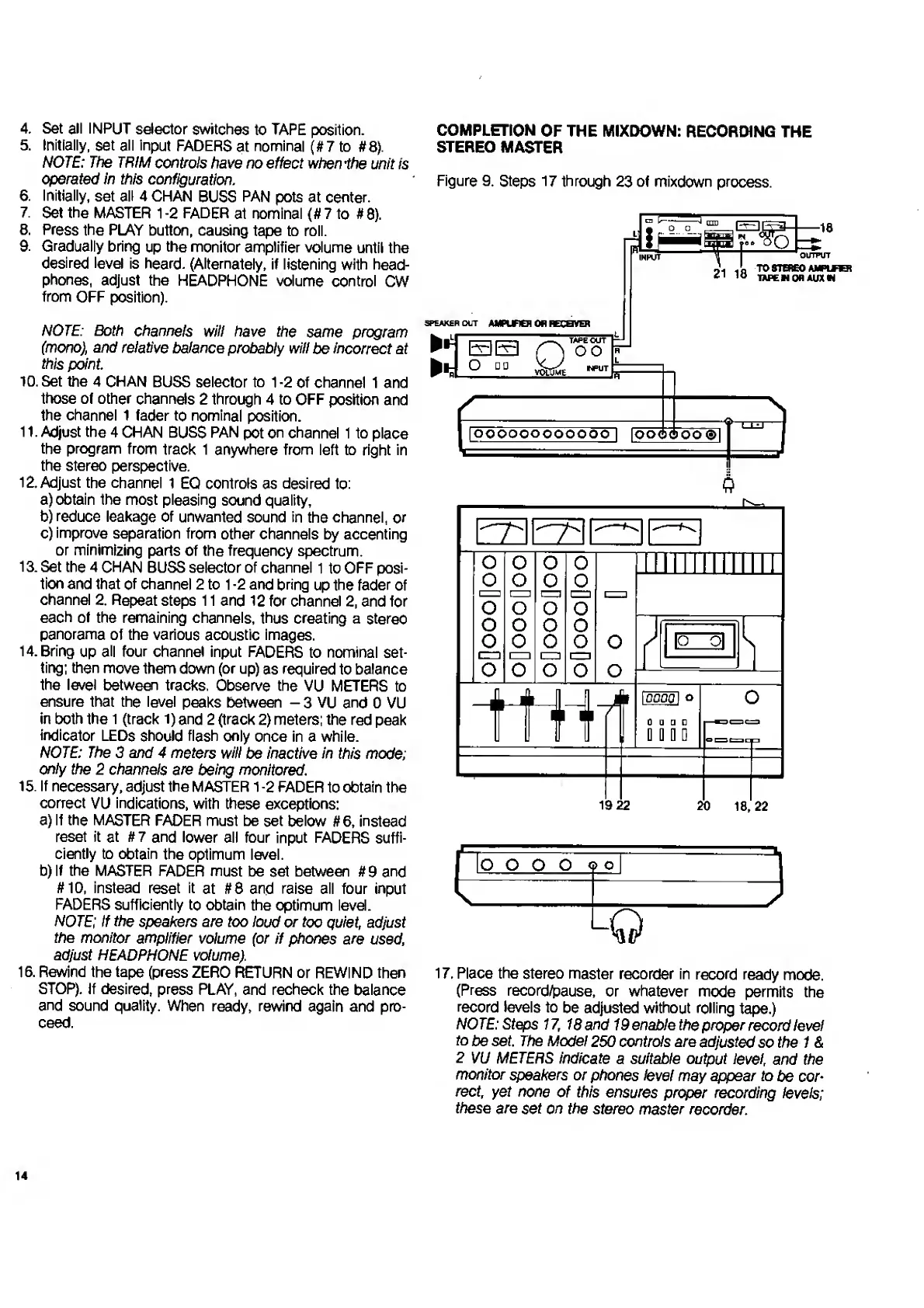
Figure
9.
Steps
17
through
23
of
mixdown
process.
21
18
OUTPUT
TO
STEREO
AMPLFBt
TAPE
M
Qfl
AUX
M
SPEAKER
OUT
AMPURCH
OH
RECOVER
D
TAPE
OUT
oo
o
19
22
20
18,22
17.
P
lace
the
stereo
master
recorder
in
record
ready
mode.
(Press
record/pause,
or
whatever
mode
permits
the
record
levels
to
be
adjusted
without
rolling
tape.)
NOTE:
Steps
17,
18
and
19
enable
the
proper
record
level
to
be
set.
The
Model
250
controls
are
adjusted
so
the
1
&
2
VU
METERS
indicate
a
suitable
output
level,
and
the
monitor
speakers
or
phones
level
may
appear
to
be
cor¬
rect,
yet
none
of
this
ensures
proper
recording
levels;
these
are
set
on
the
stereo
master
recorder.
14

Related product manuals