EasyManua.ls Logo

Fostex 250 - Combining Tracks (Ping-Pong); Combining Two Tracks into One

Fostex 250
28 pages
Print Icon
To Next Page IconTo Next Page
To Previous Page IconTo Previous Page
Loading...
18.
Press
the
Model
250
PLAY
button,
and
observe
the
record
level
meters
on
the
stereo
master
recorder.
If
necessary,
adjust
the
record
level
on
that
unit
so
the
levels
fall
within
the
manufacturer’s
specified
optimum
range.
19.
Check
the
sound
quality
at
the
stereo
master
recorder
by
plugging
in
a
set
of
headphones
to
that
unit’s
phones
jack
(if
it
has
none,
skip
this
step).
In
rare
cases,
a
level
mismatch
may
cause
excess
noise
or
distortion;
usually
this
can
be
remedied
as
follows:
a)
If
the
sound
is
very
distorted,
the
Model
250
output
level
is
probably
too
high;
lower
the
MASTER
1-2
FADER,
and
raise
the
record
level
control
on
the
stereo
master
recorder.
b)
If
the
sound
is
very
noisy
or
hissy,
the
Model
250
output
level
is
probably
too
low;
raise
the
MASTER
1-2
FADER,
and,
if
necessary,
lower
the
record
level
control
on
the
stereo
master
recorder.
20.
Press
ZERO
RETURN
to
rewind
the
Model
250
multi-
track
master
cassette
to
the
beginning
of
the
program.
21.
Place
the
stereo
master
recorder
in
record
mode.
22.
Press
the
Model
250
PLAY
button.
The
mixdown
is
now
being
accomplished;
the
result
will
be
a
stereo
master
tape.
NOTE:
If
you
plan
to
fade
out
at
the
end
of
the
program,
It
is
best
to
do
this
with
the
record
level
controls
on
the
MASTER
1-2
FADER,
rather
than
with
the
stereo
master
recorder.
23.
To
monitor
the
stereo
master
tape,
use
headphones
or
connect
the
line
or
play
output
of
that
recorder
to
the
monitor
amp.
If
using
a
stereo
preamp,
integrated
amp
or
receiver,
there
is
probably
a
separate
input
that
can
be
used
without
having
to
disconnect
the
Model
250
from
the
amp
(but
be
sure
to
switch
the
amp’s
input
selector).
section
6
COMBINING
TRACKS
(PING-PONG)
Track
combination
involves
moving
program
material
from
one
or
more
tracks
to
another
track
(transfer
and
combi¬
nation)
in
order
to
"make
room"
for
additional
program
material.
During
the
track
combination
(also
known
as
"ping-pong"),
additional
live
sounds
can
be
added,
NOTE:
There
are
practical
limits
as
to
how
many
times
a
track
can
be
transferred
since
some
background
noise
is
inevitably
added
during
the
process;
we
recommend
no
more
than
two
rounds
of
ping-pong
for
a
given
original
track.
HOW
TO
COMBINE
TWO
TRACKS
INTO
ONE
NOTE:
The
following
steps
are
expressed
in
general
form.
However,
for
clarity,
we
will
use
an
example
where
pro¬
gram
is
being
transferred
from
tracks
1
and
2
onto
track
3,
citing
this
example
parenthetically.
1
.
Set
the
INPUT
selector
switches
to
TAPE
on
the
channels
numbered
to
correspond
with
the
tracks
from
which
the
transfer
will
be
made,
(e.g.,
when
program
is
being
transferred
from
tracks
1
and
2
to
track
3,
set
the
channel
1
and
2
switches
to
TAPE
position).
2
.
On
the
same
channels
you
just
switched
to
TAPE
mode,
set
the
4
CHAN
BUSS
selector
switches
and
PAN
pots
so
that
signal
is
assigned
to
the
track
onto
which
the
transfer
will
be
made.
All
other
4
CHAN
BUSS
selectors
should
be
in
the
center
OFF
position,
e.g.,
since
the
transfer
is
made
onto
track
3,
the
channel
1
and
2,
4
CHAN
BUSS
switches
should
be
in
3-4
position,
and
their
PAN
pots
should
be
fully
CCW
(to
L).
3
.
Set
the
METER
switch
to
RECORDER
position
so
you
can
monitor
the
level
being
applied
to
the
track
on
which
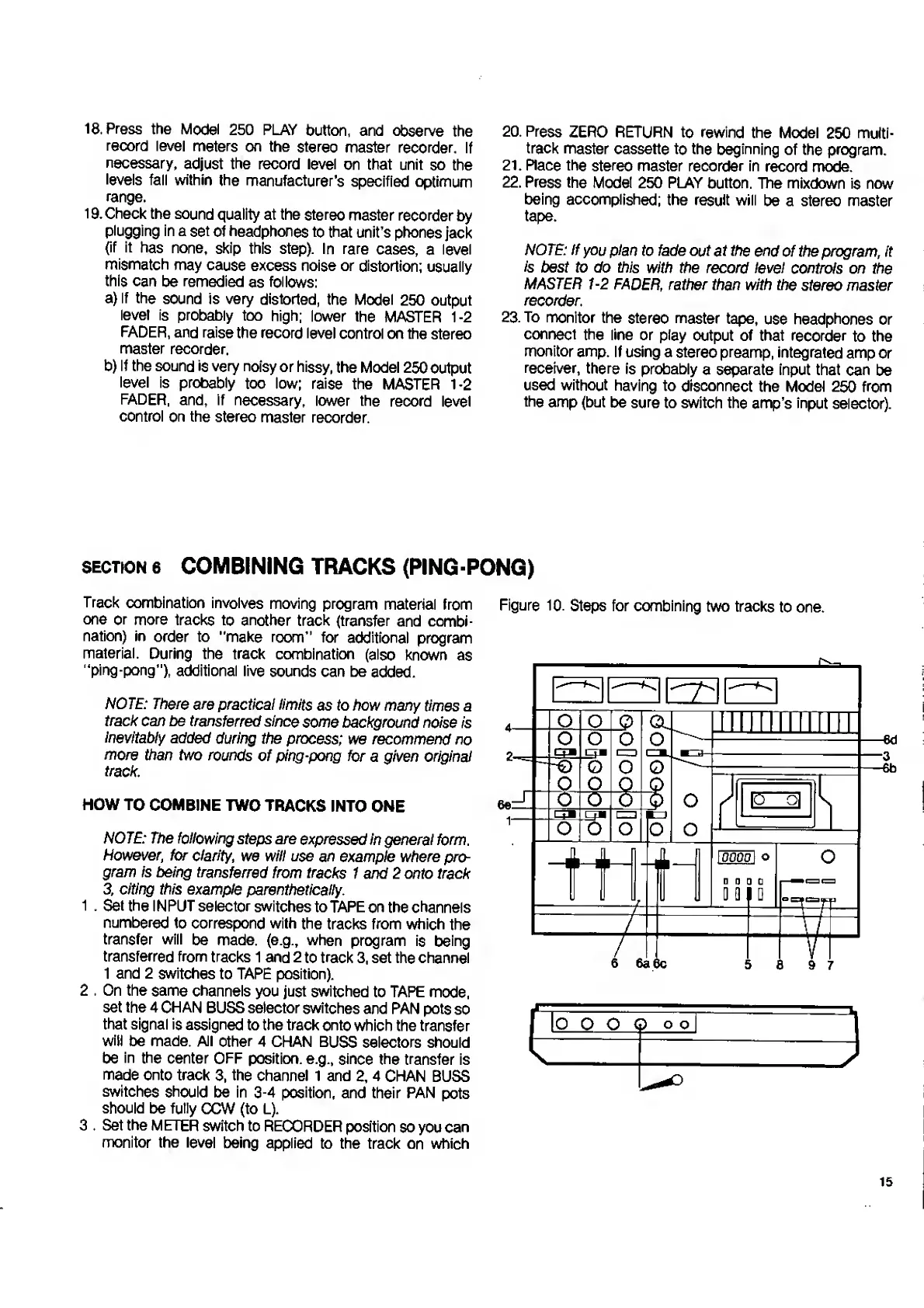
Figure
10.
Steps
for
combining
two
tracks
to
one.
OO
O
<D
o
o
5
15

Related product manuals