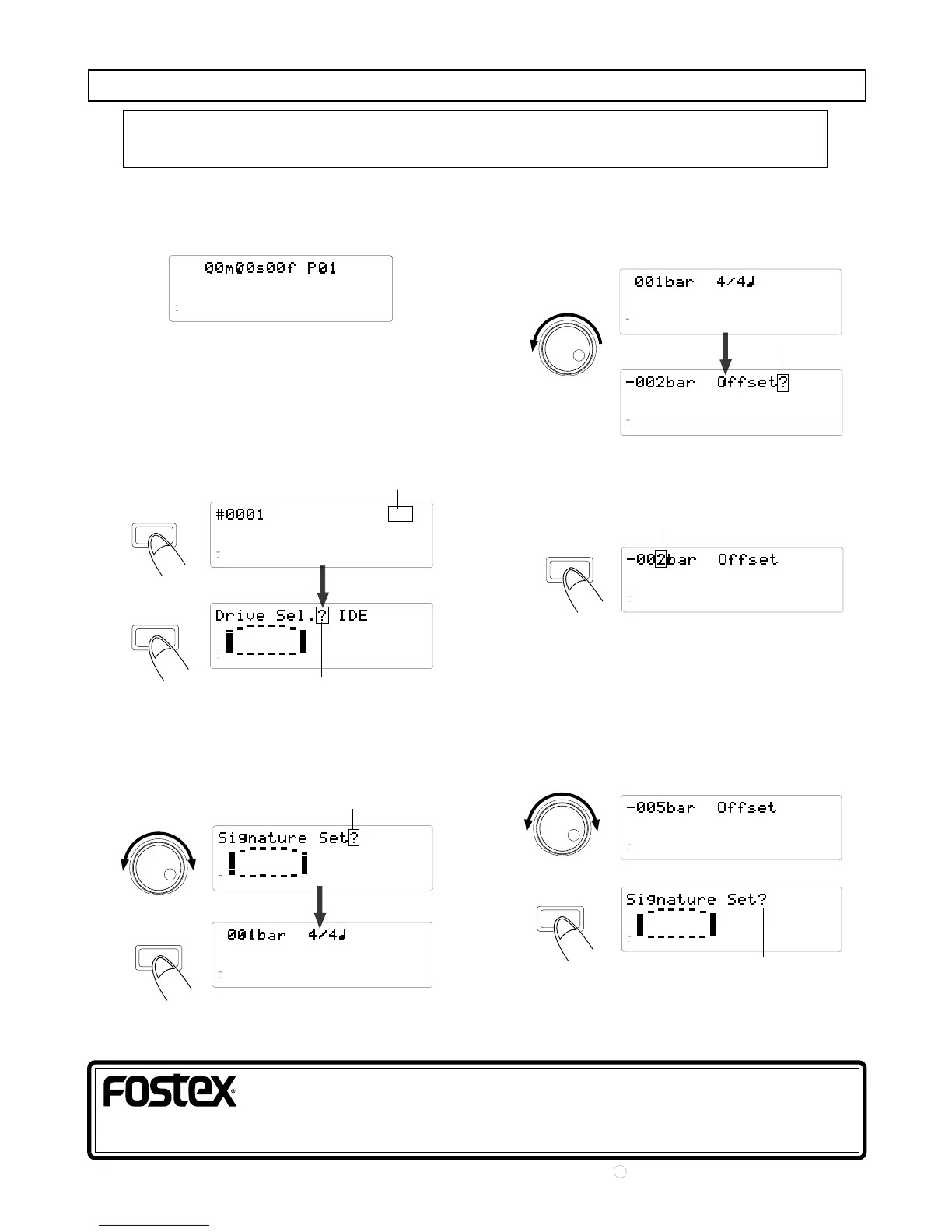
1. First select the program to which offset is to be setup.
The example below is the display as a result of selecting
program 1.
2. After switching to the SETUP display by pressing the
DISP SEL key, press the EXECUTE/YES key.
If the DISP SEL key is pressed twice against the above
ABS display, it will change to the SETUP display and if
the EXECUTE/YES key is pressed, it will change to the
[Drive Sel ? (current drive setup)] menu as shown
below when in the initial setup state.
3. Rotate the JOG dial to show [Signature Set?] in the
display and press the EXECUTE/YES key.
The current set bar will be displayed and if it is in the
initial setup state, the first bar will be 4/4.
4. Rotate the JOG dial counter-clockwise.
The offset figure of the current set bar will be
displayed. If it is in the initial state, [-002bar Offset?]
will be displayed as shown below.
5. Press the EXECUTE/YES key.
The number [2] in -002bar will blink and the bar
offset figure can now be edited.
6. Rotate the JOG dial to input the desired offset figure,
then press the EXECUTE/YES key.
Any offset figure within a 2~9 range can be input
(the example below is the result of inputting of 5 for
the bar figure). After this, press the EXECUTE/YES
key and it will be set to the input offset figure and the
display will change to the [Signature Set?] menu.
DISP SEL
EXECUTE
/ YES
EXECUTE
/ YES
7. Exit from the SETUP mode by pressing the EXIT/NO
key.
Setup procedures for BAR/BEAT/CLK offset
<NOTE>: Offset setups can be executed for each program. The setup content will be
maintained even though power is switched off.
FOSTEX CORPORATION
3-2-35, Musashino, Akishima-shi, Tokyo 196-0021, Japan
FOSTEX CORPORATION OF AMERICA
15431, Blackburn Ave., Norwalk, CA 90650, U. S. A.
Blink
Blink
Blink
Blink
Blink
Blink
EXECUTE
/ YES
EXECUTE
/ YES
C
PRINTED IN JAPAN JULY 1999 8288 672 000 FX.
42
44.1kHz
OL
0
8
7
6
5
4
32
1
30
24
18
12
9
6
3
ABS
16
15
14
13
12
1110
9
42
44.1kHz
SETUP
OL
0
8
7
6
5
4
32
1
30
24
18
12
9
6
3
16
15
14
13
12
1110
9
42
44.1kHz
SETUP
OL
0
8
7
6
5
4
32
1
30
24
18
12
9
6
3
16
15
14
13
12
1110
9
42
44.1kHz
SETUP
OL
0
8
7
6
5
4
32
1
30
24
18
12
9
6
3
16
15
14
13
12
1110
9
42
44.1kHz
SETUP
OL
0
8
7
6
5
4
32
1
30
24
18
12
9
6
3
SIGNATURE
16
15
14
13
12
1110
9
42
44.1kHz
SETUP
OL
0
8
7
6
5
4
32
1
30
24
18
12
9
6
3
16
15
14
13
12
1110
9
42
44.1kHz
OL
0
8
7
6
5
4
32
1
30
24
18
12
9
6
3
16
15
14
13
12
1110
9
42
44.1kHz
OL
0
8
7
6
5
4
32
1
30
24
18
12
9
6
3
16
15
14
13
12
1110
9
42
44.1kHz
OL
0
8
7
6
5
4
32
1
30
24
18
12
9
6
3
16
15
14
13
12
1110
9
42
44.1kHz
SETUP
OL
0
8
7
6
5
4
32
1
30
24
18
12
9
6
3
SIGNATURE
16
15
14
13
12
1110
9


 To Previous Page