8
Computer settings
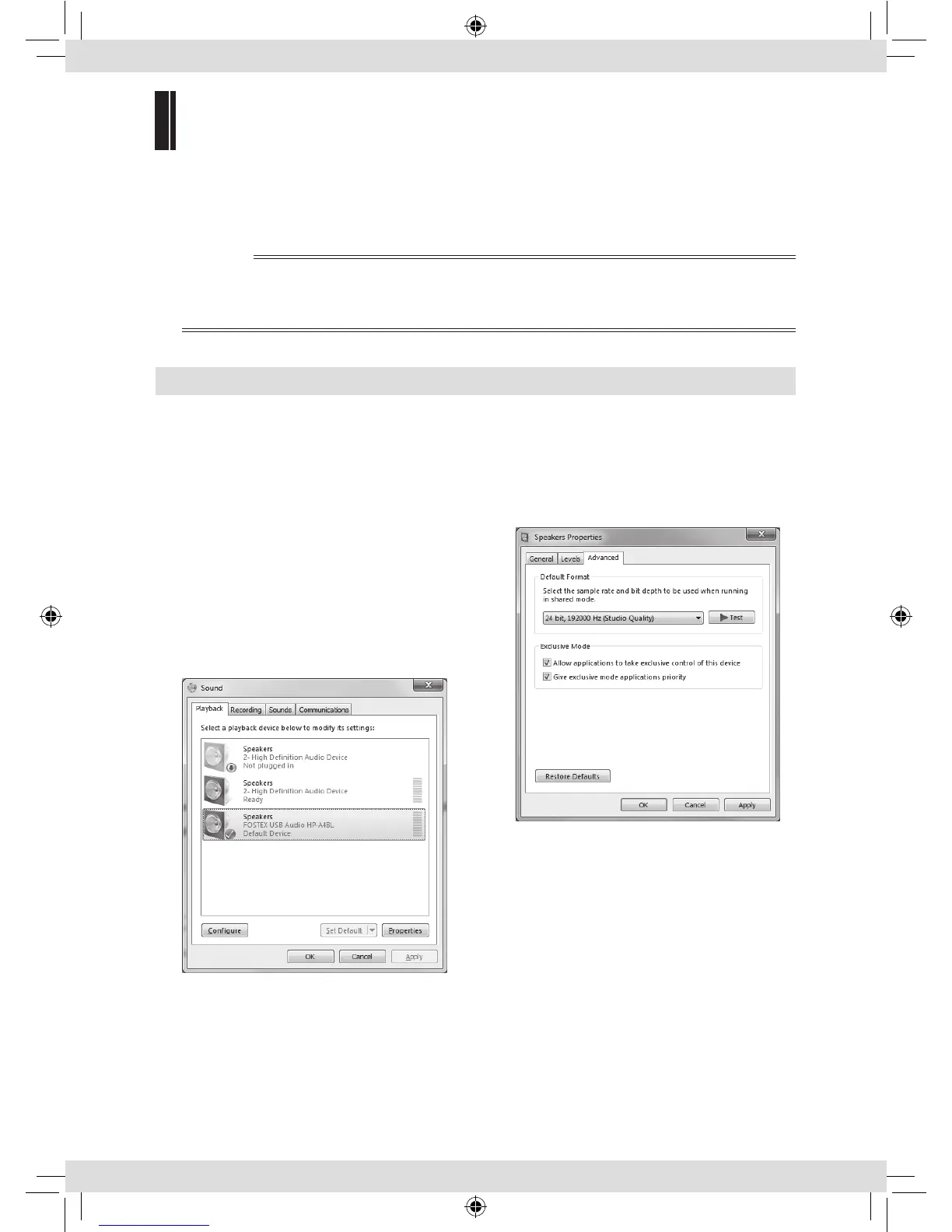
Set the sound output destination of the computer to HP-A4BL to listen to the sound of the
computer. Adjusting sound output settings of the computer may improve the sound.
See the manual of the computer or the online help for more information.
✐
Notes
• When you reboot your computer or reconnect the unit, check that the sound output destination is
correctly set.
• Adjust the sound output level of the computer according to your usage environment.
Windows 8/Windows 7
Sound output destination setting
1) Select “Hardware and Sound” from the
Control Panel.
2) Select “Sound” to open the “Sound”
window.
3) Select the “Playback” tab.
4) Select “FOSTEX USB Audio HP-A4BL” and
click the “Set Default” button, followed by
the “OK” button.
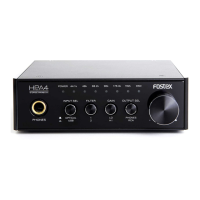
Advanced settings
Clicking the “Property” button on the “Sound”
window opens the window where you can
select the sampling rate, etc.
Fostex_HP-A4BL_3L.indb 8 16/03/11 14:14


 To Next Page